890370_0•en•01.06.2009 We reserve the right to carry out improvements
45
6 Overview
In these instructions, miniature menu structures are presented at all important
locations (see the example here). They will help you navigate to the func-
tions described there without having to leaf through an excessive number of
menus.
If you are not familiar with certain terms used here, you may refer to the glos-
sary in Chapter 13 on page 141.
6.1 Elements of the
display
6.1.1 Start menu
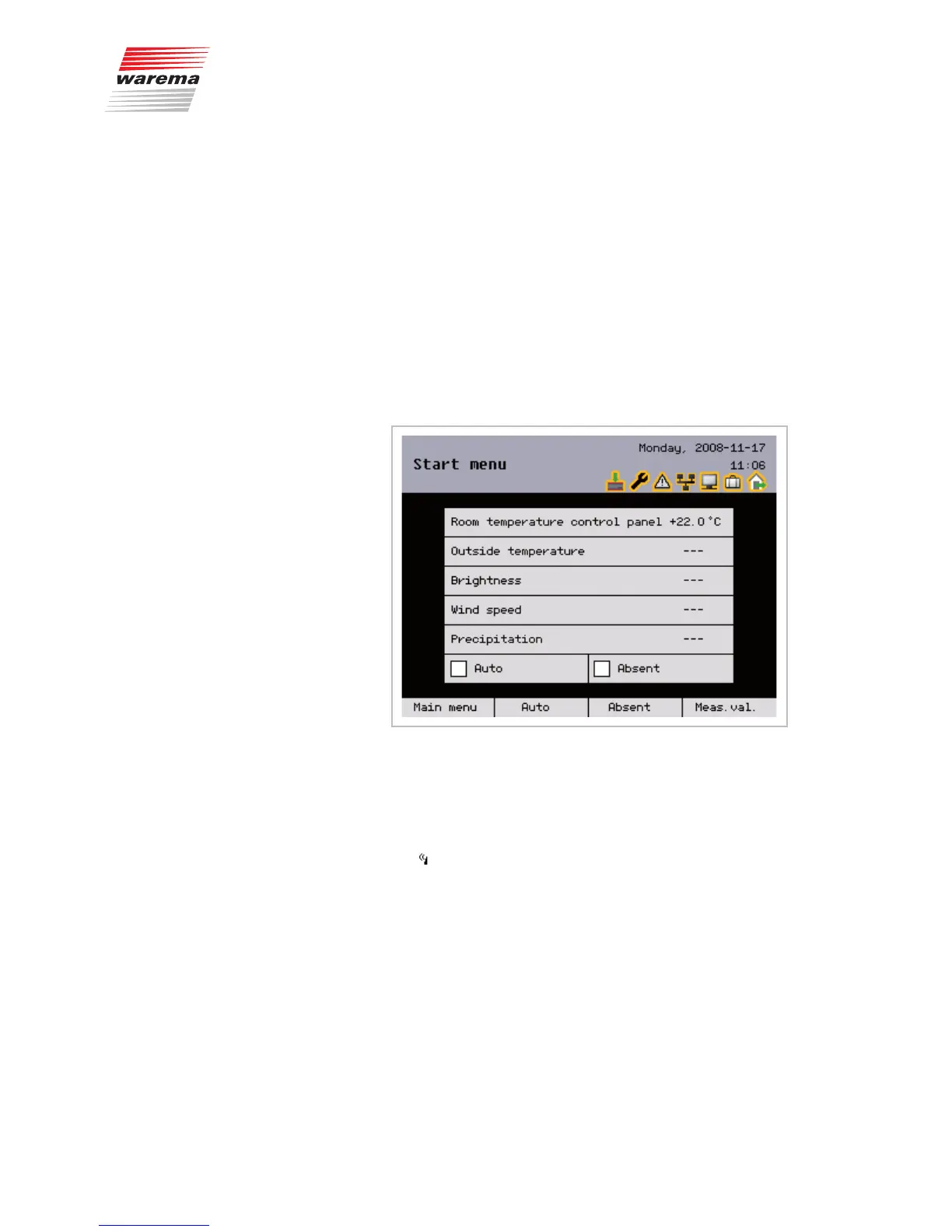
The following figure shows the WAREMA climatronic start menu:
Fig. 24 WAREMA climatronic start menu
The start menu elements:
Menu name
The header is fully visible in all menu levels.
Display of the current date and time
The symbol in front of the time informs you that the DCF-77 time signal is
being received.
Status display
These symbols are only displayed when a status is active.
D
Display of the current weather data
E
Indicator of whether the control functions are active
F
Indicator of whether "Absent" is active
G
Display of the button functions in the current menu
The footer is fully visible in all menu levels.
NOTE If an external switch has been connected and parameterised for the "Absent"
function, there is no "Absent" button in the start menu.
First menu level
Second menu level
Third menu level
...
Overview



 To Next Page