890370_0•en•01.06.2009
We reserve the right to carry out improvements
72
WAREMA climatronic
®
Installation Instructions
8 Manual
commissioning
8.1 Creating system
settings
Press the [Settings] button and select the [Authorised dealer] menu in
the [Settings] window.
Press the function wheel and enter the password [5858] (or your own se-
lected password).
Press the function wheel and select the [Project setup] menu.
Various system settings can be performed in the [System] menu of the
project setup:
8.1.1 Date and time
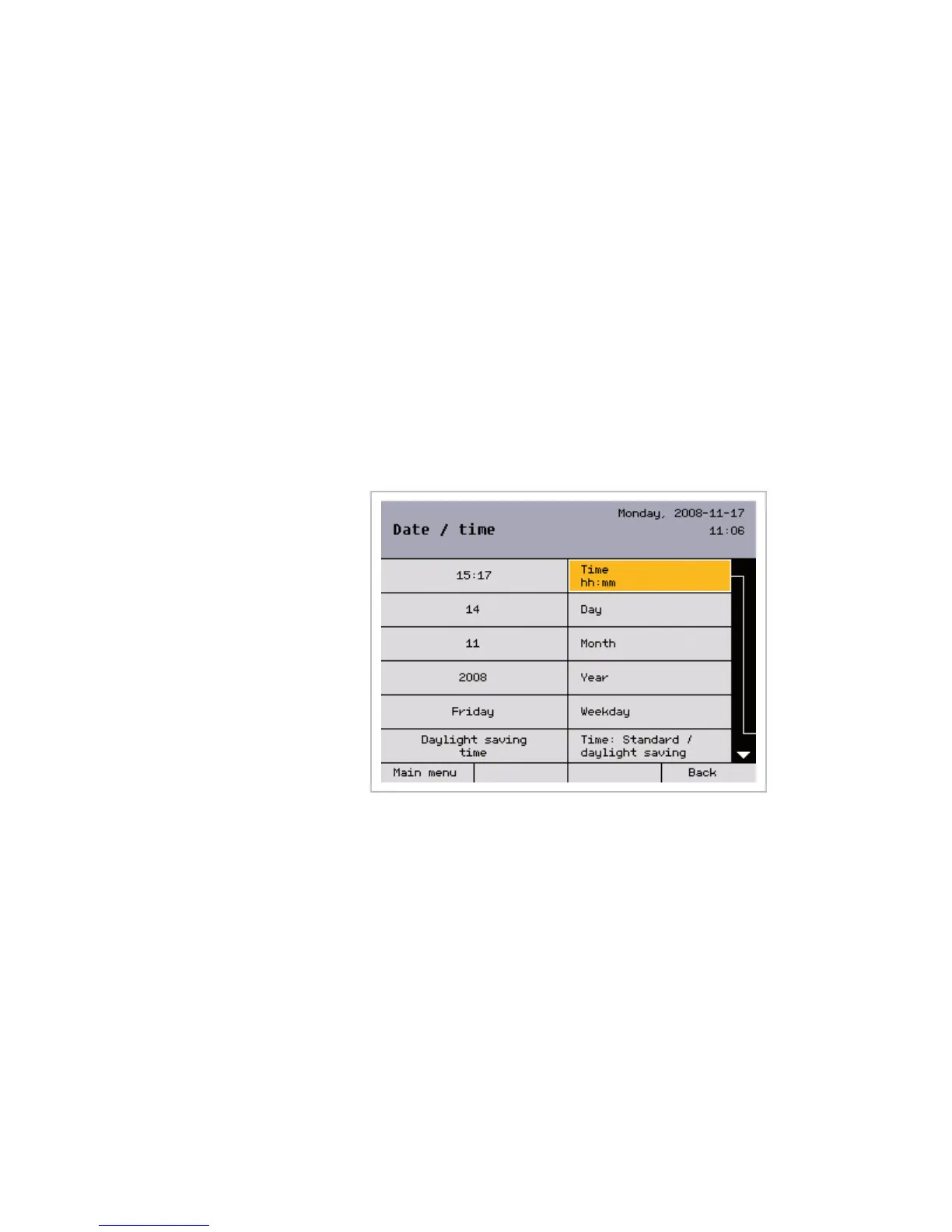
All date and time parameters can be entered in this window:
The operating step sequence is the same in each case:
Select the desired parameter by turning the function wheel.
Press the function wheel to start processing of the parameter (both cells
(value on the left and parameter on the right) are highlighted in colour.
Turning the function wheel changes the value; pressing it changes the deci-
mal point or closes the entry (the coloured highlighting disappears).
Not shown ():
To automatically change between daylight saving time and standard time for
the optional use of the DCF77 radio clock receiver (in the weather station),
scroll the function wheel all the way down.
Press the [Back] button to return to the [System] menu.
Main menu
Settings
Authorised dealer
Project setup
System
Date/time
Commissioning



 To Next Page