EasyManua.ls Logo

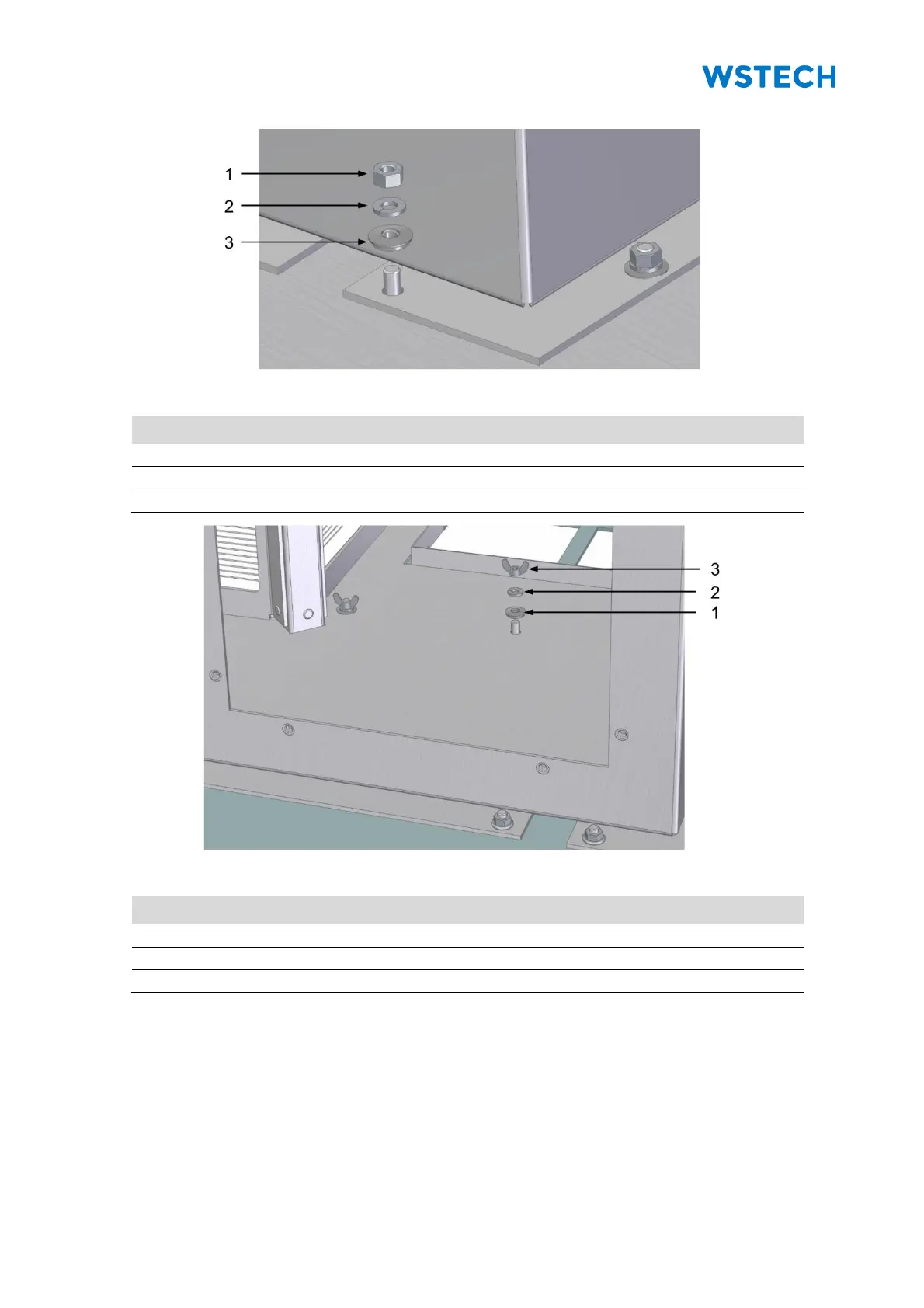
WSTECH APS Series - Figure 65: Mounting the Outer Area of the Cooling Tower (Detail View); Figure 66: Mounting the Inner Area of the Cooling Tower (Detail View)

WSTECH APS Series
213 pages
Print Icon
To Next Page IconTo Next Page
To Previous Page IconTo Previous Page
Loading...
Original Operating Instructions
APS Series Outdoor Hybrid Inverter
Installation
APS-Series 120 Operating Instructions v320 EN
Page 82 of 213
Figure 65: Mounting the outer area of the cooling tower (detail view)
Pos.
Description
1
Hexagon nut
2
Spring lock washer
3
Bonded sealing
Figure 66: Mounting the inner area of the cooling tower (detail view)
Pos.
Description
1
Bonded sealing
2
Spring lock washer
3
Wing nut
6. Screw the cooling tower with the top cover (Figure 65,
Figure 63, C).
7. Tighten nuts for mounting the outer area with a torque of 4 Nm.
8. Screw the dry location with the top cover (Figure 66, Figure 63, C).
9. Tighten the wing nuts hand-tightened.
10. Close service access to dry location.
11. Close service access to wet location.

Table of Contents