EasyManua.ls Logo

WSTECH APS Series - Figure 70: Terminal Strip (-X205.3); Figure 71: Connection of Radial Fans

WSTECH APS Series
213 pages
Print Icon
To Next Page IconTo Next Page
To Previous Page IconTo Previous Page
Loading...
Original Operating Instructions
APS Series Outdoor Hybrid Inverter
Installation
APS-Series 120 Operating Instructions v320 EN
Page 85 of 213
Procedure:
1. Route the cable through the cable grommet.
2. Bring the radial fan into the correct position (Figure 68).
3. Carefully mount radial fan from the inside (Figure 69), so that the device
protrudes out of the cabinet.
4. Tighten the hexagon screws with 9 Nm.
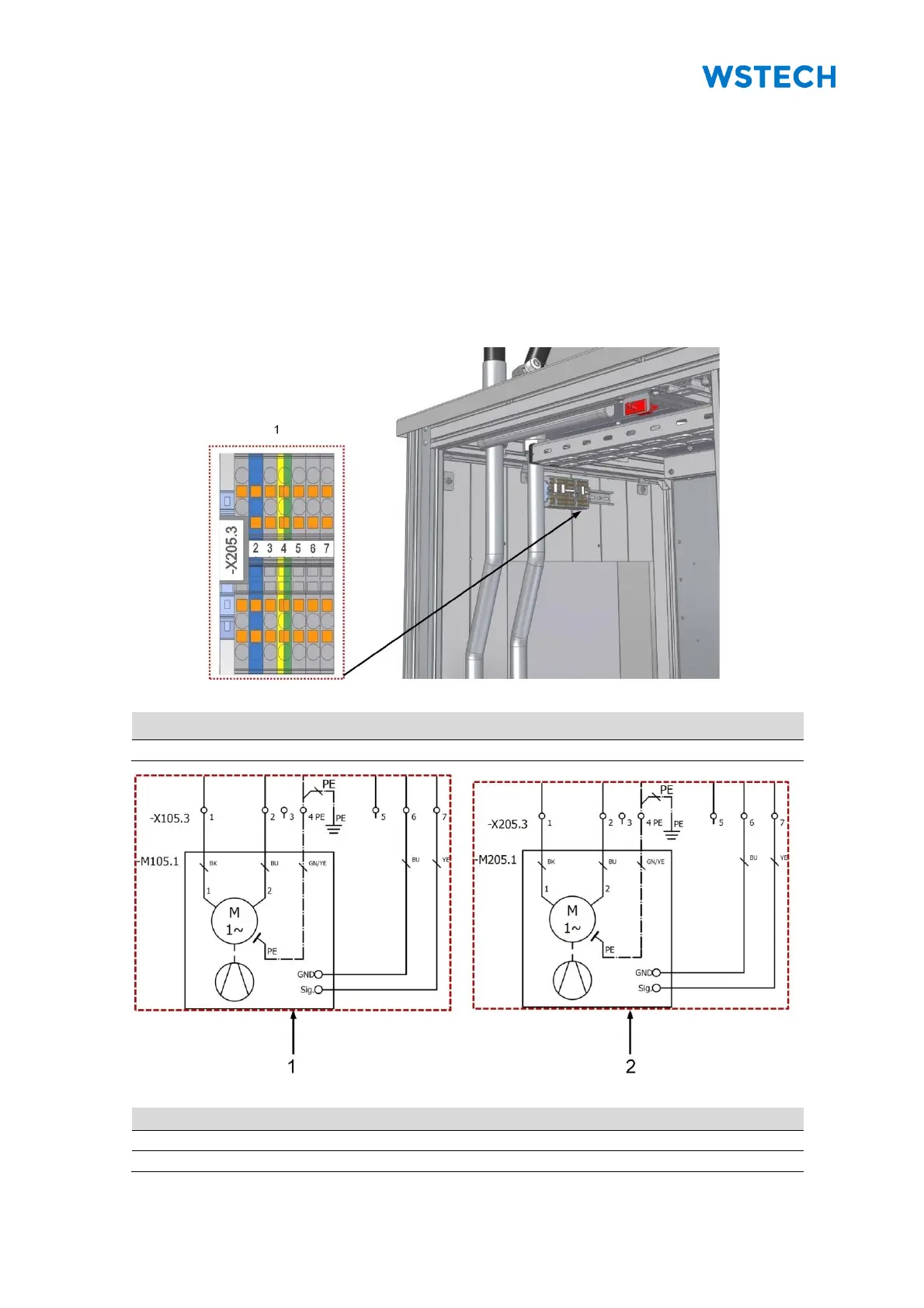
5. Connect the cores to terminal strip (-X105.3) and (-X205.3).
Terminal strip (-X205.3) does not exist for an APS with 1-2 APUs (Figure 71).
Figure 70: Terminal strip (-X205.3)

Pos.
Description
1
Terminal strip (-X205.3)
Figure 71: Connection of radial fans
Pos.
Description
1
Section +C3
2
Section +C6

Table of Contents