BALANCERS
5-109
▲▲▲▲ ▲ ▲▲▲▲▲▲▲▲▲ ▲ ▲▲▲▲ ▲ ▲▲▲▲ ▲ ▲▲▲▲▲▲▲
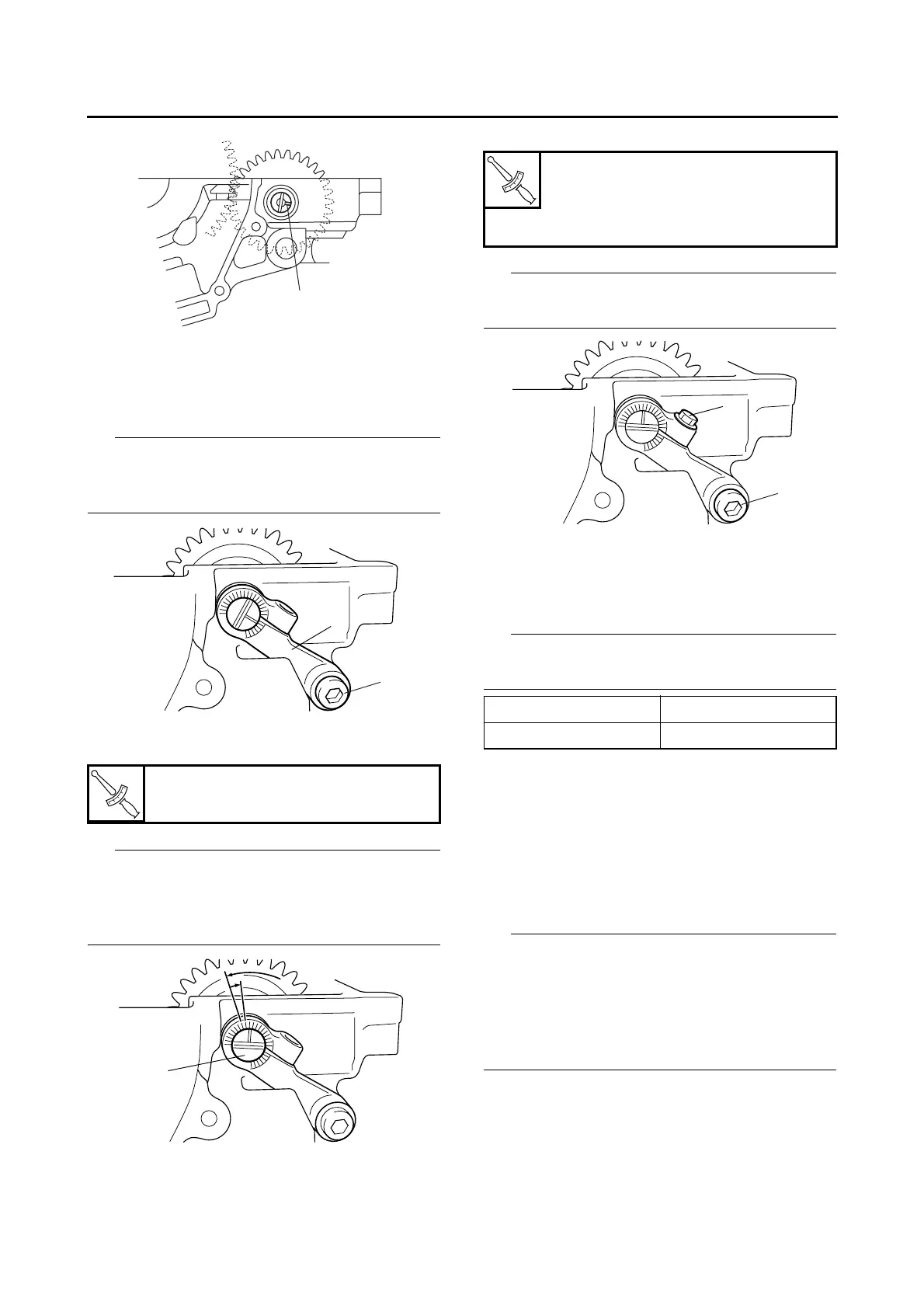
4. Install:
• Front balancer lever “1”
• Front balancer lever bolt “2”
• Apply locking agent (LOCTITE®) to the
threads of the balancer lever bolt.
• Temporarily tighten the balancer lever bolt.
5. Tighten:
• Front balancer shaft “1”
Tighten the balancer shaft to the specified
torque by turning it counterclockwise, and then
turn it one mark back on the balancer lever
scale.
6. Tighten:
• Front balancer lever bolt “1”
• Front balancer shaft pinch bolt “2”
Make sure that the balancer shaft does not ro-
tate.
7. Start the engine and check that there is no
abnormal noise coming from the balancer
gear. If noise is abnormal, adjust the gear
lash by turning the balancer shaft.
With each adjustment, turn the balancer shaft
one scale.
ET3P61033
INSTALLING THE REAR BALANCER
1. Install:
• Rear balancer gear “1”
• Dampers “2”
• Rear balancer weight “3”
• Bearings
• Washers
• Install the dampers onto the balancer gear so
that the middle section “a” of each damper is
positioned to the outside of the gear projec-
tions as shown in the illustration.
• Align the punch mark “b” in the balancer weight
with the mark “c” in the balancer gear.
Front balancer shaft
0.4 Nm (0.04 m·kg, 0.29 ft·lb)
Front balancer lever bolt
14 Nm (1.4 m·kg, 10 ft·lb)
Front balancer shaft pinch bolt
10 Nm (1.0 m·kg, 7.2 ft·lb)
Clockwise Gear lash decreased
Counterclockwise Gear lash increased




 To Next Page