FEATURES
1-35
EAS1MC1030
MULTI-FUNCTION METER UNIT
EWA1MC1008
Be sure to stop the vehicle before making
any setting changes to the multi-function
meter unit. Changing settings while riding
can distract the operator and increase the
risk of an accident.
The select switch “ / ” and the menu switch
“MENU” are located on the left handlebar. These
switches allow you to control or change the set-
tings of the multi-function meter unit.
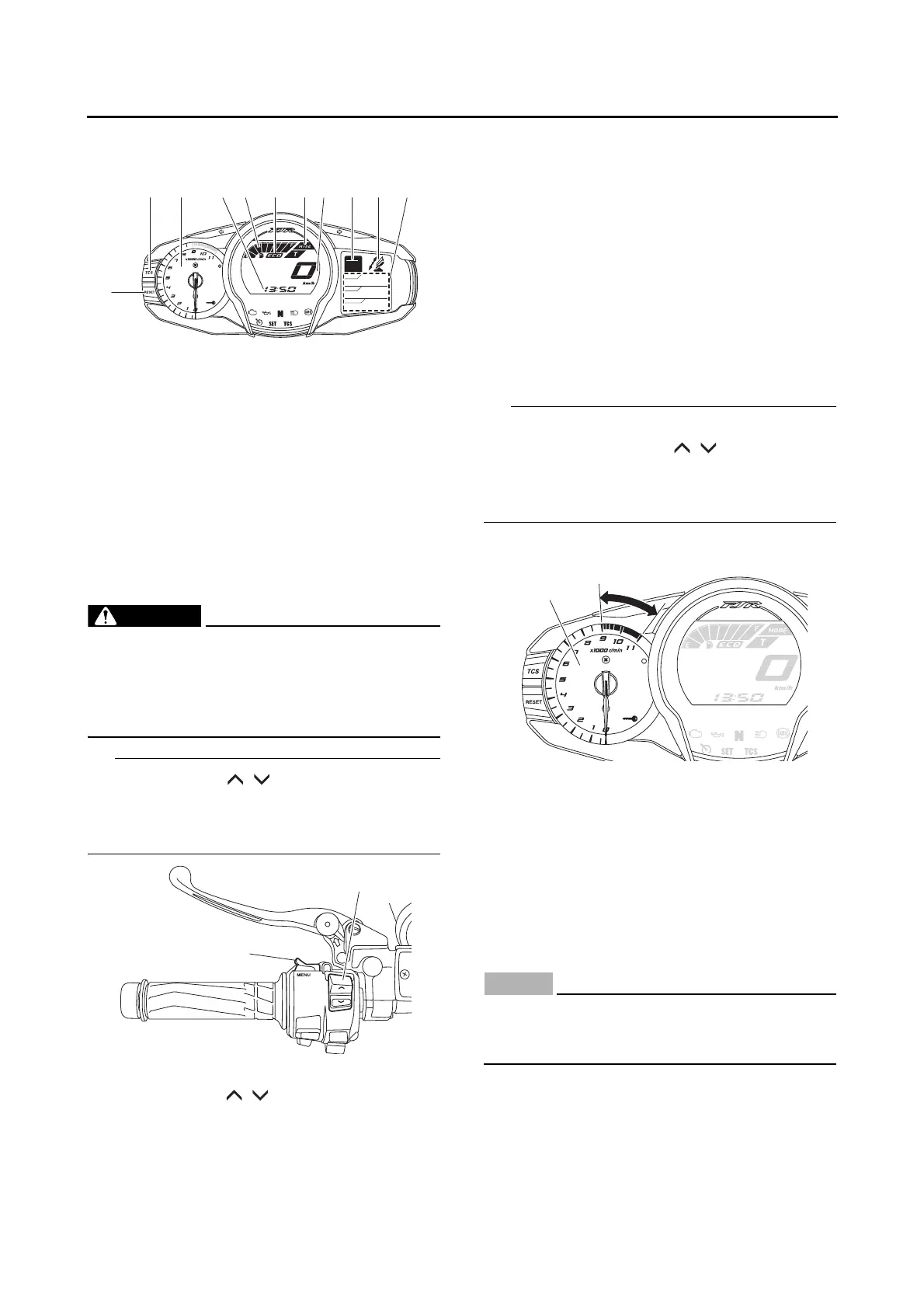
The multi-function meter unit is equipped with
the following:
• a speedometer
• a tachometer
•a clock
• a fuel meter
• a transmission gear display
• a drive mode display (which shows the select-
ed drive mode)
• a function display (which shows the selected
function)
• an information display (which shows various
information, such as the odometer reading)
• a setting mode display (which allows you to
set, select, or reset the items shown in the in-
formation display)
• a self-diagnosis device
• Be sure to turn the main switch to “ON” before
using the select switch “ / ”, menu switch
“MENU”, “RESET” button and “TCS” button.
• For the UK only: To switch the meter displays
between kilometers and miles.
Tachometer
The electric tachometer allows the rider to mon-
itor the engine speed and keep it within the ideal
power range.
When the main switch is turned to “ON”, the ta-
chometer needle sweeps once across the r/min
range and then returns to zero r/min in order to
test the electrical circuit.
ECA1MC1007
Do not operate the engine in the tachometer
red zone.
Red zone: 9000 r/min and above
1. “RESET” button
2. “TCS” button
3. Tachometer
4. Clock
5. Fuel meter
6. Eco indicator “ECO”
7. Drive mode display
8. Speedometer
9. Transmission gear display
10.Function display
11.Information display
1. Menu switch “MENU”
2. Select switch “ / ”
GEAR
N
25
A.TEMP ˚C
Lo
C.TEMP ˚C
0:06
TIME TRIP
1. Tachometer
2. Tachometer red zone




 To Next Page