DD+DIS150
.06E
Repair and Service
Tools and auxiliary Means
DOCUMENT CONTROL NOTE:
The controlled version of this document resides on MedNet. Any printed copy of this document is uncontrolled.
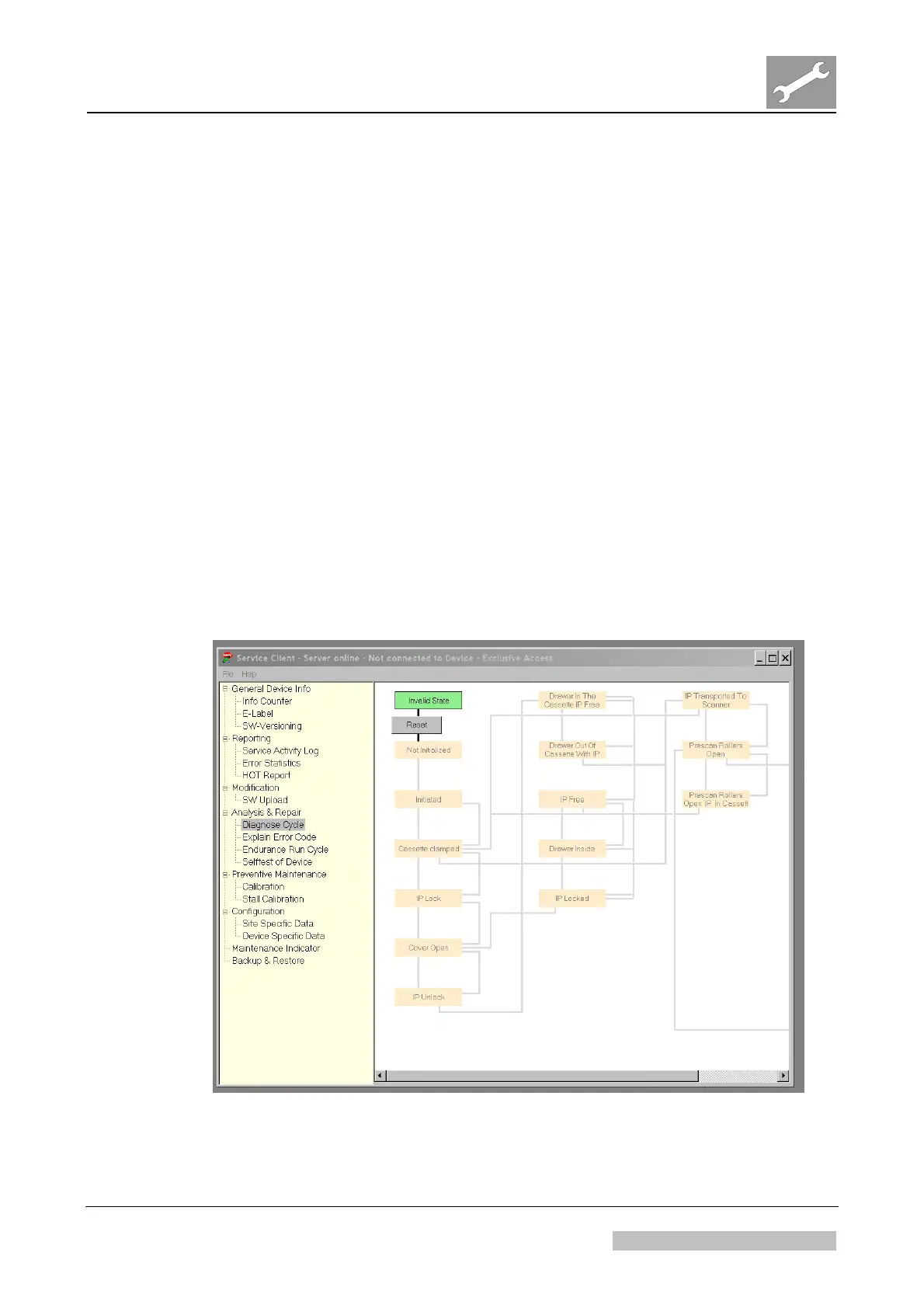
2.2.8 Service Client Menu “Diagnose Cycle”
Purpose
Menu “Diagnose Cycle” allows to perform a complete scan cycle manually step by
step e.g. for troubleshooting purpose.
Usage
A) Diagnose Cycle of the complete device:
(1) Select "Analysis & Repair - Diagnose Cycle".
(2) Put a cassette into the digitizer.
(3) Activate one of the grey displayed actions.
B) Diagnose Cycle of the Cassette Unit only:
(1) Open the cassette unit.
(2) Insert a service key in the safety switch.
(3) Select "Analysis & Repair - Diagnose Cycle".
(4) Put a cassette into the digitizer.
(5) Activate one of the grey displayed actions.
Figure 15
Edition 1, Revision 2 CR 30-X Chapter 3.2 / 20
03-2010 Type 5175 / 100/110 Agfa Company Confidential



 To Next Page