Functional Description
DD+DIS150.06E
DOCUMENT CONTROL NOTE:
The controlled version of this document resides on MedNet. Any printed copy of this document is uncontrolled.
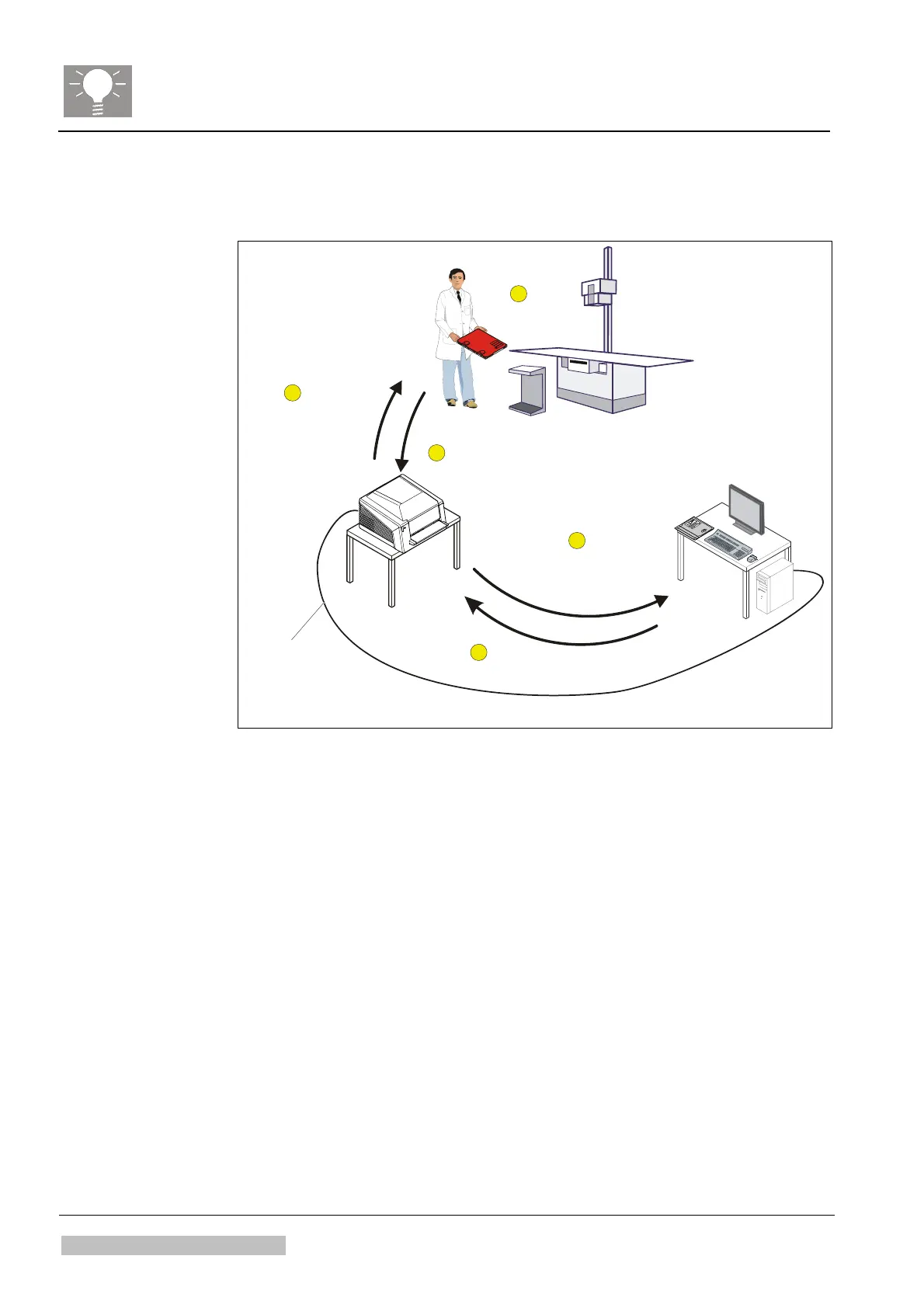
2 Workflow of the CR 30-X System
Insert exposed Cassette
in Digitizer
Take exposure
Take cassette
for next exposure
Go to processing station
and select Patient:
The IP* cycle starts.
Wait till IP* cycle
is finished (approx. 1 min.)
*IP = mage late
IP
FireWire cable
517502ah.cdr
1
2
3
4
5
Figure 4
Workflow of an examination with the CR30-X system in the view of a
radiologic technologist:
Step 1: Take the exposure.
Step 2: Insert the exposed cassette into the digitizer
Step 3: Go to processing station. Select the patient from the worklist and
select the "ID" button (ID stands for "identify"): The IP* cycle
starts.
Step 4: Wait till the IP* cycle is finished. This takes approx. 1 min.
The digitizer sends the image data during scanning (i.e. during
the IP cycle) to the processing station.
Step 5: Take out the cassette for the next examination.
*IP = Image Plate
Chapter 2 / 4 CR30-X Edition 1, Revision 0
Agfa Company Confidential Type 5175/100



 To Next Page