DD+DIS150
.06E
Repair and Service
Adjustments and Calibrations
DOCUMENT CONTROL NOTE:
The controlled version of this document resides on MedNet. Any printed copy of this document is uncontrolled.
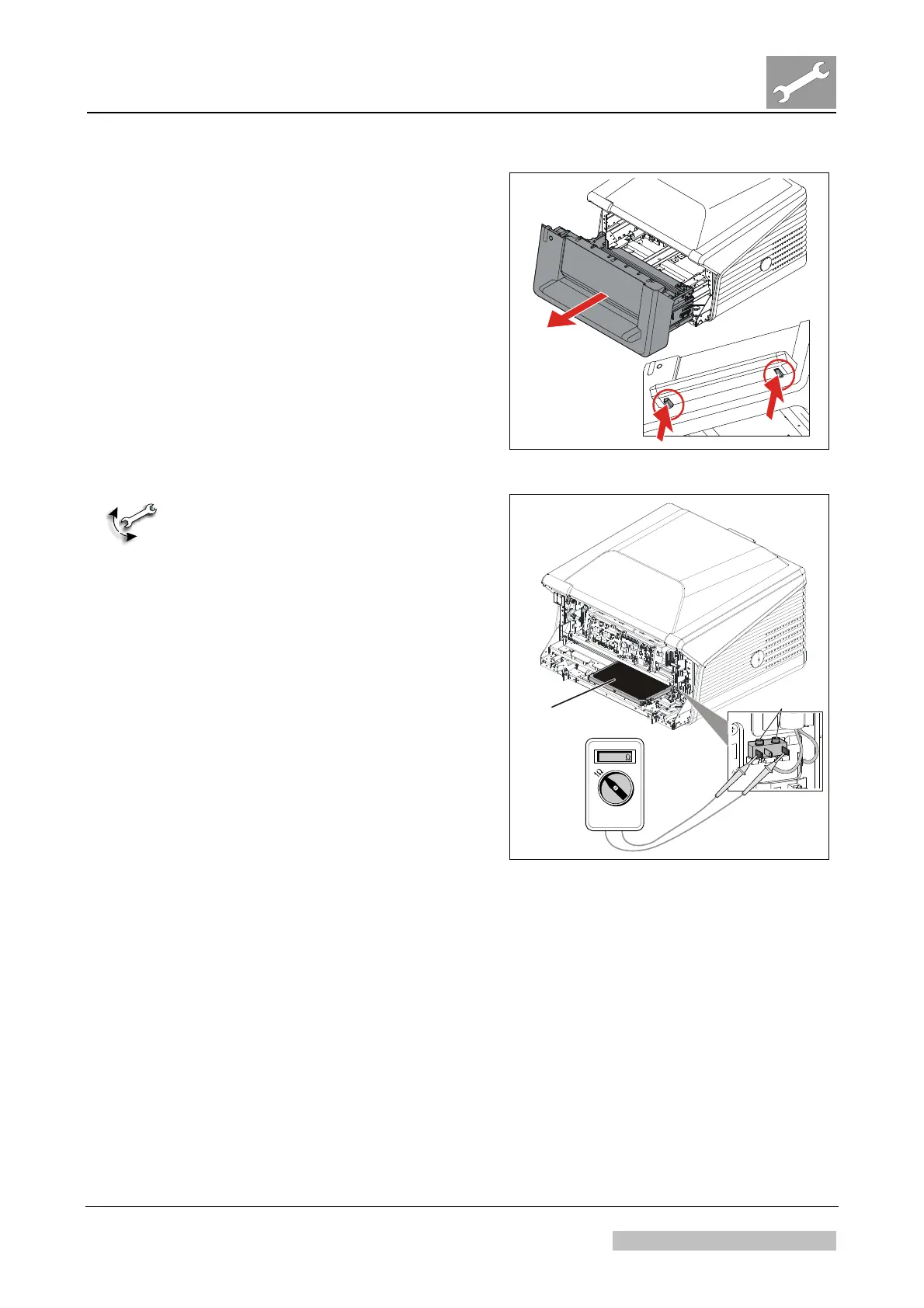
(1) Switch off the digitizer.
(2) Disconnect the mains cable.
(3) Simultaneously press the two
buttons (A) positioned underneath
the feed table.
(4) Pull out cassette unit (B).
(5) Remove the front cover.
A
A
B
Figure 22
Right:
Black tube side on top
Fixation
screws
MECHANICAL ADJUSTMENT:
(1) Insert a cassette the right way, i.e.
black tube side to the top and the
shutter inside the digitizer.
(2) Push the cassette to the right: The
cassette edge sensor has to
switch.
A click must be audible.
When using a multimeter, the
resistance has to be close
to 0 Ω.
(3) If the sensor does not switch, open
the fixation screws at the cassette
edge sensor and push it more to
the left. Fasten the fixation screws
and repeat step (2).
(4) If the sensor switches, continue
with next step.
Figure 23
Edition 1, Revision 3 CR 30-X Chapter 3.6 / 17
10-2009 Type 5175 / 100/110 Agfa Company Confidential



 To Next Page