102
"JOB MENU" - F6 PRESCRIPTION MAP
15.6
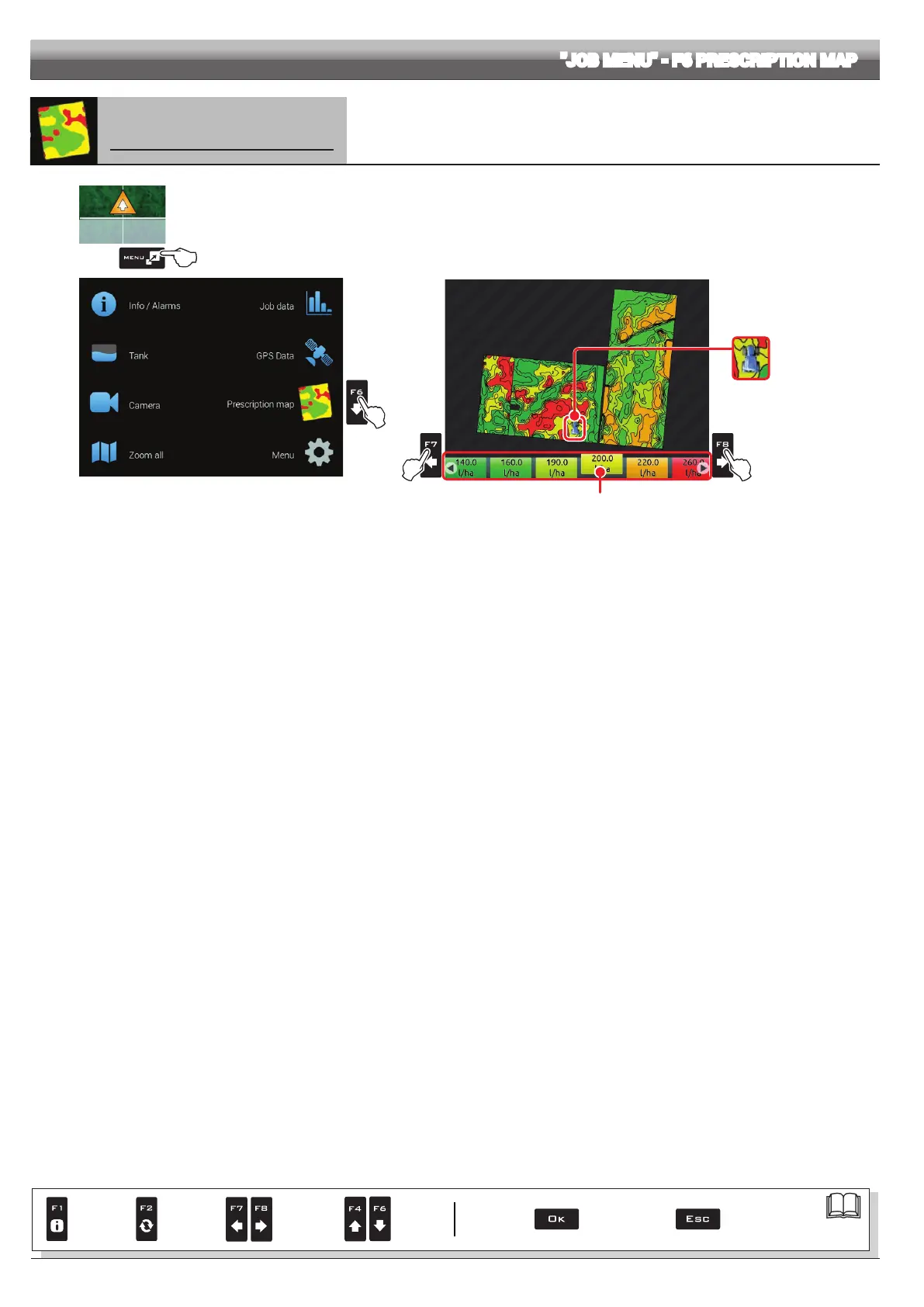
F6 Prescription map
Overview of the prescription map in use
1
2
Fig. 327
1 In the guidance screen, press
Menu.
2 Press
F6 to view the Prescription map menu (Fig. 328).
From this screen it is possible to view data of the prescription map during spraying and to check the position of the machine on the
map.
Fig. 328
F7 Scroll spray rate values to
the LEFT.
F8 Scroll spray rate values to
the RIGHT.
Machine position
Spray rate values legend:
The highlighted box displays the spray rate referred to
the machine's current position
Par.
7. 4
Conrm access
or data change
Exit the function or
data change
Delete
selected
character
Scroll
(LEFT /
RIGHT)
Data
increase /
decrease
Scroll
(UP /
DOWN)
Enter
selected
character



 To Next Page