91
"HOME" MENU - F4 MEMORIES MANAGEMENT
14.4.5 Remote devices upgrade
• Upgrade les
Allows to upgrade the software of the devices connected to Delta 80: ECU IBX100 (remote control unit), switch panel, etc.
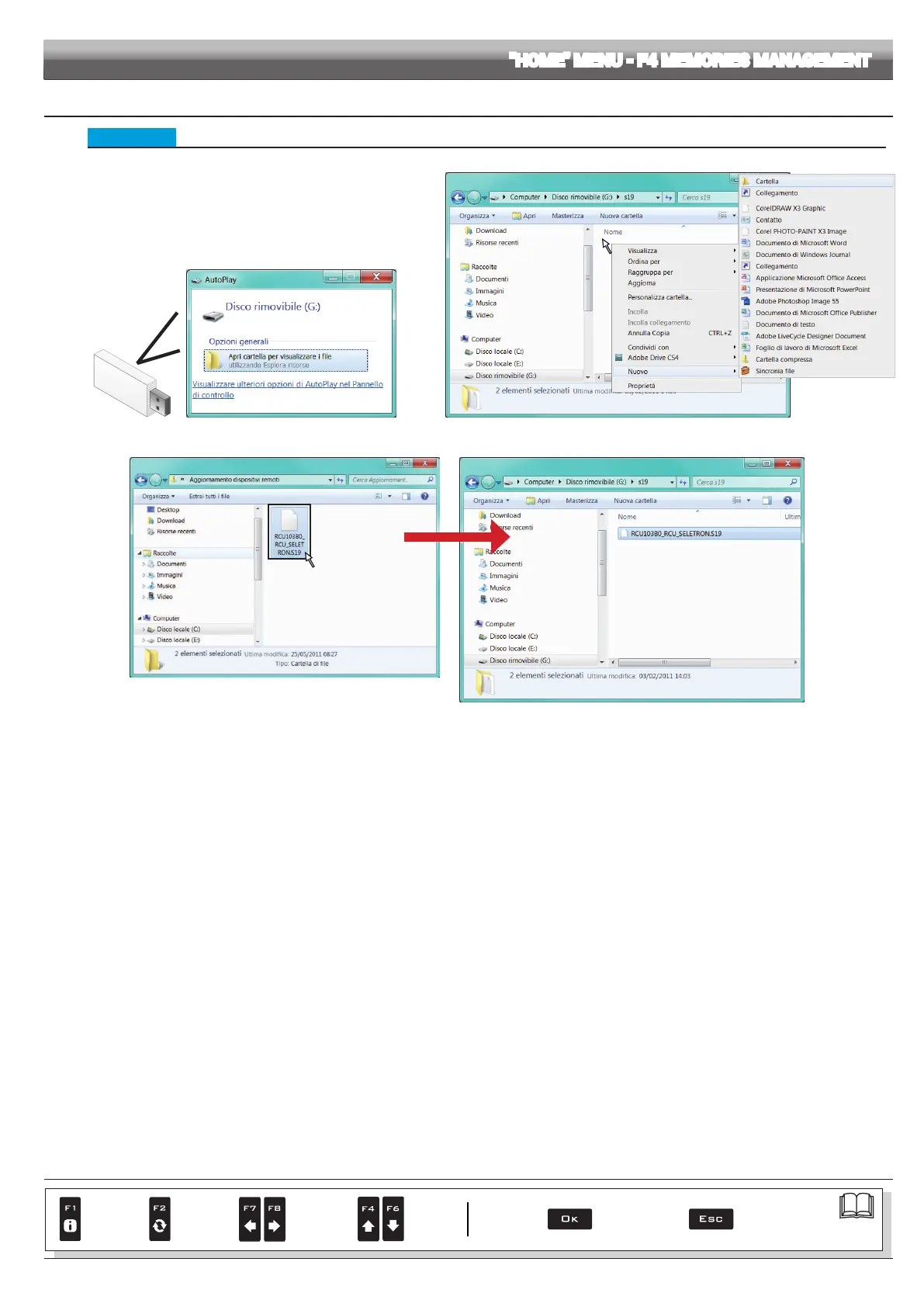
Before starting the procedure copy the upgrade les onto
the pendrive.
- Insert the pendrive in a pendrive reader and connect it to the
computer. The window to the right will appear: select Open
folder to view the les.
- The pendrive explorer window will open: create a new folder
and name it "s19"
Fig. 293 Fig. 294
- Select the upgrade le and drop it onto the pendrive explorer window, in the folder named "s19".
- Insert the pendrive in its slot on Delta 80.
Fig. 295
CONTINUES
Par.
7. 4
Conrm access
or data change
Exit the function or
data change
Delete
selected
character
Scroll
(LEFT /
RIGHT)
Data
increase /
decrease
Scroll
(UP /
DOWN)
Enter
selected
character



 To Next Page