108
"JOB FUNCTIONS" - F2 GUIDANCE MODE
16.2 F2 Guidance mode
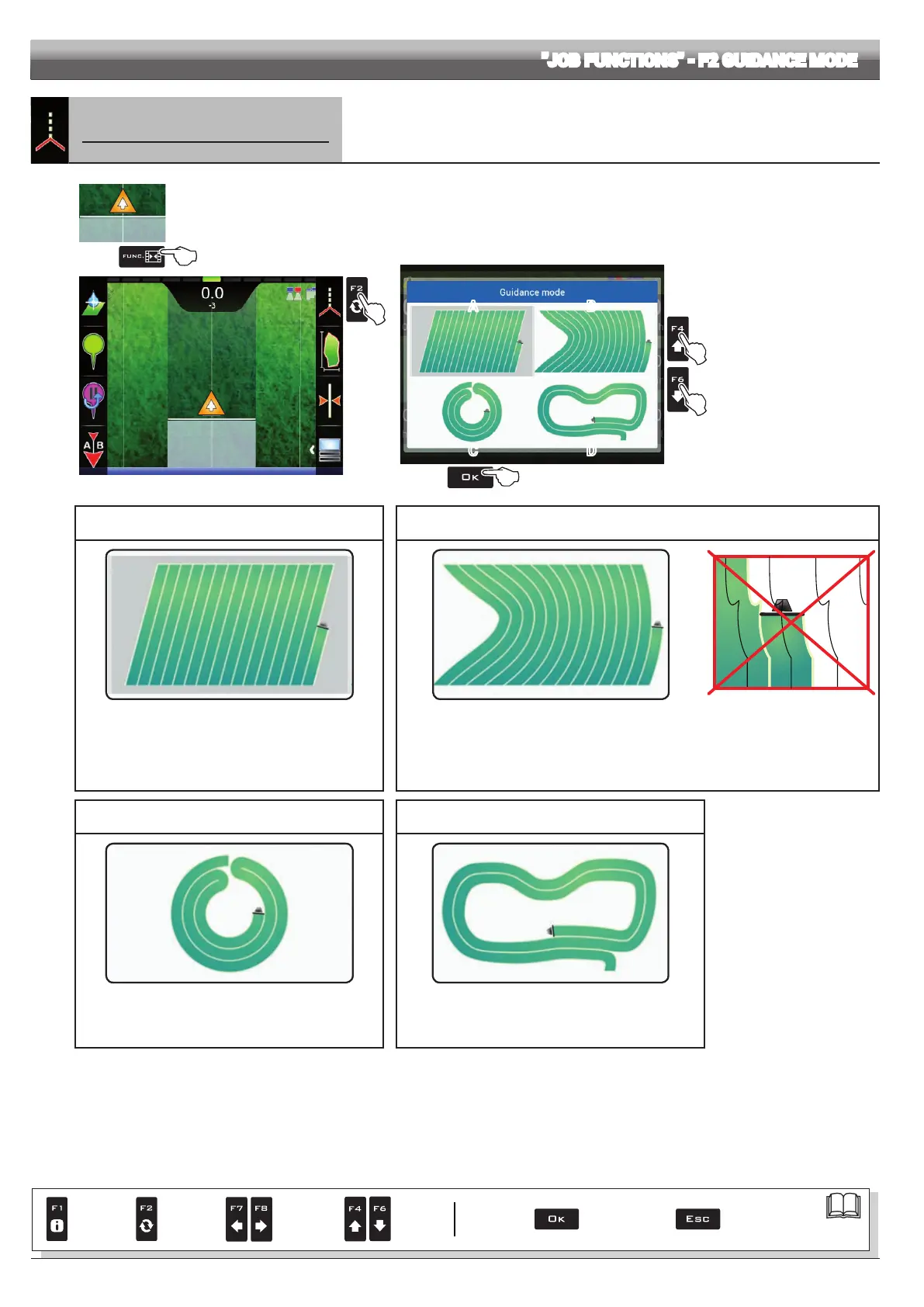
Selecting guidance mode:
1
2
Fig. 343
1 In the guidance screen, press Func.
2 Press F2 to enable the function.
3 Select a guidance mode (Fig. 344): press F4 and F6 to move across the available items
(A - Straight guidance mode, B - Curved guidance mode, C - Pivot mode or D - Free guidance mode)
4 Conrm selection.
3
3
4
A
C
B
D
Fig. 344
A - STRAIGHT GUIDANCE MODE B - CURVED GUIDANCE MODE
Fig. 345 Fig. 346
Fig. 347
The tracks appearing on the display, which will act as a
guidance reference, are perfectly straight and parallel to the
reference line joining point
A to point B as previously marked.
Upon creation of the reference track, any bends in the
trajectory between
A and B will be ignored.
The tracks appearing on the display, which will act as a guidance reference, include portions that
are not straight, but do not include sharp bends (Fig. 347).
The trajectory between
A and B will be saved and Delta 80 will create evenly distributed tracks.
C - PIVOT MODE D - FREE GUIDANCE MODE
Fig. 348 Fig. 349
Specic mode for spraying of eld with movable pivots.
The circular trajectory between
A and B will be memorized
and Delta 80 will create concentric, evenly distributed tracks.
No guidance references are shown on the display.
The operator will drive freely and will be able to check the
spraying range on the display in real time.
Par.
7. 4
Conrm access
or data change
Exit the function or
data change
Delete
selected
character
Scroll
(LEFT /
RIGHT)
Data
increase /
decrease
Scroll
(UP /
DOWN)
Enter
selected
character



 To Next Page