86
14.2
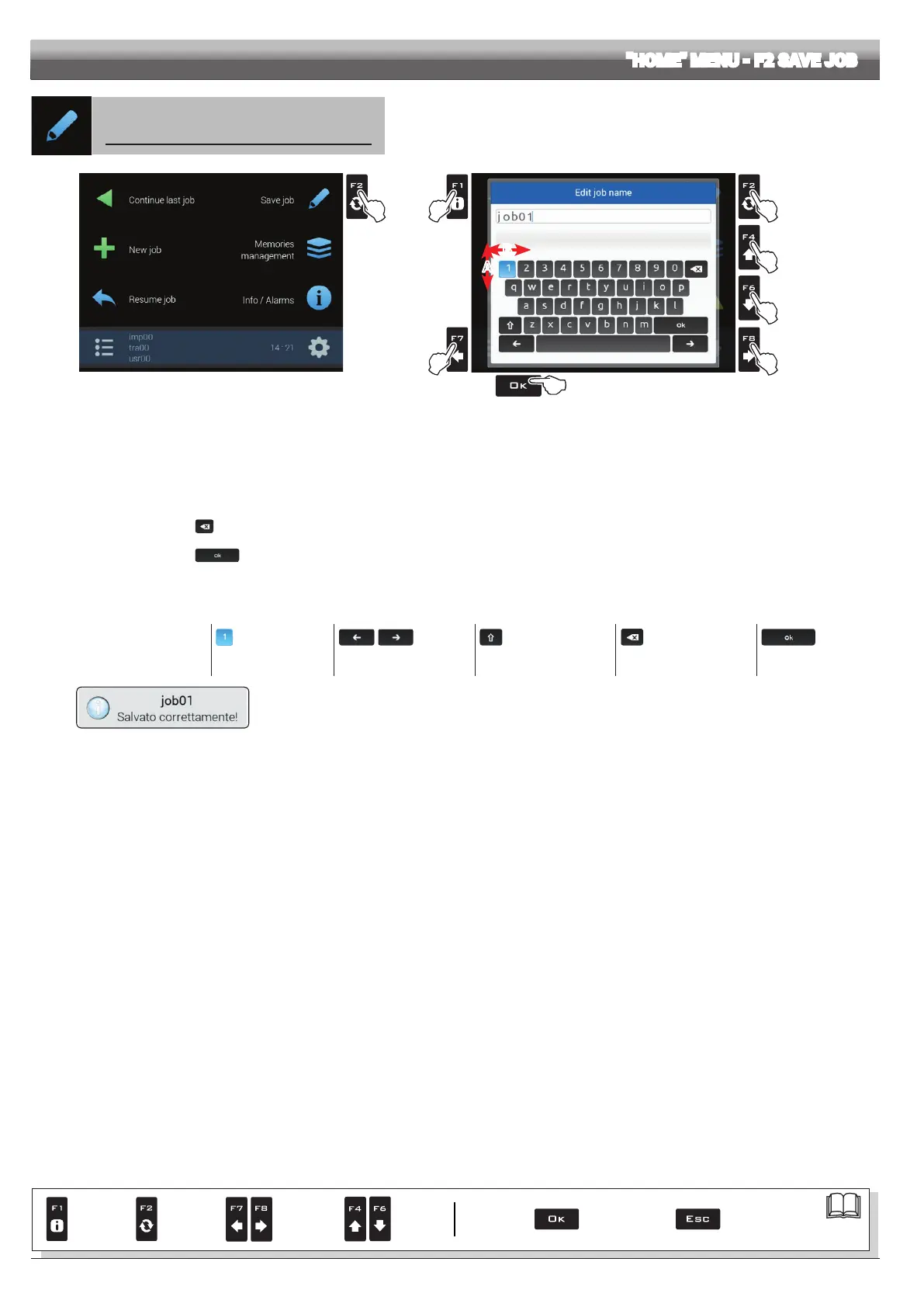
F2 Save job
Save current job
1
Fig. 273
3
2B
4
2A
2A
2B
5
B
A
Fig. 274
1 Press
F2 to save current job: the name edit screen is displayed (Fig. 274). Type the name.
2A Press in succession to select the character you wish to type
(UP / DOWN)
2B Press in succession to select the character you wish to type
(RIGHT / LEFT).
3 Press to:
- Conrm the selected character
- Delete the character before the cursor
(when the symbol "
" is selected)
- Save the entered text
(when the symbol "
" is selected)
4 Press to delete the character before the cursor
5 Press to exit screen without conrming modication
Legend:
imp03
Typed Name
|
Cursor
Selected character
Shift cursor across name
characters
Caps lock
Deletes the character
before the cursor
Saves the entered text
Fig. 275
A conrmation message is displayed once the process is completed (Fig. 275). Press
ESC.
"HOME" MENU - F2 SAVE JOB
Par.
7. 4
Conrm access
or data change
Exit the function or
data change
Delete
selected
character
Scroll
(LEFT /
RIGHT)
Data
increase /
decrease
Scroll
(UP /
DOWN)
Enter
selected
character



 To Next Page