58
ADVANCED SETUP "TRACTOR"
10.5 TRACTOR ADVANCED SETTINGS
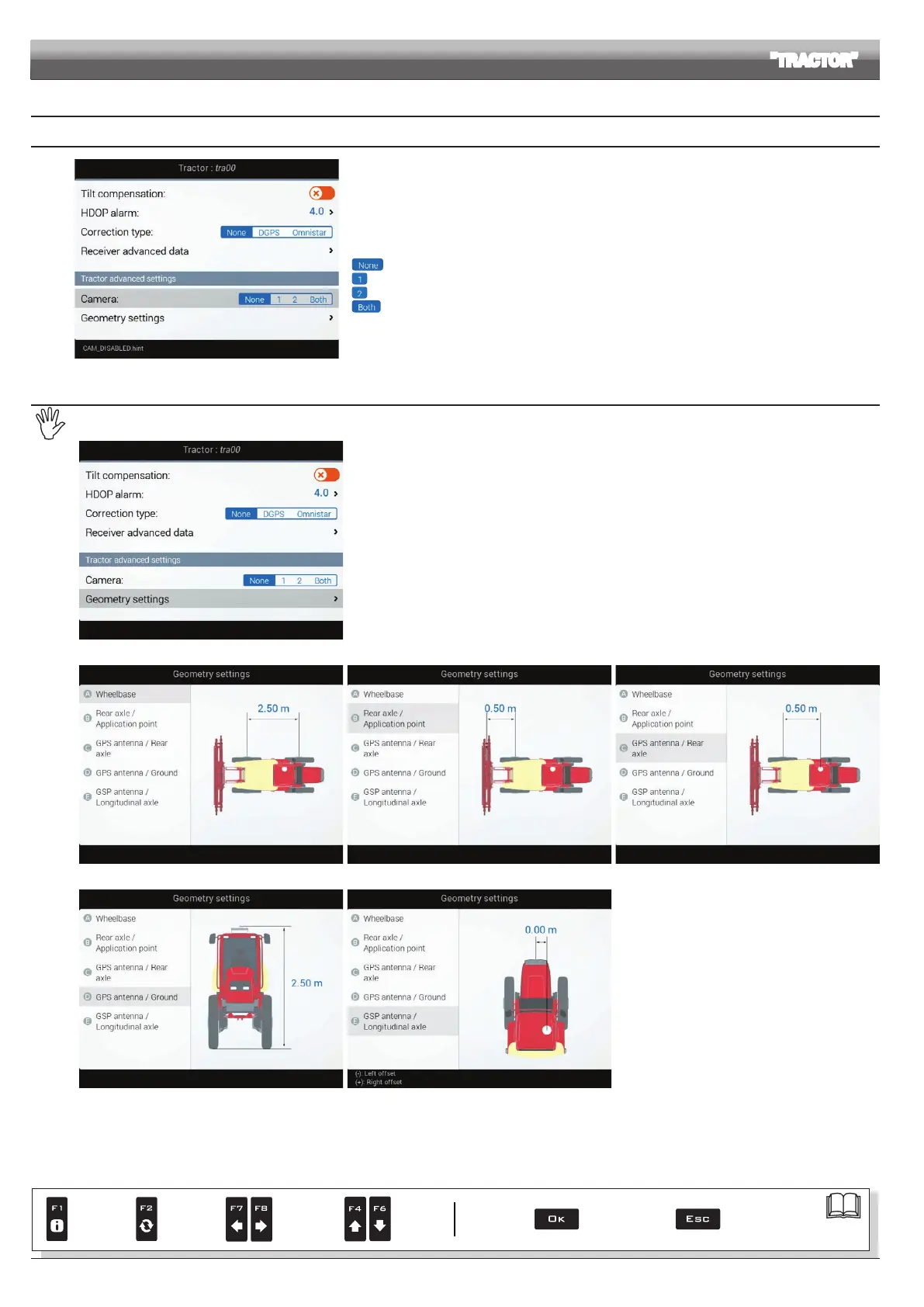
10.5.1 Camera
Fig. 186
Delta 80 can connect to up to 2 cameras in order to monitor the working areas that the operator is unable to
see (e.g., when driving in reverse).
From the menu it is possible to enable/disable each single camera individually or both cameras:
No camera connected
1 camera connected to input no.1
1 camera connected to input no.2
2 cameras connected
10.5.2 Geometry settings (SELF-PROPELLED WITH REAR BOOM)
Settings displayed next will depend on set type of system (chap. 9).
Fig. 187
Enter farming machine measures (Fig. 187).
- Press the arrow keys (UP, DOWN) to move across value descriptions:
the image of the selected value will appear on the display.
- Conrm by pressing
OK to enter setup.
- Set as required.
- Select and enter, one by one, all values.
Fig. 188 Fig. 189 Fig. 190
Fig. 191 Fig. 192
Par.
7. 4
Conrm access
or data change
Exit the function or
data change
Delete
selected
character
Scroll
(LEFT /
RIGHT)
Data
increase /
decrease
Scroll
(UP /
DOWN)
Enter
selected
character



 To Next Page