31
10.1.2 Boom settings
Fig. 79
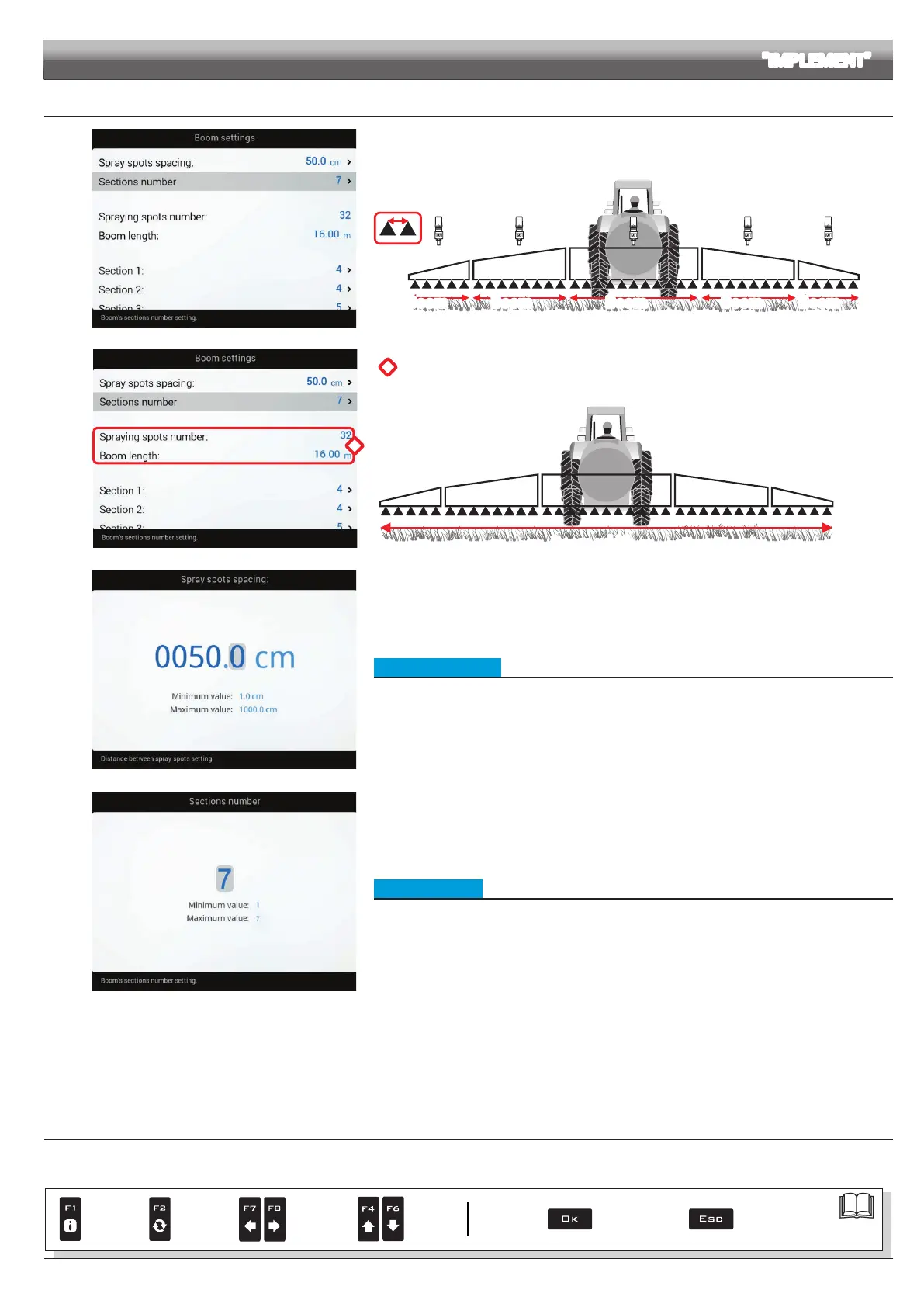
The operator may choose the way in which the boom is subdivided into different sections: this is done in
order to act on the corresponding switch when closing sections manually.
With automatic management, instead, the computer acts on each single Seletron separately.
Spray spots
spacing
Boom
sprayer
Boom
sprayer
Boom
sprayer
Boom
sprayer
Boom
sprayer
Fig. 80
*
Fig. 81
*
Depending on the selected settings, the number of spraying points as well as the
value of the boom width, displayed in Fig. 81, will change.
Boom width
Fig. 82
Fig. 83
• Spray spots spacing
Indicate the distance between spraying points (nozzle holders).
Fig. 84
• Sections number
Indicate the number of boom sections.
ADVANCED SETUP "IMPLEMENT"
CONTINUES > > >
Par.
7. 4
Conrm access
or data change
Exit the function or
data change
Delete
selected
character
Scroll
(LEFT /
RIGHT)
Data
increase /
decrease
Scroll
(UP /
DOWN)
Enter
selected
character



 To Next Page