17
6.9 3G Modem
The communication module allows, when a mobile phone network is available,
data exchange with Delta 80 computer.
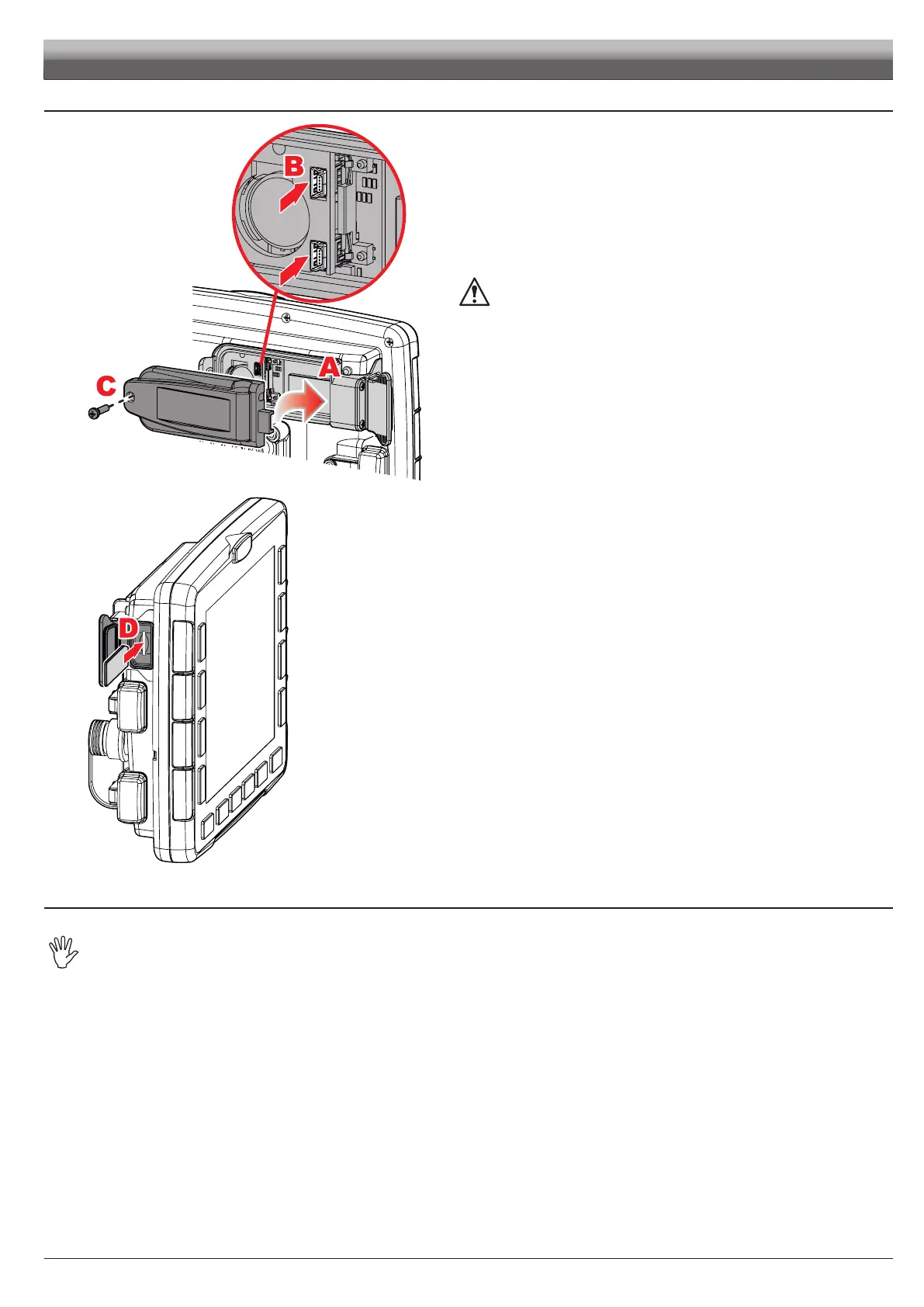
• Modem installation
Slide out cover from modem housing, after removing the retaining screw.
Insert the modem, rst position the RH side into housing
A.
Press toward the monitor and check alignment of connectors
B, fasten modem
with the screw
C previously removed.
WARNING: modem incorrect positioning might cause water
seepage inside the monitor!
Fig. 25
• Insertion
Insert the SIM card making sure to orient it correctly:
the card cut edge D must be face up; push the card until it engages into place and close the slot with the
cover MAKING SURE IT IS DULY CLOSED TO AVOID WATER SEEPAGE.
• Removal
To remove the SIM card, press and immediately release the card into the slot and slide it out.
6.10 Pendrive
The pen drive may be used to exchange data with the Delta 80 computer.
Before using it make sure the pendrive is not protected.
All pendrives with up to 8 GB memory are compatible.
ACCESSORIES



 To Next Page