38
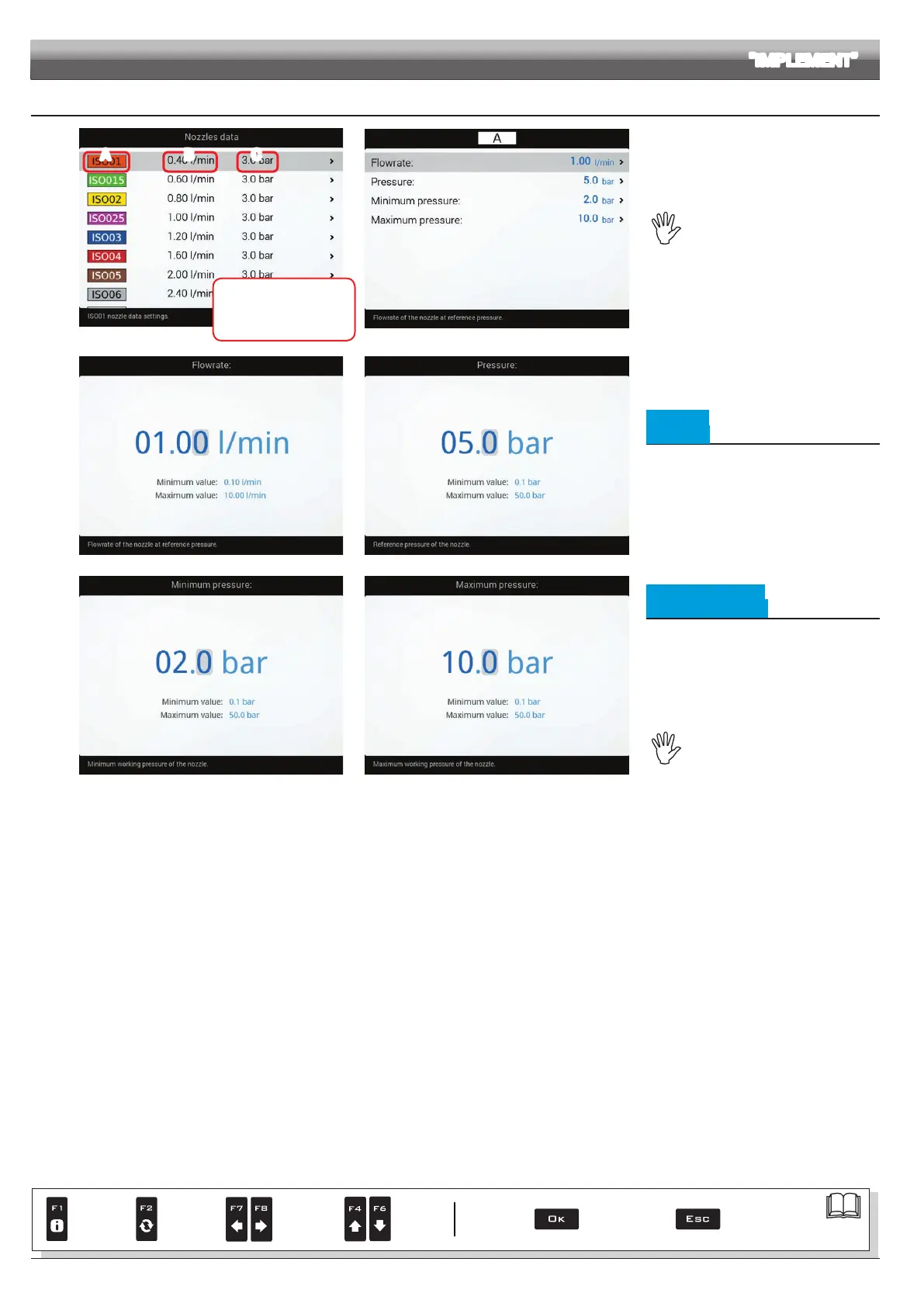
10.1.7 Nozzles data
Legend:
A Nozzle
B Reference rate
C Reference pressure
A B C
Fig. 105
Fig. 106
Allows setting the values of
12 types of ISO nozzles and 6 "User" nozzles
(A, B, C, D, E, F).
The values for Flowrate and
Pressure can be modied for "User"
nozzles ONLY, not for ISO nozzles.
- Select the nozzle you wish to set up (Fig. 105).
- Enter the relevant features (Fig. 106).
- If necessary, repeat the setup for each nozzle.
Fig. 107 Fig. 108
• Flowrate
• Pressure
Set the reference owrate and pressure for the
selected nozzle.
The rate of the nozzle being used allows Delta
80 to calculate the pressure without a pressure
sensor.
Fig. 109 Fi g. 110
• Minimum pressure
• Maximum pressure
Set the pressure limits for the selected nozzle.
Enable the relevant function on the Alarms
menu (par. 10.1.11) if you want the computer to
trigger an alarm when the nozzle is outside the
set range.
For the procedure to be followed when an
alarm occurs, please refer to par. 17.1 Error
messages.
Pressure limits for the nozzle in use
allow Delta 80 to select the suitable
nozzle during spraying, therefore they
must be set correctly.
ADVANCED SETUP "IMPLEMENT"
Par.
7. 4
Conrm access
or data change
Exit the function or
data change
Delete
selected
character
Scroll
(LEFT /
RIGHT)
Data
increase /
decrease
Scroll
(UP /
DOWN)
Enter
selected
character



 To Next Page