49
10.1.14 Device calibration
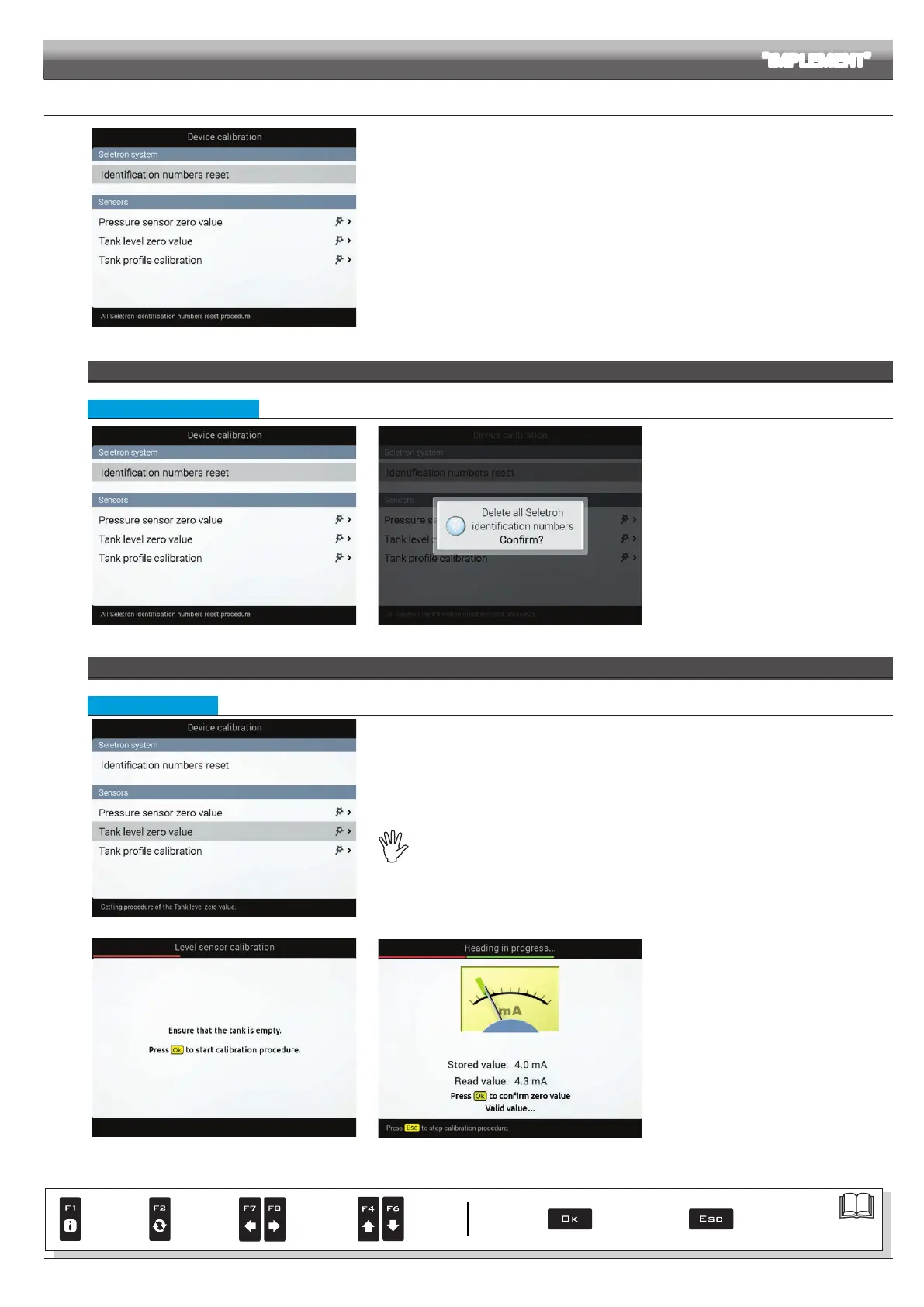
Fig. 151
Allows to start calibration for the devices connected to Delta 80.
SELETRON SYSTEM
• Identication numbers reset
Fig. 152 Fig. 153
Allows to reset the identication numbers of all
saved Seletrons, before repeating the pairing
procedure (chap. 11).
- Select
Identification numbers reset
(Fig. 152) and press OK.
- The message in Fig. 153 is displayed: conrm
reset by pressing OK again.
At the end of the reset procedure,
DISCONNECT ALL SELETRONS and start a
new pairing procedure (chap. 11).
SENSORS
• Tank level zero value
Fig. 154
In the cases below it is necessary to perform the level sensor zero adjustment.
1 Delta 80 displays the presence of uid inside the tank, even when it is empty;
2 A tank prole has been loaded (par. 10.1.10).
To use this menu the level sensor must be active (Tank level source, chap. 9). Perform the
adjustment with empty tank
Fig. 155
Fig. 156
1 Select the item
Tank level zero value
(Fig. 154) and press OK.
2 The message in Fig. 155 is displayed: follow
the instructions, then start the procedure by
pressing OK.
3 Press OK to reset the level sensor residual
signal.
Value out of range!
If this alarm is displayed, faulty values have
been detected: check the sensor operation.
If problem persists, check for residual uid
in the tank.
ADVANCED SETUP "IMPLEMENT"
Par.
7. 4
Conrm access
or data change
Exit the function or
data change
Delete
selected
character
Scroll
(LEFT /
RIGHT)
Data
increase /
decrease
Scroll
(UP /
DOWN)
Enter
selected
character



 To Next Page