103
"JOB MENU" - F7 ZOOM ALL
15.7
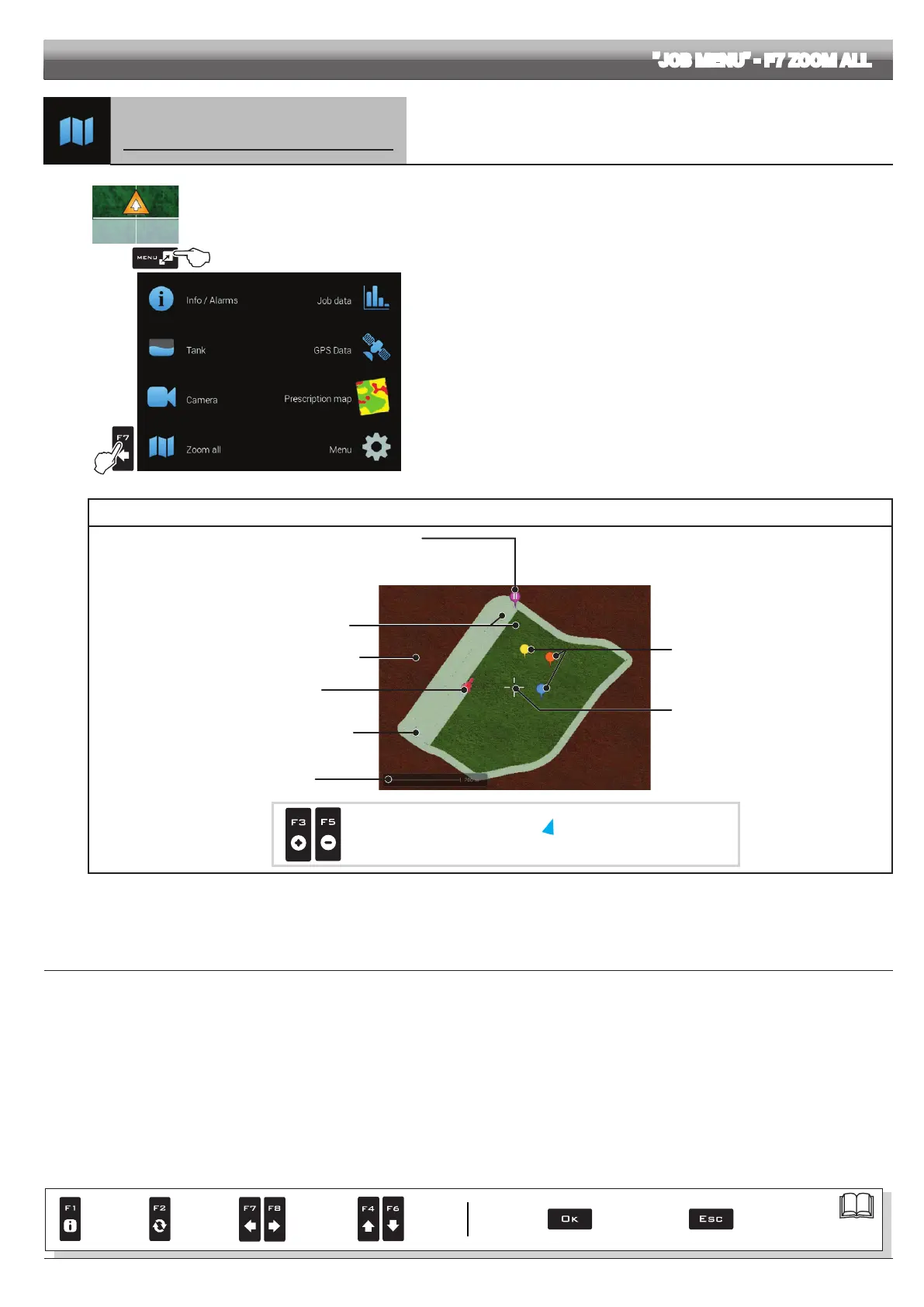
F7 Zoom all
Overview of the eld during spraying
1
2
Fig. 329
1 In the guidance screen, press Menu.
2 Press F7 to view the Zoom all menu (Fig. 330).
INDICATORS AND POINTS OF INTEREST ON THE FIELD
Surface inside the eld perimeter
("SURFACE" function (par. 16.4)
Job interruption point, enabled with the "PAUSE"
function (par. 16.3.1)
In this screen it is NOT possible to mark or
modify this point.
General points of interest
Cursor
Machine position
Surface outside the eld perimeter
(see "SURFACE" function)
Scale
Sprayed surface
Display zoom adjustment:
F3 (+) zoom in,
F5 (-) zoom out
It indicates the machine position
outside the displayed area
Fig. 330
CONTINUES
Par.
7. 4
Conrm access
or data change
Exit the function or
data change
Delete
selected
character
Scroll
(LEFT /
RIGHT)
Data
increase /
decrease
Scroll
(UP /
DOWN)
Enter
selected
character



 To Next Page