45
AUTOMATIC SECTION CONTROL
Fig. 135
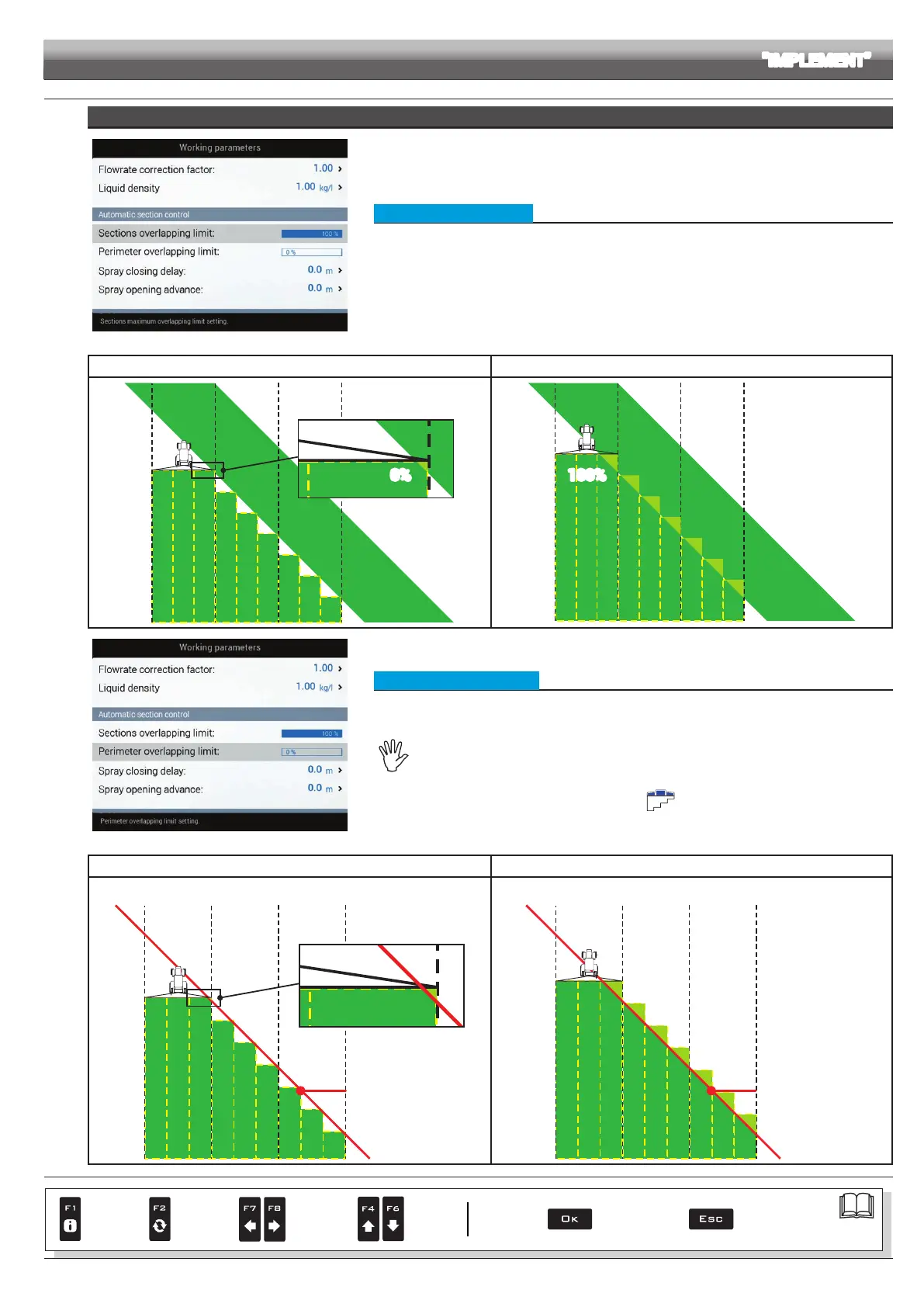
• Sections overlapping limit
Set the acceptable threshold for overlapping of already-sprayed areas.
When this value is exceeded, Delta 80 restores the correct spraying: depending on the section
management mode enabled (par. 13.7 Boom section management), Delta 80 will prompt the operator to
close the relevant valves or proceed to the automatic closing of the spraying points.
Sections overlapping limit 0% Sections overlapping limit 100%
0%
Fig. 136
100%
Fig. 137
Fig. 138
• Perimeter overlapping limit
Set the acceptable threshold for overlapping of spraying with respect to eld perimeter.
When this value is exceeded, Delta 80 restores the correct spraying:
depending on the section management mode enabled (par. 13.7 Boom section management), Delta 80 will
notify the operator that the section valves spraying outside the eld perimeter must be opened or closed, or
proceed to the automatic opening/closing of the spraying points.
The following conditions are required in order to use this setup:
- Drawing the eld perimeter (red line in the gures) using the function F4 Surface (par. 16.4).
- Enabling automatic section management: the icon on the guidance screen indicates that
automatic management is enabled.
Perimeter overlapping limit 0% Perimeter overlapping limit 100%
The alert asking to close / open section valves will be displayed following a
minimum overlapping (0%) across the eld perimeter.
The alert asking to close / open section valves will be displayed ONLY when the
machine is spraying across the entire eld perimeter (100%).
PERIMETER
OF THE FIELD
Fig. 139
PERIMETER
OF THE FIELD
Fig. 140
> > > 10.1.12 Working parameters
CONTINUES > > >
ADVANCED SETUP "IMPLEMENT"
Par.
7. 4
Conrm access
or data change
Exit the function or
data change
Delete
selected
character
Scroll
(LEFT /
RIGHT)
Data
increase /
decrease
Scroll
(UP /
DOWN)
Enter
selected
character



 To Next Page