87
14.3
F3 New job
Start a new spraying
1 Press
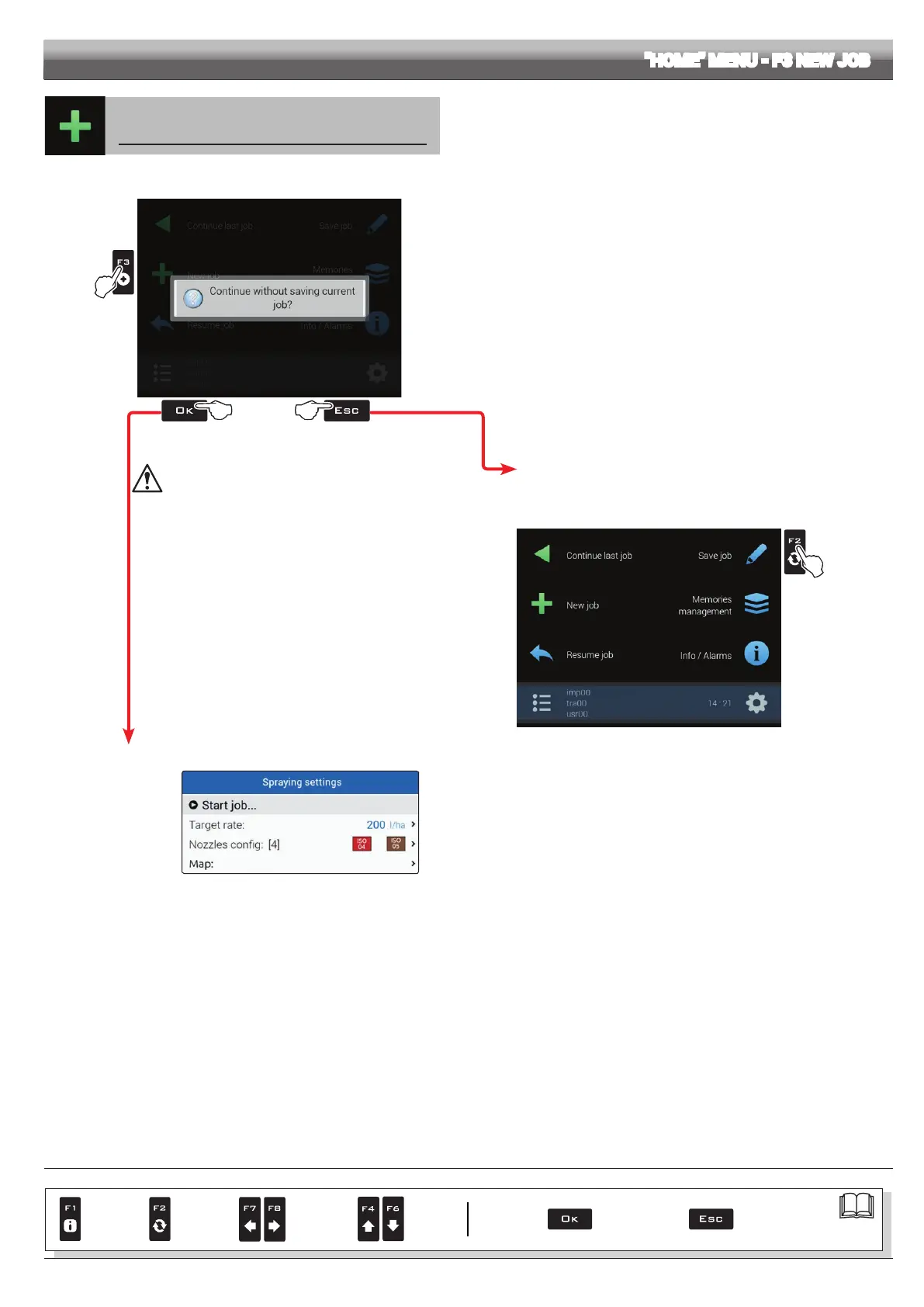
F3 to start a new spraying. If the current job has not been saved yet, Delta 80 will prompt the user to save it (Fig. 276).
Press OK to continue without saving (2A) or ESC to interrupt the procedure and save (2B).
1
2b2a
Fig. 276
IF AT THIS STAGE YOU CHOOSE TO CONTINUE
WITHOUT SAVING (
2A), ALL CURRENT JOB DATA WILL
BE LOST.
2B The ESC key stops the beginning of a new job.
3B Save the previous job with the function
Save job (par. 14.2).
Now start from point 1 to begin a new spraying and pass directly to step 2A.
3B
Fig. 277
2A The
OK key allows switching to the treatment start page without saving the job.
Fig. 278
Check the
Spraying settings in Fig. 278;
change them if necessary.
"HOME" MENU - F3 NEW JOB
CONTINUES
Par.
7. 4
Conrm access
or data change
Exit the function or
data change
Delete
selected
character
Scroll
(LEFT /
RIGHT)
Data
increase /
decrease
Scroll
(UP /
DOWN)
Enter
selected
character



 To Next Page