20
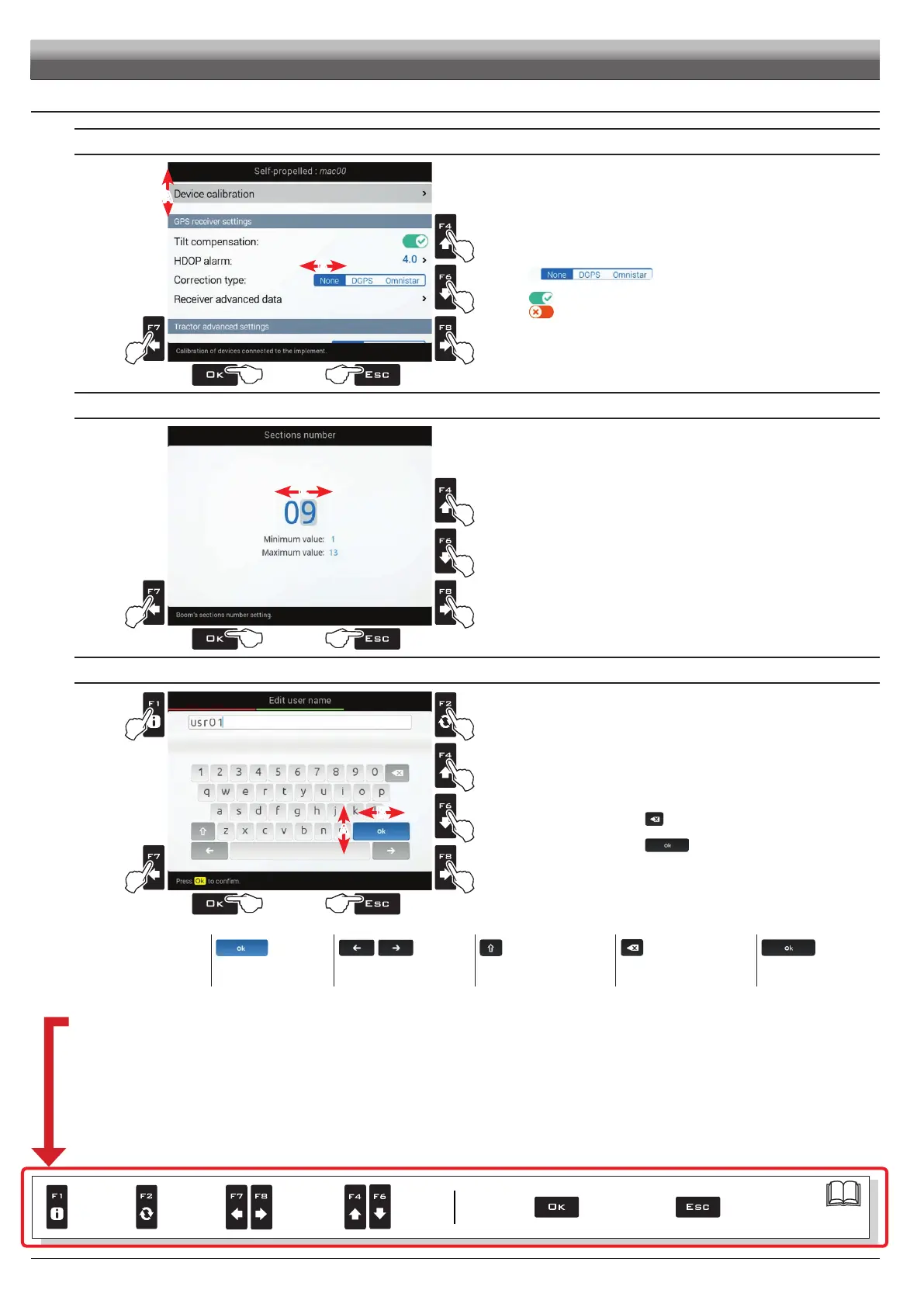
7.4 Use of keys for setup
SELECTION AND ACCESS TO MENU ITEMS
1B
1A
1A
1B
32
A
B
Fig. 35
1A Press in succession to move across the menu items (UP / DOWN).
The selected item is highlighted with a gray bar (A).
1B Press in succession to move across the available options
(LEFT / RIGHT).
Display options (B):
The selected item is highlighted with a blue
bar.
Active option
Inactive option
2 Press to access the selected item or to conrm modication.
3 Press to exit screen without conrming modication.
ENTERING A NUMERICAL VALUE
1
2
2
1
43
C
Fig. 36
1 Press to move the cursor (C) across the digits
2 Press to edit the highlighted digit
(increase, decrease)
3 Press to conrm.
4 Press to exit screen without conrming modication.
ENTERING TEXT
2
1B
3
1A
1A
1B
54
B
A
|
Fig. 37
1A Press in succession to select the character you wish to type
(UP / DOWN).
1B Press in succession to select the character you wish to type
(RIGHT / LEFT).
2 Press to:
- Conrm the selected character
- Delete the character before the cursor
(when the symbol "
" is selected)
- Save the entered text
(when the symbol " " is selected)
3 Press to delete the character before the cursor
4 Press to exit screen without conrming modication
Legend:
usr01
Typed Name
|
Cursor
Selected character
Shift cursor across name
characters
Caps lock
Deletes the character
before the cursor
Saves the entered text
Below is a summary of key functions during setup.
SETUP
Par.
7. 4
Conrm access
or data change
Exit the function or
data change
Delete
selected
character
Scroll
(LEFT /
RIGHT)
Data
increase /
decrease
Scroll
(UP /
DOWN)
Enter
selected
character



 To Next Page