75
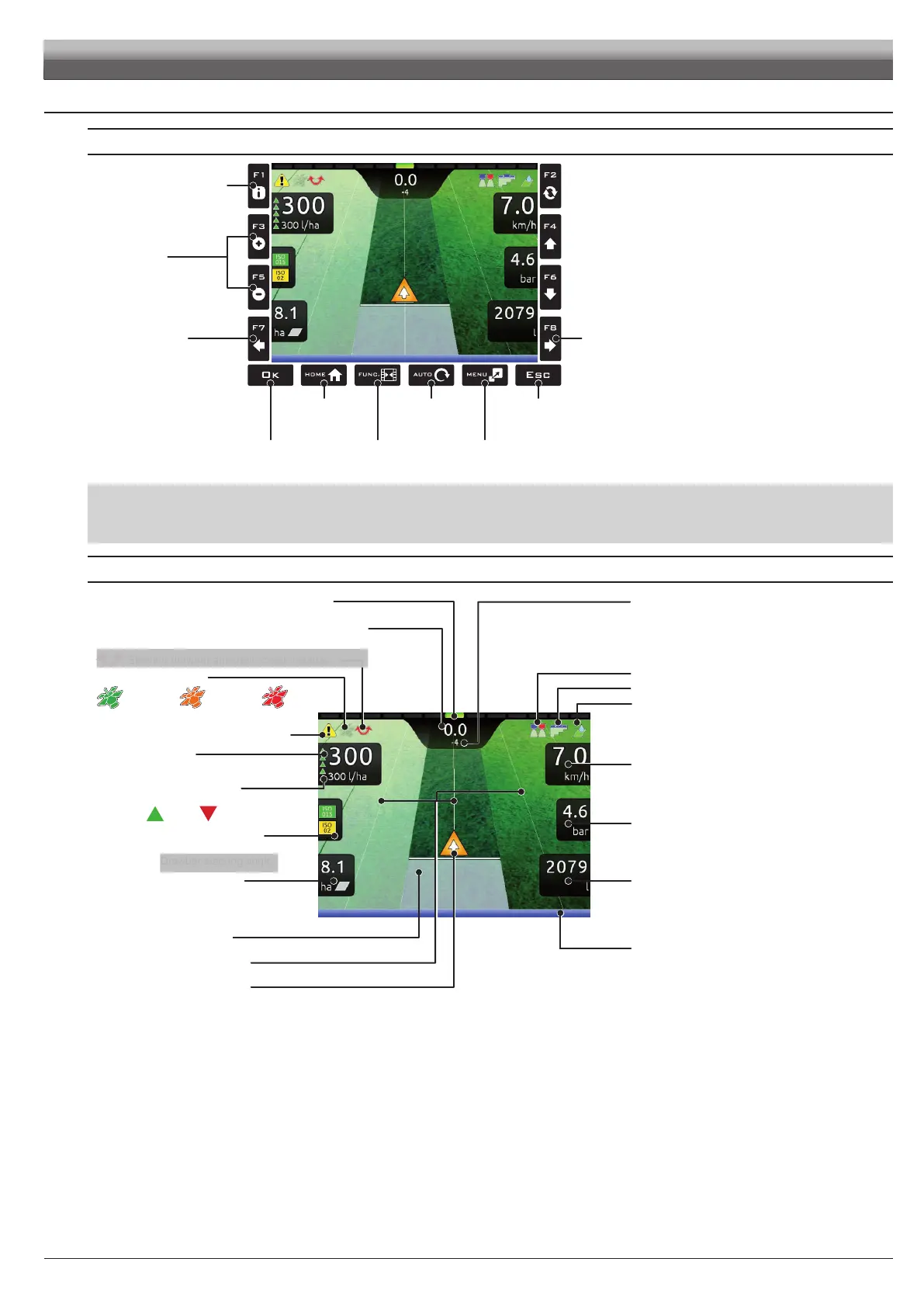
12.4 Guidance screen
USING THE KEYS
Conrmation
key
Go to “Home”
menu
Switch to job
menu
View automatic
function menu
Aborts a function
Aborts data change
Select job data
displayed on the
LEFT side
Select job data
displayed on the
RIGHT side
Display zoom
adjustment:
F3 (+) zoom in
F5 (-) zoom out
Displays job information /
alarms (par. 15.1)
Enables / disables
job functions display
Fig. 240
F1÷ F8: Contextual function keys
These keys control what is shown on the display (display zoom adjustment, etc., Fig. 240)
When the function list is displayed, they perform specic functions: the function of each key depends on what appears on the display, therefore the use of these keys
will be illustrated during the description of the corresponding procedures.
DISPLAY ITEMS
GPS signal strength:
Nozzle selection (par. 13.5)
Section management (par. 13.8)
Output setting (par. 13.2)
Deviation: distance between the position of the tractor
and the track to be followed
Instant output /
Target spray rate /
Instant owrate
Output percentage variation
Every symbol corresponds to a 10%
variation:
+ 10% - 10% (max. ± 50%)
Spray number: the reference line is 0, tracks to its
left are negative while tracks to its right are positive.
Machine position
Reference tracks
Covered area
Speed /
Tank level
Enabled alarm
(Press
F1 for more details, par. 15.1)
Nozzles being used /
Direction /
Drawbar steering angle
Pressure /
Range
Sprayed surface/
RPM
Sprayed quantity /
Calculated area
Automatic functions status:
Spraying boom (par. 13.7)
Led bar: graphic representation of the deviation
Each LED corresponds to the value set in par. 10.6.8
DGPS
signal
GPS
signal
Data
not valid
Steering drawbar automatic control status
Fig. 241
USE
DRAFT
DRAFT



 To Next Page