CHAPTER 2 CONTROLS AND DISPLAY
Page 2-20
091-00019-001 REV B
Page 2-21
091-00019-001 REV BEFD1000 C3 Pro PFD Pilot’s Guide
2.3. Display
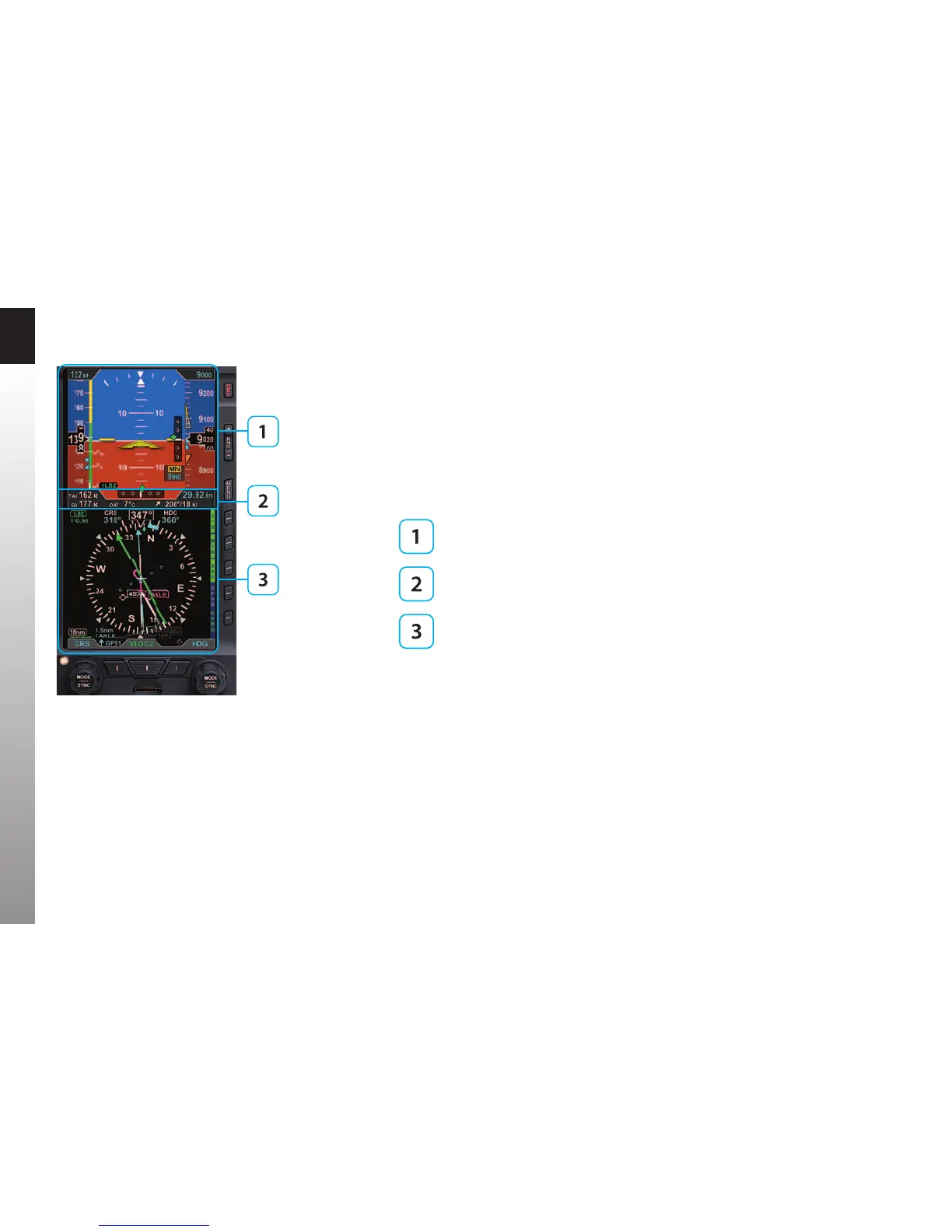
The PFD replaces the existing Attitude Indicator and HSI or DG in the center of the
primary ight instrument cluster. Like the instruments it replaces, the top half presents
an Attitude Display and the bottom half contains a Navigation Display (Figure2-26).
Between the two halves is the Data Bar. The Data Bar contains a dedicated display of
real-time winds, Outside Air Temperature (OAT), True Airspeed (TAS), and GPS Ground
Speed (GS).
Attitude Display
Data Bar
Navigation Display
Unlike the mechanical indicators it typically replaces, the PFD can also display all the
data provided by the remaining four instruments in the six pack (airspeed, altitude,
turn and slip, and vertical speed), and much more. Concentrating all primary ight
information onto a single instrument directly in front of the pilot improves instrument
scan and reduces pilot workload, thereby enhancing safety, especially in busy phases
of ight. Additionally, analog backup instruments can be retained in the pilot’s primary
eld of view, and should be included in the instrument scan to cross-check indications
of both the primary (EFIS) and backup (analog) instruments.
Figure 2-26
EFD1000 C3 Pro PFD Display Areas



 To Next Page