CHAPTER 3 FLYING THE EFD1000 C3 PRO PFD
Page 3-8
091-00019-001 REV B
Page 3-9
091-00019-001 REV B EFD1000 C3 Pro PFD Pilot’s Guide
Next, since we’ll be departing from Runway 8, we set our Heading Bug to runway
heading, 080°.
Set the Heading Bug
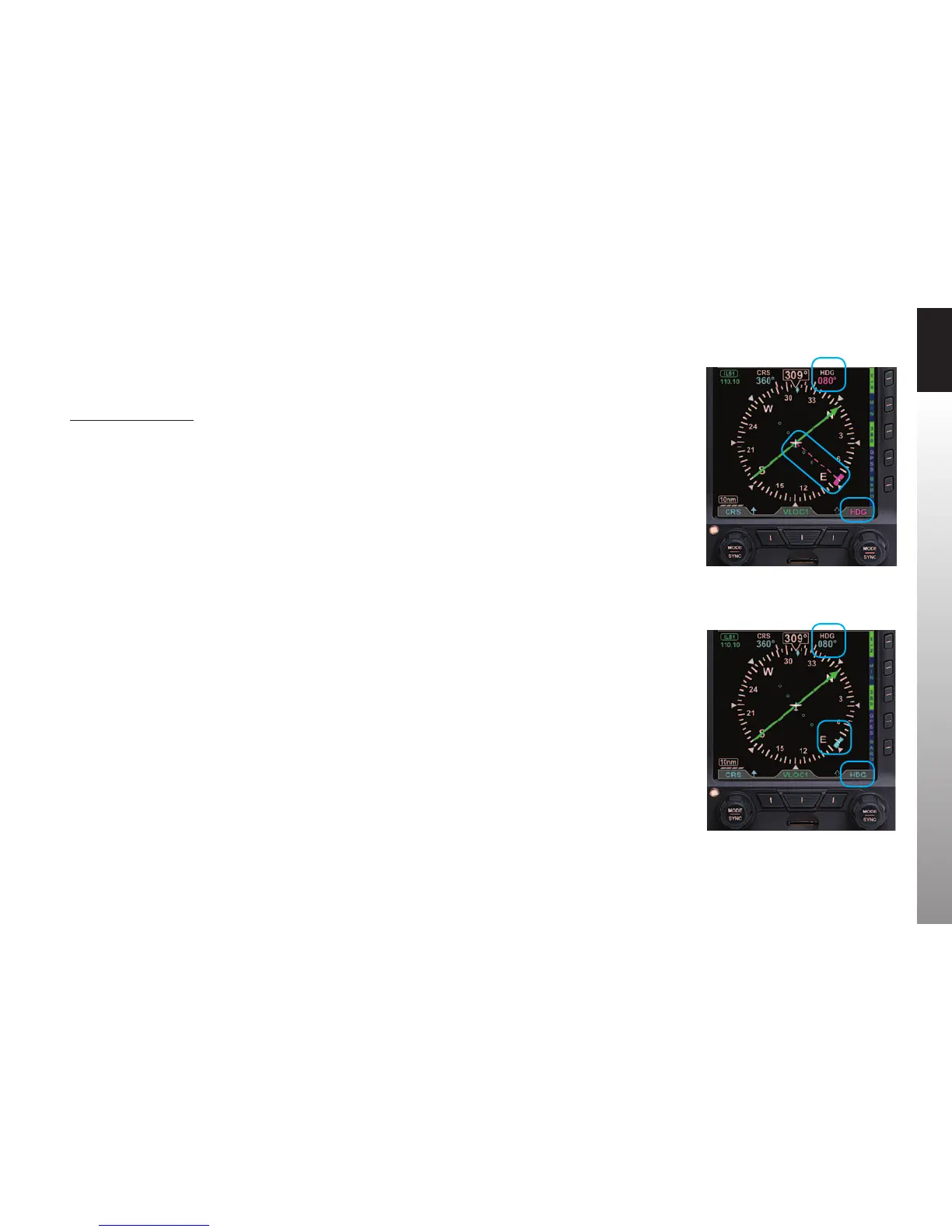
1. Press or simply rotate the Right Knob to edit the HDG eld. The HDG label
above the Right Knob and the HDG eld are both rendered in magenta for
editing (Figure 3-8). The Heading Bug is also be rendered in magenta, and a
dashed magenta line will extend from the ownship symbol to the Heading
Bug to make it easier to see the bug position.
2. Rotate clockwise to increase, or counterclockwise to decrease, the HDG value.
Once the correct heading is selected and after 10 seconds of inaction, the
eld is disabled, and the label and eld are rendered in cyan (Figure 3-9).
We call Clearance Delivery to pick up our IFR clearance. It is:
Baron N1234 is cleared to the Reno/Tahoe Airport via the LARGO2 departure,
Zuni (ZUN) transition, then as filed; Maintain 7,000; Expect 10,000 in five minutes;
Departure frequency is 127.4; Squawk 0123.
We copy and read back our clearance, and then set up our avionics for an instrument
departure. We set our transponder code and comm radio frequencies. Then we enter
our ight plan into GPS1, load the LARGO2 departure, crossll into GPS2, and activate
the ight plan. We make sure the CDI Button on the GNS-430W is set to GPS.
The LARGO2 departure calls for vectors to our route. From past experience, we expect
to be vectored past ABQ VOR, and then given a vector to join the departure on the
ABQ-to-ZUN leg (a 255º course). While we navigate with GPS, for situational awareness,
we tune those rst two VOR xes into our nav radios. We tune the ABQ VOR (113.2) into
VLOC1 and the ZUN VOR (113.4) into VLOC2.
Figure 3-8
Selected Heading Field Enabled
Figure 3-9
Selected Heading Field Disabled



 To Next Page