CHAPTER 3 FLYING THE EFD1000 C3 PRO PFD
Page 3-14
091-00019-001 REV B
Page 3-15
091-00019-001 REV BEFD1000 C3 Pro PFD Pilot’s Guide
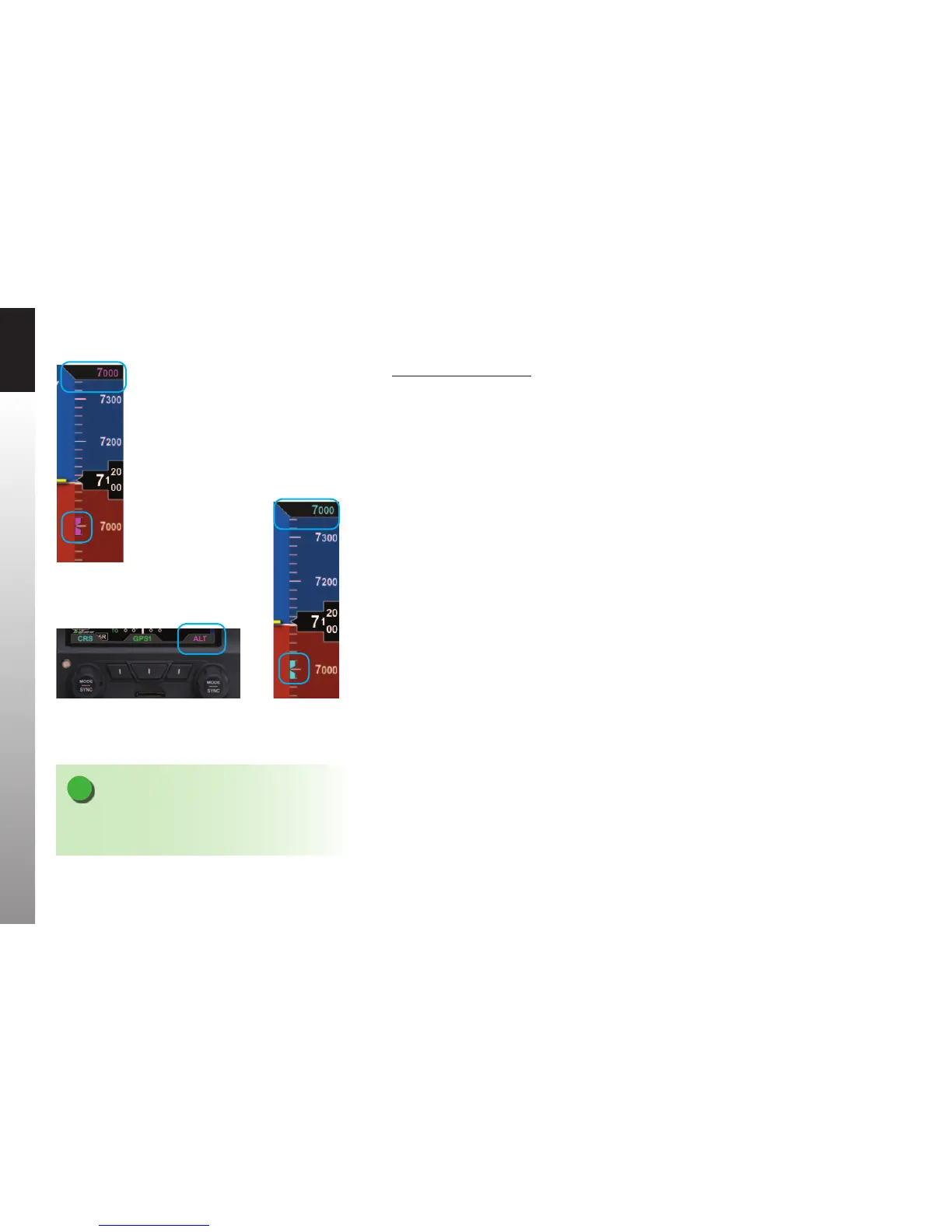
Set the Altitude Alerter
1. Press the Right Knob until ALT displays above the Right Knob and the
Selected Altitude numerical eld and Bug are enabled for editing, all three
rendered in magenta (Figures 3-18 and 3-19).
2. Rotate the Right Knob to change the value of the Selected Altitude eld.
Rotate clockwise to increase, or counterclockwise to decrease, the value.
3. Once the correct value is selected, and after 10 seconds of inaction, the eld
is disabled and the label, Selected Altitude eld, and Bug are rendered in cyan
(Figure 3-20).
Figure 3-18
Altitude Bug Enabled
Figure 3-20
Altitude Bug Disabled
Figure 3-19 Altitude Field Enabled
NOTE
Synchronizing the altitude sets the selected altitude to
the current altitude, see Section 2.2.1.3.



 To Next Page