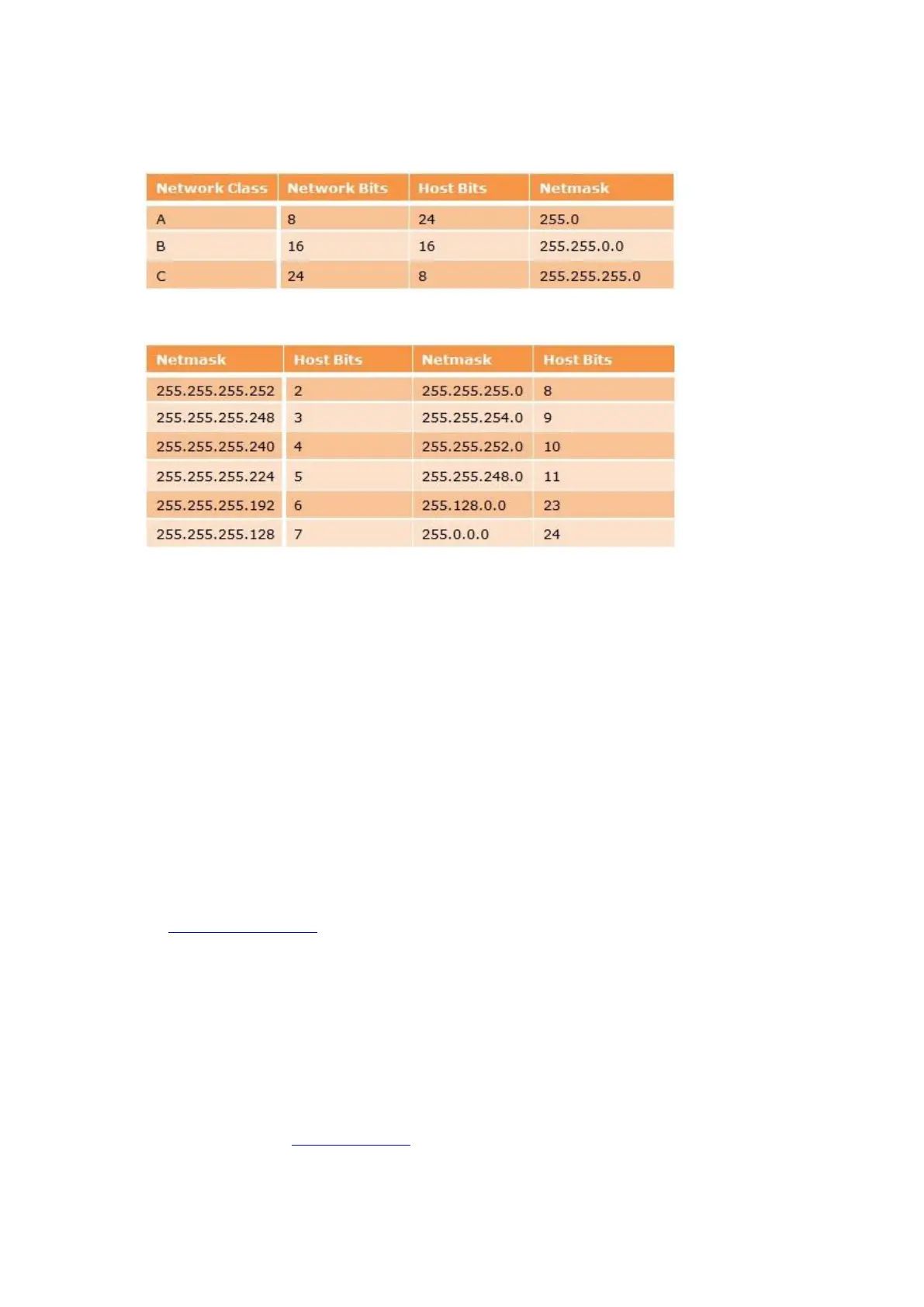
4. Select the appropriate subnet mask from the following table and type the corresponding number of Host Bits
followed by Enter.
Standard IP Network Netmasks…
Netmask Examples...
Netmask: Number of Bits for Host Part (0=default) (0) 8
5. Select if it is required to protect the Telnet Configuration capability with a password.
Type N for no password.
Change telnet config password (N) N
Type Y to enable / change a password and then enter a password. The password cannot have more than 4
characters as standard unless the Enable Enhanced Password option is enabled.
Change telnet config password (N) Y
Enter new Password: 1234
6. Type 1 (Channel 1 configuration) followed by Enter.
7. Again, type each value one at a time followed by Enter setting to the following values. If you do not want to
change a value, just press Enter to skip.
8. For the Baudrate, type 9600 for an 8bit Control PCB fitted with a 3MHz crystal, type 19200 for an 8bit
Control PCB fitted with a 7MHz crystal, or type 38400 for a 16bit system followed by Enter. Please refer to
the 8bit Control PCB Layout to locate the crystal type.
Baudrate (9600) ? 19200
9. For the next two settings please keep the default settings as shown below. If you do not want to change a
value, just press Enter to skip.
I/F Mode (4C) ?
Flow (00) ?
10. Make a note of the Port No, as you need this to configure Traka32. It is usually 10001 but you can alter this
if required.
11. If you will be using the XPort Remote Host feature on more than one Traka System, a different Port No. must
be set for each system for example, System 1: 10001, System 2: 10002, System 3: 10003 and so on.
Port No (10001) ?



 To Next Page