CONFIGURA TION 197
Recipe file in PC
Hyperterminal.
Contains source
Page.
Recipe file in PC
Hyperterminal.
Contains source
Page + lock mode
Recipe file in PC
Hyperterminal.
Contains source
Page.
Recipe Page
N ORM AL RESET
Non-volatile memory
(Normally called)
Recipe Page
2-KEY RESET
Non-volatile memory
Recipe Page
3-KEY RESET
Non-volatile memory
With LO CK facility
Recipe Page
4-KEY ROM RESET
Factory defaults
( + USER C ALIBRATION)
SA VE SA VE SA VE
V OLATILE MEMORY. This holds the working set of drive parameters and internal connections
PC running PL PILOT
Contains recipes.
RS232 PORT1
ASCII C OMMS to PL PILOT
RS232 PORT1 / PARA METER EXCH ANGE to/from host computer
DRIVE BLOCK DIAGRA M AND PO WER CO NTROL
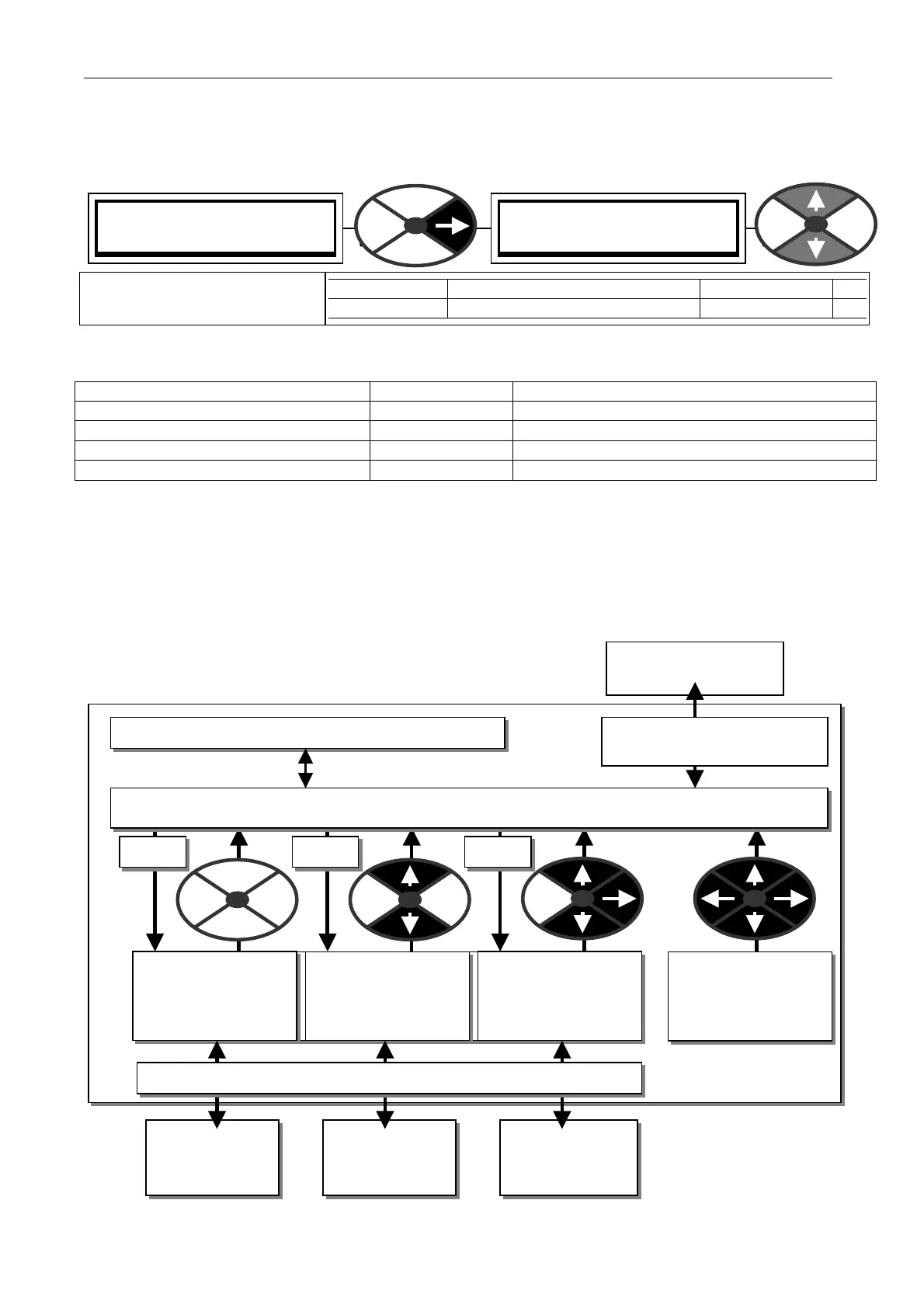
13.13.2 DRIVE PERSON ALITY / Recipe page PIN 677
If left unchanged, the window will show which instrument recipe page has been called.
To make a recipe permanently operative it must be S A VED in the NORMAL page.To re-call any page requires
the appropriate power up reset choice. (Pressing keys during the appli cation of the c ontrol supply).
Selected page / (Type of POWER UP) SOURCE page DESTINATION FOR SAVE OPERATIONS
NORM AL RESET / (No keys) N ORM AL page PARAMETER S A VE overwrites NORM AL page
2-KEY RESET / (Up/Down) Page 2 PARA METER SA VE overwrites page 2
3-KEY RESET / (Up/Down/Right) Page 3 PARA METER SA VE overwrites page 3
4-KEY ROM RESET / (All 4 keys) Factory Defaults PARAMETER S A VE overwrites NORM AL page
Note. Any parameters that are memorised during a power off sequence will be saved on the selected page.
After a 2, 3, or 4 key power up reset, the display confirms the type of reset, and asks for LEFT KEY TO
REST ART. The left key must be pressed within 15 seconds otherwise the unit reverts to the NORM AL page.
Note. If when S A VING, the message A UTHORIS A TION NEEDED appears, then this means that the page is
LOCKED and is read only. Please refer to your supplier or system integrator, he may have installed a special
recipe in this particular page that prevents itself from being over-written. Each page may have its own
password, but be aware you might overwrite the pass word w hen saving parameters from a different recipe
page. For this reason it is recommended that the same passw ord is used in each page.
13.13.2.1 Recipe page block diagram
See also 5.3 Archiving PL/X recipes.
DRIVE PERSON ALITY 3
677)RECIPE PA GE
677)RECIPE PA GE
*****NORM AL RESET* ***
PARA METER RA NGE DEF AULT PIN
RECIPE PA GE
NORMAL, 2, 3 or 4-KEY RESET NORMAL RESET
67
Sets the recipe page for the
PARA METER SA VE function.



 To Next Page