96 BD FACSCalibur Instructions for Use
6 If needed, adjust the FL3 voltage to place the negative population in the
lower-left quadrant of the FL3 vs FL2 plot.
7 Click Pause in Acquisition Controls, and remove the tube from the SIP.
8 Close the Detectors/Amps and Threshold windows.
Adjusting Compensation Settings
It is important to choose appropriate reagents for compensation, based on the
panel to be run. For each fluorophore, compensation should be set using the
brightest stained population. For example, in a panel containing CD3 FITC, CD4
FITC, and CD8 FITC, set compensation using CD8 FITC, the brightest FITC-
stained population in the panel.
Compensation settings are adjusted to correct for spectral overlap. Settings are
dependent on the detector voltages established with the isotype control. Once
voltages are set, compensation is adjusted on fluorescence-positive cells.
1 Choose Cytometer > Compensation, and drag the Compensation window
to the side.
2 Place the FITC control tube on the SIP, and click Restart in Acquisition
Controls.
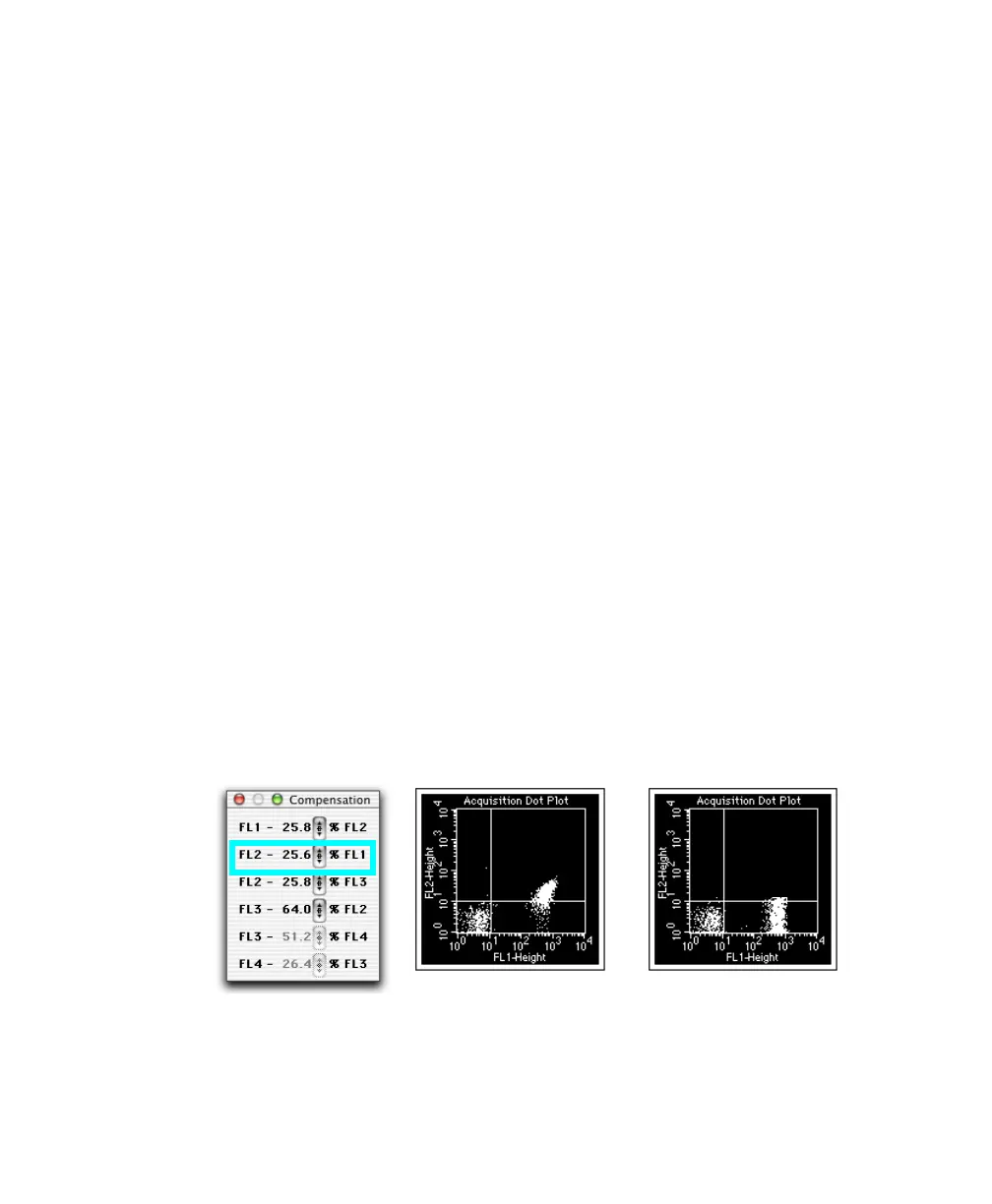
3 If necessary, adjust FL2–%FL1 to place FITC-positive events in the lower-
right quadrant of the FL1 vs FL2 plot.
; Tip Compare the mean channel of the FL1-positive population with that
of the negatives.
unadjusted adjusted



 To Next Page