114
Calibration
Pressure Transmitters and Sensors
This procedure suits all instruments with a pressure input and any
kind of electrical output signal. Both the input and output signal
range should be measurable with MC5P. To be able to perform an
automatic calibration, MC5P needs to have the firmware option re-
quired to communicate with the pressure controller.
Required modules
• An internal or external pressure module.
• The E module for measuring the electrical output signal.
Preparations
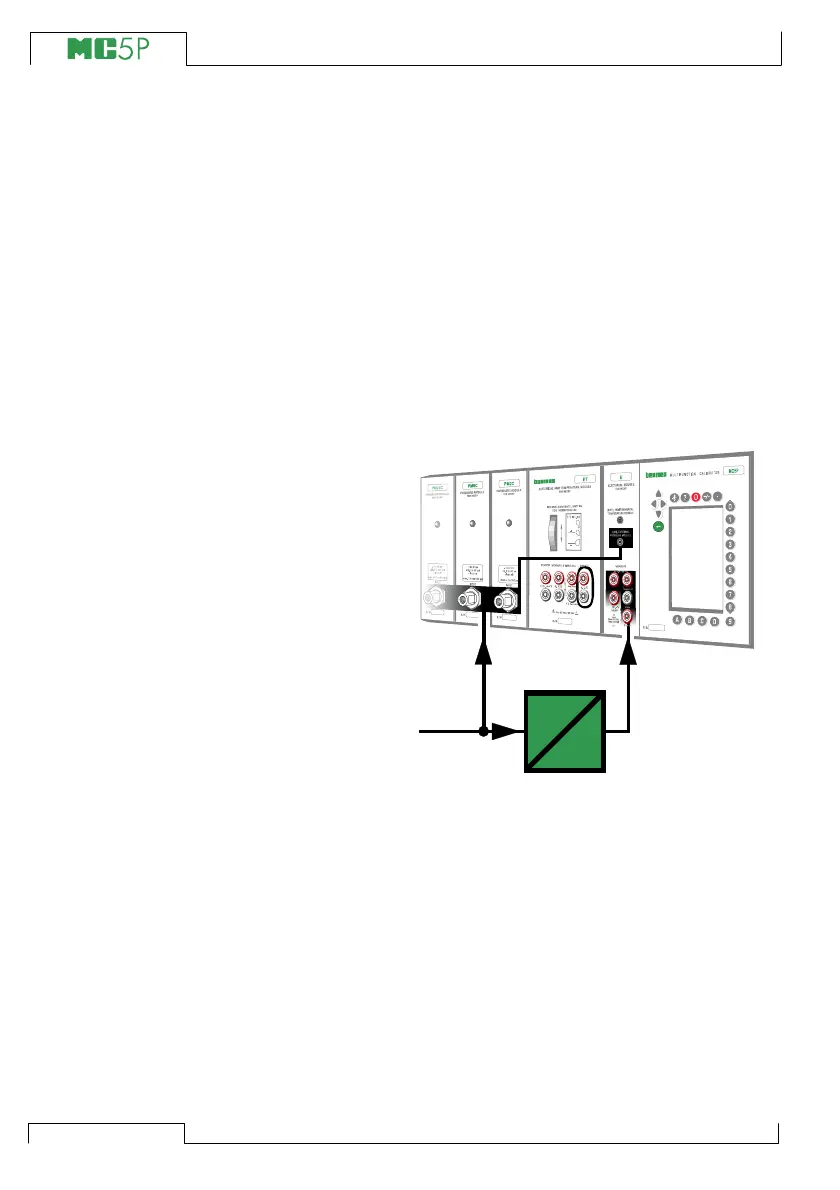
1. Connect the input signal of the instru-
ment to the pre-selected pressure mod-
ule (INT, EXT, XPM). If you are calibrat-
ing a pressure sensor, and have con-
figured MC5P to provide the supply volt-
age or current, connect the ET
module’s output terminals (marked with
a circle in the picture) to the sensor’s
supply terminals. For more information
on sensor supply configuration, see
chapter Instrument Input Page on
page 126.
2. Connect the pressure source both to the
instrument’s input and to the pre-se-
lected pressure module (INT, EXT,
XPM). If a pressure output controller is
used, connect it to MC5P’s AUX inter-
face.
3. Connect the instrument’s output signal
to the chosen electrical input port in
MC5P.
4. Test the connections in Basic Mode if
needed. To quickly configure the Basic
Mode’s windows, go to Calibration
Mode, select the instrument to be cali-
brated and the Function Key C/Cali-
brate but immediately return to Basic
Mode.
XXXXXXX
XXXXXXX
P
E
Pressure
Source
+24V
V, ,
Open
CloseClose
T/C
WIRES
ONLY



 To Next Page