118
The BR-80 provides a Chromatic Tuner
function that makes it easy to tune an
instrument. The built-in tuner supports
guitar or bass guitar.
Here’s how to tune your guitar.
The inputs that can be tuned will depend
on the mode.
Input
LIVE REC
mode
MTR
mode
eBand
mode
GUITAR/
MIC IN
Built-in
microphones
LINE IN
USB
* Playback or recording is not possible
while using the tuner.
Switching to the tuner
1. Hold down the [RHYTHM] button and
press the [COSM] button.
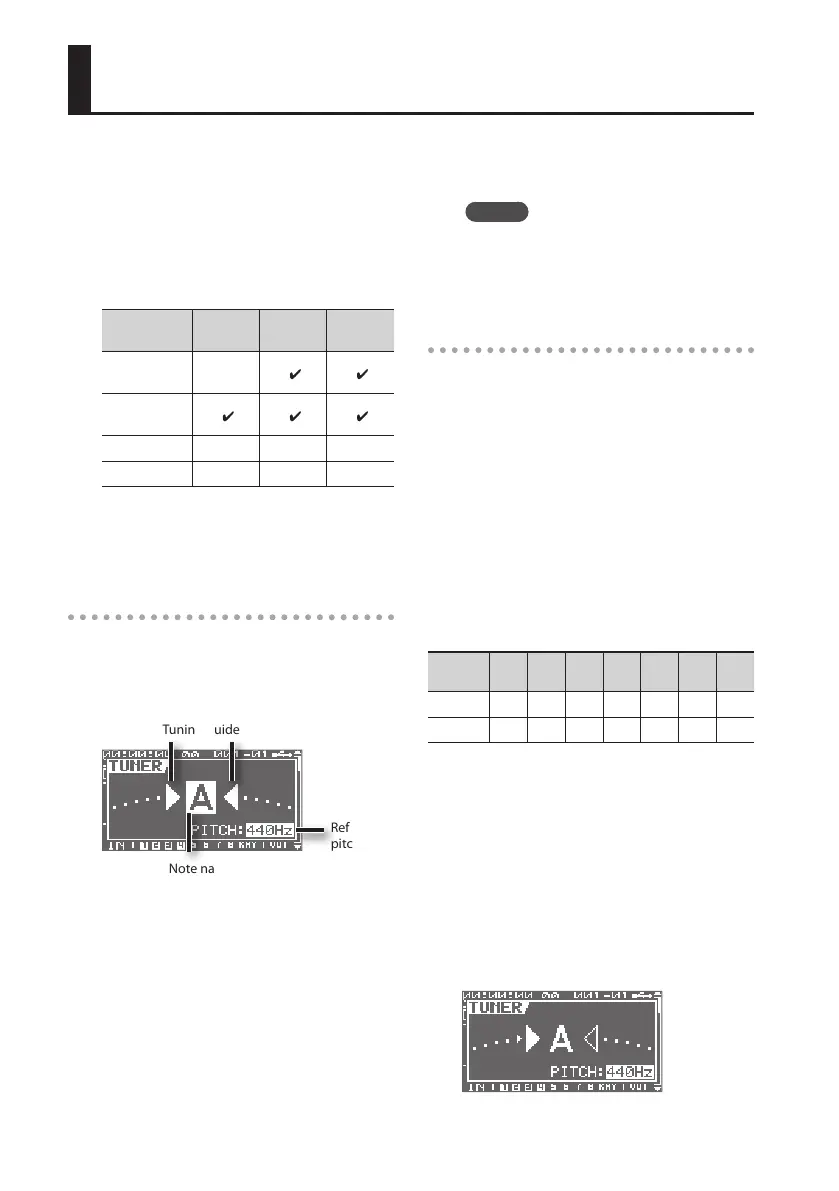
The TUNER screen will appear.
Tuning guide
Reference
pitch
Note name
The tuning guide indicates the dierence
between the input pitch and the displayed
note name. If the dierence between the
input and the correct pitch is within ±50
cents, the tuning guide shows the amount
of dierence.
2. To turn o the tuner, press the [EXIT]
button.
MEMO
If you don’t want sound to be output
during tuning, lower the [VOLUME]
knob.
Tuning
1. Play a single note on the open string
that you’re tuning.
The display will show the note name that is
closest to the pitch of the string you played.
* You must cleanly play a single note on
only the string you’re tuning.
2. Tune your instrument so that the
correct note name of the string you’re
tuning appears in the display.
Standard tuning
7th
string
6th
string
5th
string
4th
string
3rd
string
2nd
string
1st
string
Guitar B E A D G B E
Bass - - B E A D G
3. While watching the tuning guide,
tune your instrument so that the
screen shows the desired note name
and both of the triangular symbols.
If the dierence is within ±50 cents of the
correct pitch, the tuning guide will show
the dierence between your instrument
and the displayed pitch.
If your instrument is at
Tuning Your Instrument



 To Next Page