97
eBand mode provides two eects
processors (insert eect and reverb).
Selecting an Eect
Here’s how to choose the eect that’s
applied to the input from the GUITAR/MIC
IN jack.
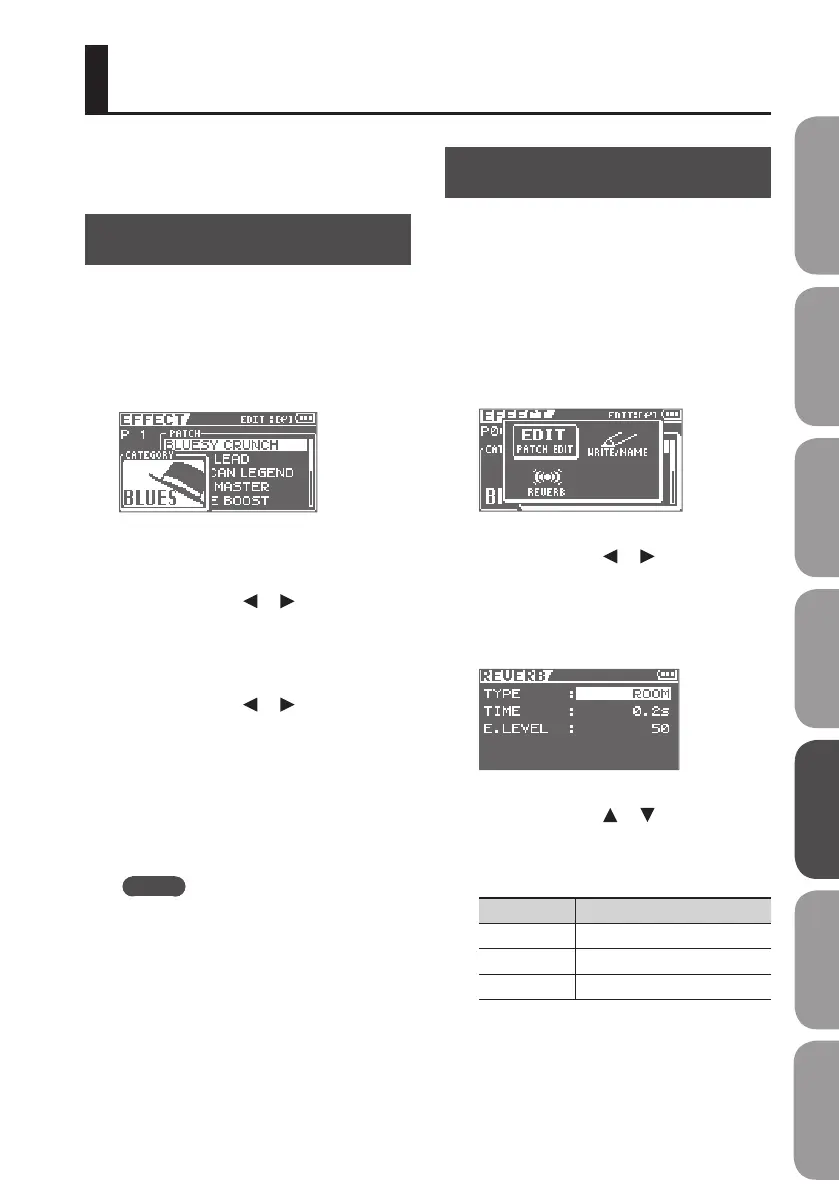
1. Press the [COSM] button.
The eect patch select screen will appear.
The eect will turn on/o each time you
press the [COSM] button.
2. Use the cursor [ ] [ ] buttons to
move the cursor to “CATEGORY,” and
use the dial to select the desired
category.
3. Use the cursor [ ] [ ] buttons to
move the cursor to “PATCH,” and use
the dial to select the desired patch.
* Song patches cannot be used in eBand
mode.
4. Press the [EXIT] button a number of
times to return to the basic screen.
MEMO
For details on the eects, refer to
“Editing the Insert Eect Settings (EDIT)”
(p. 110).
Apply Reverb
Here’s how to make settings for the
reverberation (reverb) that’s applied to the
input from the GUITAR/MIC IN jack.
1. Press the [COSM] button.
The eect patch select screen will appear.
2. Press the [ENTER] button.
The Menu screen will appear.
3. Use the cursor [ ] [ ] buttons to
move the cursor to “REVERB,” and
press the [ENTER] button.
The screen for detailed reverb settings will
appear.
4. Use the cursor [ ] [ ] buttons to
select a parameter, and use the dial
to edit the setting.
Parameter Value
TYPE ROOM, HALL, PLATE
TIME 0.1 s–10.0 s
E.LEVEL 0–100
5. Press the [EXIT] button a number of
times to return to the basic screen.
Using Eects
Quick Start Preparations LIVE REC Mode MTR Mode eBand Mode
Convenient Functions
Appendix



 To Next Page