74
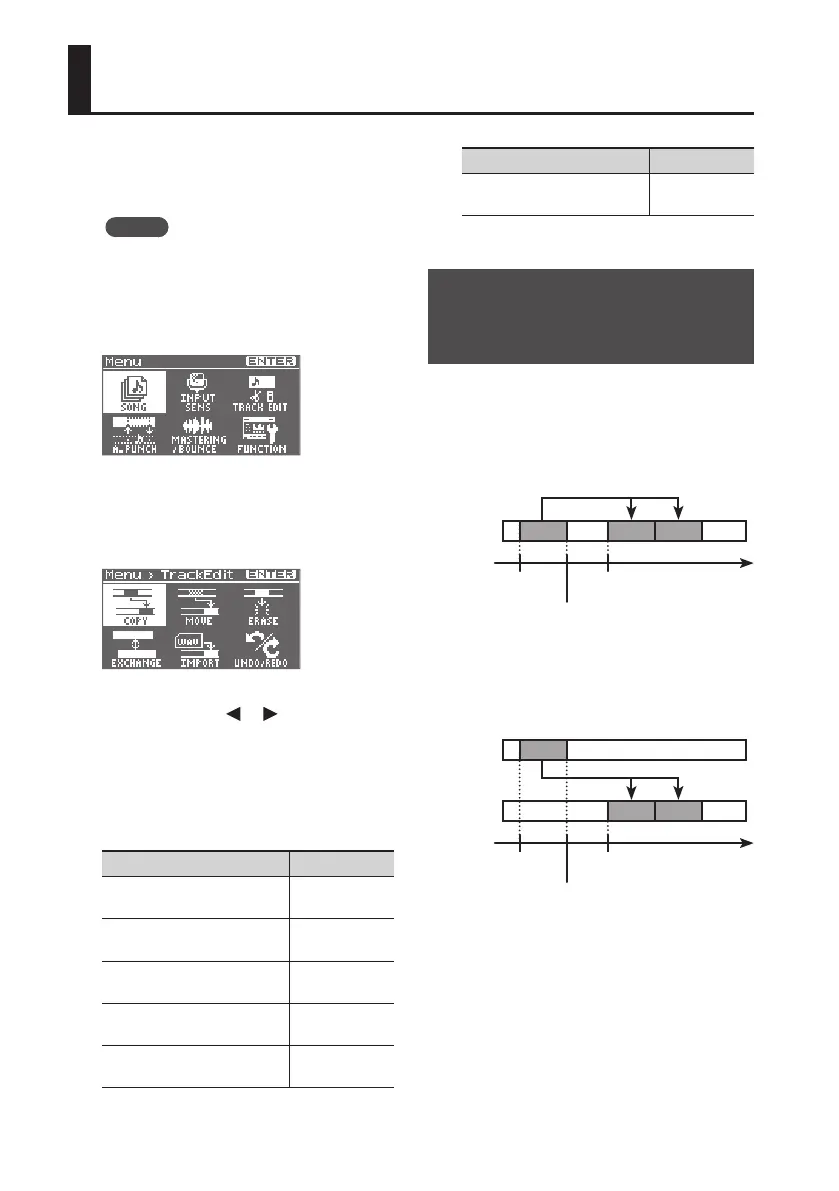
Track Editing (TRACK EDIT)
Here’s how to copy or erase tracks, or
import data from eBand mode or LIVE REC
mode.
MEMO
The results of your track editing
operations are saved to the song when
you return to the level meter screen.
1. Press the [MENU] button.
2. Use the cursor buttons to move the
cursor to “TRACK EDIT,” and press the
[ENTER] button.
3. Use the cursor [ ] [ ] buttons to
select the editing operation that you
want to perform, and then press the
[ENTER] button.
You can perform the following track edit
operations.
Items Page
Copying Track Data
(COPY)
p. 74
Moving Track Data
(MOVE)
p. 76
Erasing Track Data
(ERASE)
p. 76
Exchanging data
(EXCHANGE)
p. 77
Importing Audio Data
(IMPORT)
p. 78
Items Page
Cancelling an Operation
(UNDO/REDO)
p. 78
Copying Track Data
(TRACK COPY)
The specied source track data will be
copied to the specied destination track.
Example 1:
Copying twice to the same track
Start or Repeat
start point
End or Repeat
end point
Time
(A)
(B)
TO
Track 1
Example 2:
Copying twice to a dierent track
Start or Repeat
start point
End or Repeat
end point
Time
(A)
(B)
TO
Track 1
Track 2



 To Next Page