34
1
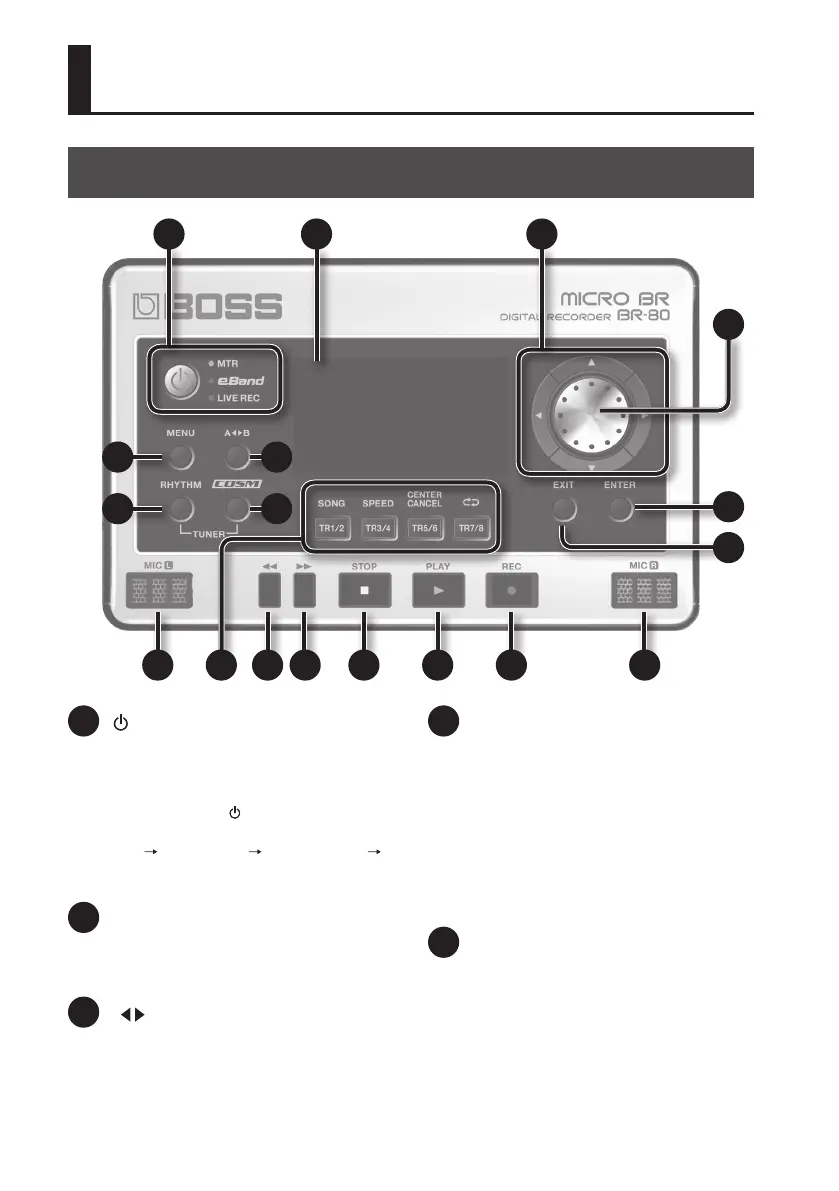
[ ] (Power) button
This turns the power on/o. To turn the
power o, press and hold this button for a
few seconds.
Also, pressing the [
] button cycles you
through the available modes like this: MTR
mode eBand mode LIVE REC mode
MTR mode...
2
[MENU] button
This button accesses various functions, such
as settings for the entire BR-80.
3
[A B] button
Use this button to specify a section to be
played back repeatedly.
4
[RHYTHM] button
In MTR mode, calls up the screen where
you can change (edit) the settings for the
rhythm.
In eBand mode and LIVE REC mode, it turns
on the metronome.
To use the built-in tuner, hold down the
[RHYTHM] button and press the [COSM]
button (p. 118).
5
[COSM] button
This button accesses a screen in which you
can turn the insert eect on/o and edit its
settings.
To use the built-in tuner, hold down the
[RHYTHM] button and press the [COSM]
button (p. 118).
Panel Descriptions
Top Panel
1 6 7
8
9
10
1716151413121117
5
32
4



 To Next Page