Recording/Playback
59
Selecting the Track(s) for Recording (REC TRACK)
Select the track(s) on which you’ll record.
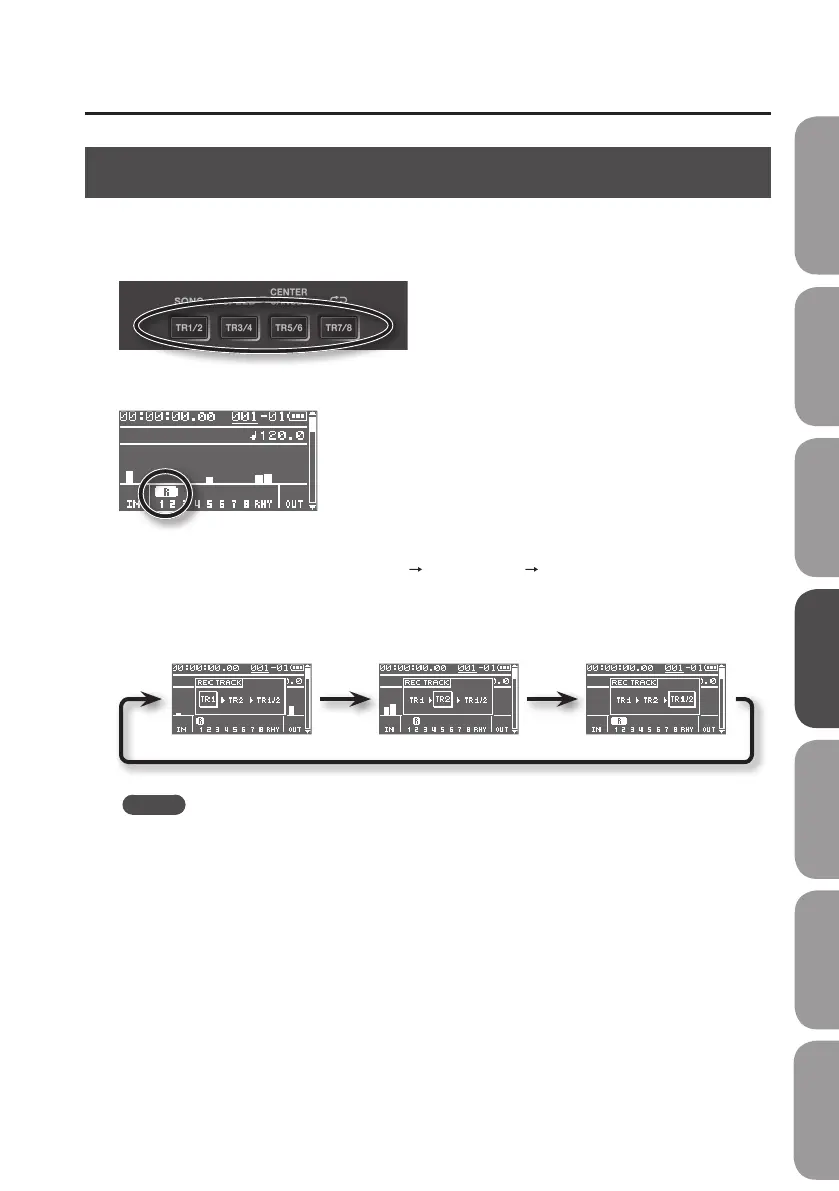
1. Press a track button to select the track(s) to use for recording.
The recording track level is shown in the level meter screen in the location circled below.
If you press the [TR1/2] button, repeated pressing of the button allows you to cycle through the
available choices, which are: track 1 (mono)
track 2 (mono) track 1/2 (stereo).
If the built-in microphones have been selected for input, or if the selected tracks are linked for
stereo, tracks 1/2 (stereo) will be selected initially.
Track 1 (mono) Track 2 (mono) Track 1/2 (stereo)
MEMO
• If you want to record in mono, select “TR1” or “TR2.”
• If you want to record in stereo, select “TR1/2.”
If a signal is input in mono, the same signal will be recorded on the left and right tracks.
The left channel of signals input in stereo will be recorded on “TR1,” while the right channel will
be recorded on “TR2.”
• If you record in stereo, you'll be able to modify the parameters for the mixer's left and right
channels simultaneously; see”Creating a Stereo Track” (p. 63).
Quick Start Preparations LIVE REC Mode MTR Mode eBand Mode
Convenient Functions
Appendix



 To Next Page