Troubleshooting
124
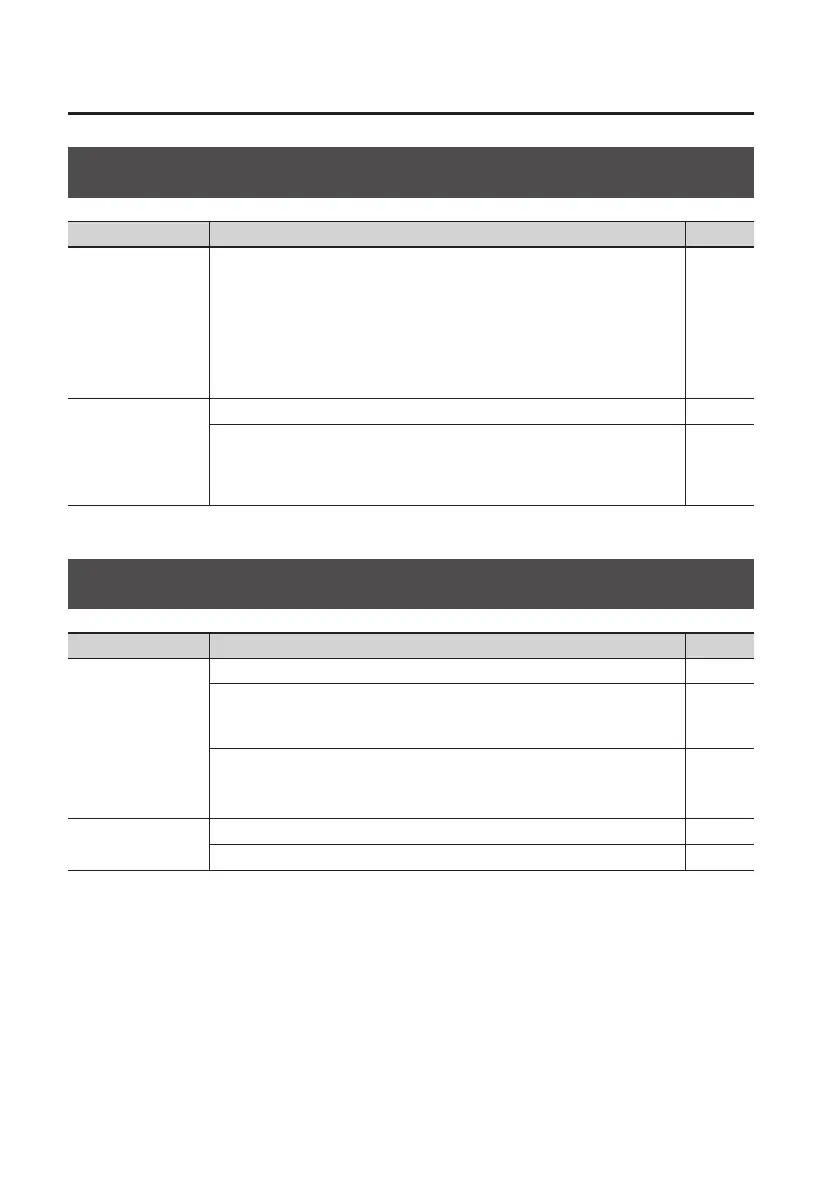
Problems with the SD Card
Item Explanation Page
Data on the SD card
was damaged
Data on the SD card can be damaged due to the following reasons. Please
format the SD card.
• Could the power have been turned o during recording or playback?
• Could the SD card have been subjected to strong physical shock?
• Could you have turned o the power while the SD card was being accessed?
• Could you be using an SD card that was formatted by a computer or digital
camera?
p. 115
Can’t format the SD
card
Could the SD card be write protected? p. 39
Could an SD card not supported by the BR-80 be inserted?
Before using any SD card other than the one that was supplied with the unit,
please refer to the Roland website (http://www.roland.com).
There you’ll nd the latest information regarding compatibility.
–
Problems with USB
Item Explanation Page
IDLING screen does
not appear
Is the USB cable connected correctly? p. 40
Does your computer’s operating system support the BR-80?
For information concerning the operating environment needed for using USB,
please refer to the Roland website (http://www.roland.com).
–
Does your computer support USB 2.0?
The BR-80 will not work with USB 1.1 or earlier.
Use a computer that supports USB 2.0.
–
Can’t hear sound
being input via USB
Could the USB mode be set to Storage? p. 104
Is the USB driver installed correctly? p. 104



 To Next Page