Track Editing (TRACK EDIT)
76
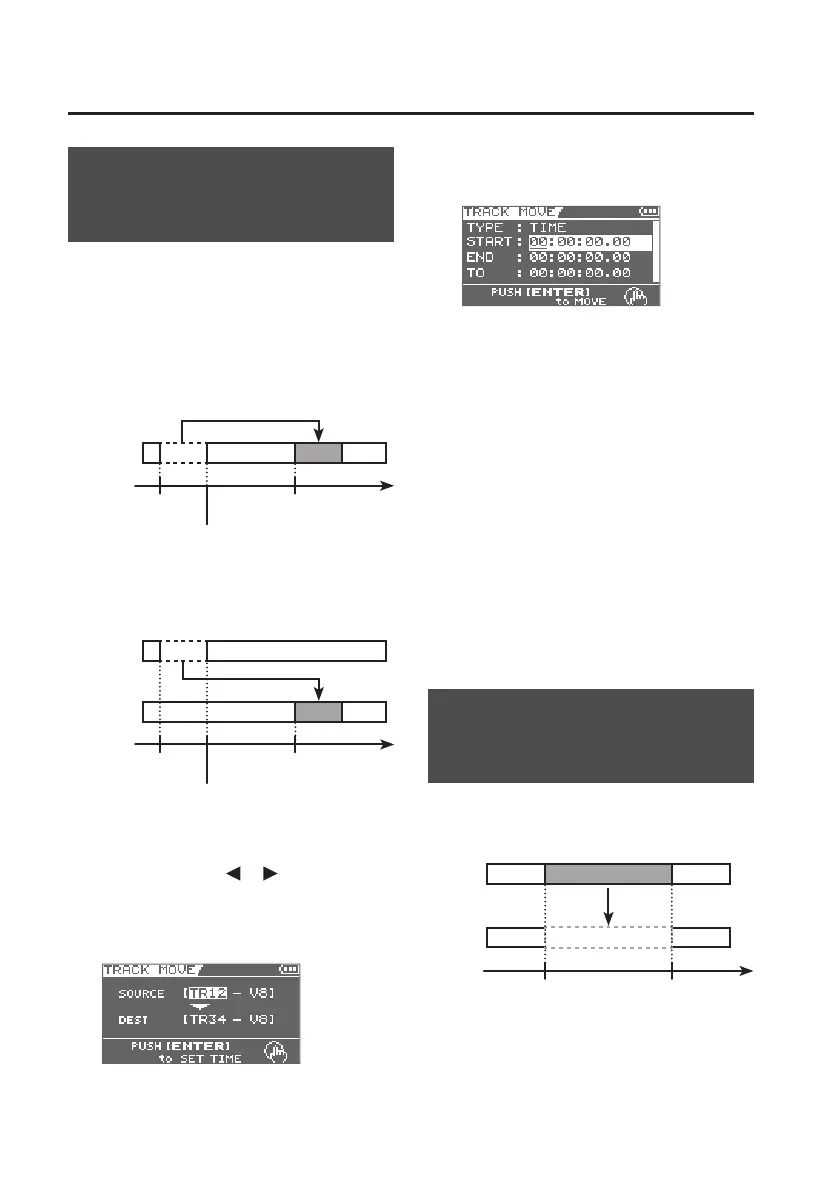
Moving Track Data
(TRACK MOVE)
This operation moves the data of the
specied track.
If recorded data exists at the destination of
the move, it will be overwritten by the data
that was moved.
Example 1: Moving within the same track
Start time
End time
Time
(A)
(B)
TO
Tack 1
Example 2: Moving to a dierent track
Start time
End time
Time
(A)
(B)
TO
Track 1
Track 2
1. Use the cursor [ ] [ ] buttons and
the dial to select the move-source
track/V-track (SOURCE) and move-
destination track/ V-track (DEST).
2. Press the [ENTER] button.
The time setting screen will appear.
3. Use the cursor buttons and the dial to
specify the time location.
4. To carry out the move, press the
[ENTER] button.
A message will ask “Are you sure?”
If you decide to cancel the procedure, press
the [EXIT] button.
5. Press the [ENTER] button.
The move will be carried out.
* The display will indicate “Keep power
on!” while the data is being updated.
Do not turn o the power while this
message is shown.
Erasing Track Data
(TRACK ERASE)
This operation erases data from the
specied region.
Time
Start time
End time
(A)
(B)
Track 1
Track 1



 To Next Page