122
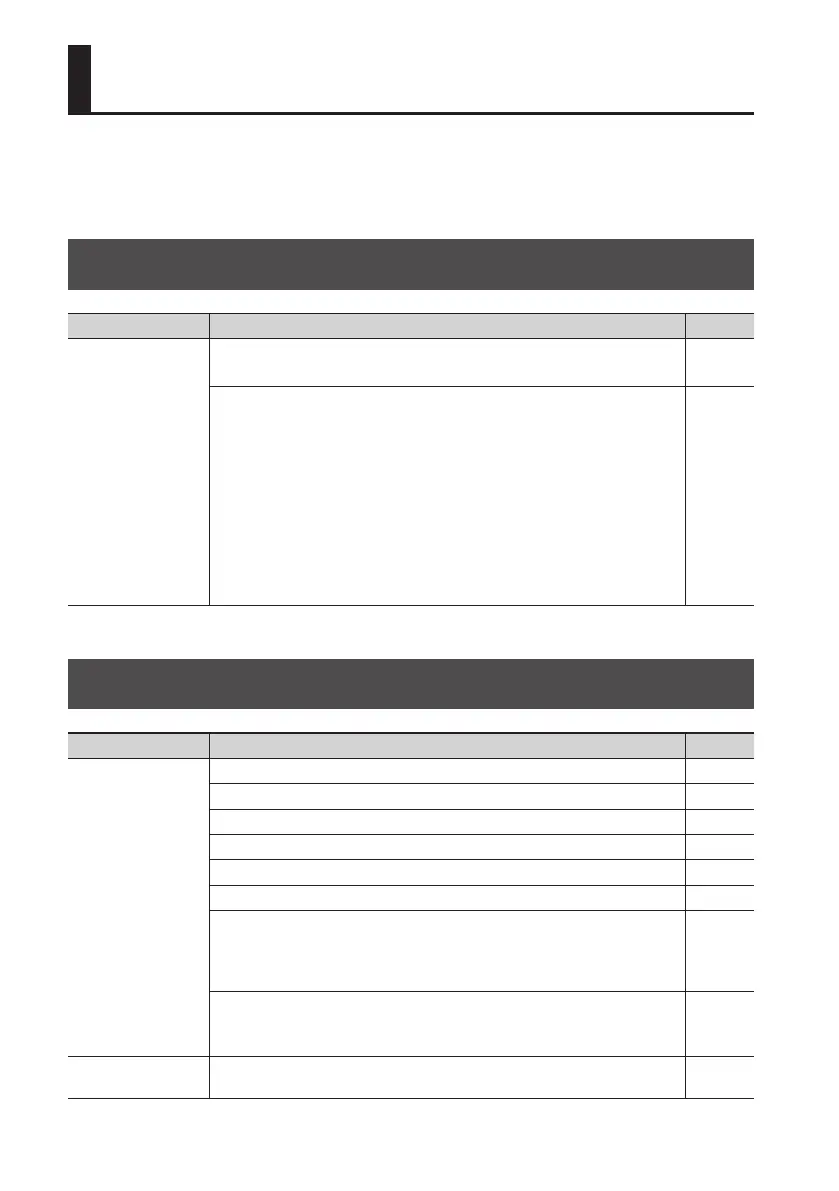
This section contains tips to help you solve problems.
If this information does not help you solve the problem, please contact a customer service
location listed at the end of this manual.
Problems with the Power Supply
Item Explanation Page
Power won’t turn on
• Is the specied AC adaptor (PSA series; sold separately) properly connected?
• Never use any AC adaptor other than one specied for use with the BR-80.
–
Is sucient power being supplied to your computer or USB hub?
The connection cannot be established if insucient power is being supplied to
the BR-80. Make sure that none of the following cases apply.
• If you’re using a notebook computer that’s running on its battery, operation
may be unstable in the case of some computers. In this case, connect an AC
adaptor to your computer.
• The power management settings of your computer may be limiting the power
that is supplied to USB. Check the settings on your computer.
• In some cases, the BR-80 cannot be used with bus-powered hubs (USB hubs
that do not contain a power supply). Please use a self-powered hub (a hub
that contains a power supply).
–
Problems with the Sound
Item Explanation Page
No sound
Is power to the BR-80 and any connected equipment turned on? p. 41
Are the audio cables connected correctly? p. 40
Could an audio cable be broken? –
Could the volume be turned down on the connected amp or mixer? –
Could the [VOLUME] dial be lowered? –
Is an SD card inserted? p. 39
Could an SD card not supported by the BR-80 be inserted?
Before using any SD card other than the one that was supplied with the unit,
please refer to the Roland website (http://www.roland.com).
There you’ll nd the latest information regarding compatibility.
Could you be attempting to play back a phrase shorter than one second in MTR
mode?
Phrases shorter than one second cannot be played back in MTR mode.
–
Can’t play back a
WAV/MP3 le
Could you be attempting to play back a le in a format that the BR-80 does not
support?
p. 128
Troubleshooting



 To Next Page