125
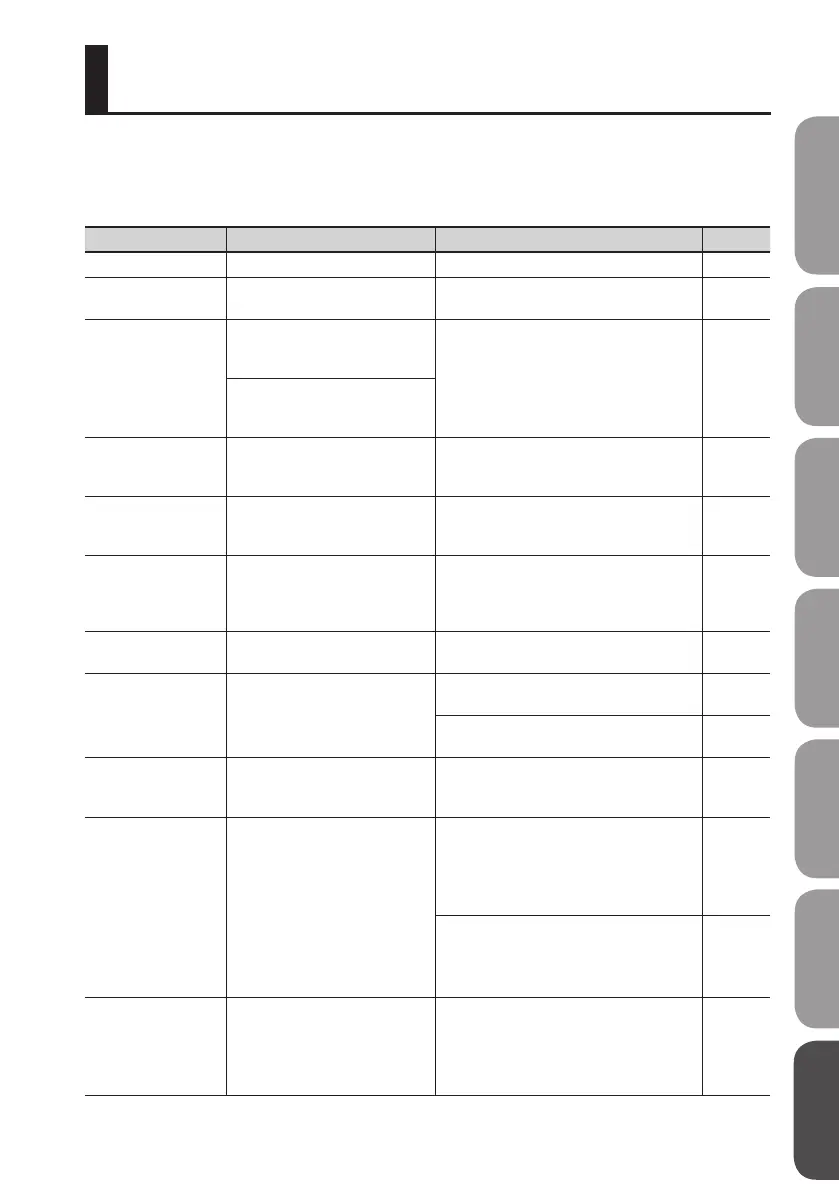
An error message will appear in the display if you attempt to perform an invalid operation or if an
operation could not be executed correctly.
Take the appropriate action for the message that appears.
Message Cause Action Page
Already exists! There is a le of the same name. Create the le using a dierent name. –
Battery low!
The operating batteries have
run low.
Replace the batteries as soon as possible. p. 38
Cannot change le
name!
The le name contains some
characters which are incompat-
ible with BR-80.
Please change the le name using your
computer.
p. 106
The selected le has a name
containing more than eight
characters.
Cannot edit song
name!
The song name edited by Song
List Editor can be viewed but not
edited on the BR-80.
It is not possible to edit the song name. Use
Song List Editor to edit the name.
–
Cannot delete!
You tried to erase a pattern from
a rhythm that contains only one
pattern.
Make sure that there are at least two
patterns in the rhythm, then try the erasure.
p. 70
Cannot Edit!
You attempted to change, from
the Level Meter screen, the tempo
of a rhythm that has a tempo
change partway through it.
Make your tempo changes using the
rhythm edit function.
p. 69
Cannot insert!
The rhythm exceeded 999
measures.
A rhythm cannot have more than 999
measures.
p. 69
Card full!
Recording or copying is not pos-
sible because there isn’t enough
free space on the SD card.
Back up important data to your computer,
and delete unwanted data from the card.
p. 107
Erase unnecessary tracks, and carry out
song optimization in MTR mode.
p. 76, p. 88
Card locked!
Writing or erasure cannot be
performed because the SD card’s
Lock feature is on.
Turn o the power, remove the SD card, and
turn Lock o.
p. 39
Card read error!
Data could not be read correctly
from the SD card.
Turn o the power, reinsert the SD card
securely, and then turn on the power again.
If the same message appears even after
you’ve performed the above action, the SD
card may be damaged.
p. 39
Format the SD card.
If the same message appears even after
you’ve performed the above action, the SD
card may be damaged.
p. 115
Card write error!
An error occurred while writing
data to the SD card.
Format the SD card. The song data you were
attempting to save will be lost.
If the same message appears even after
you’ve performed the above action, the SD
card may be damaged.
p. 115
Error Message List
Quick Start Preparations LIVE REC Mode MTR Mode eBand Mode
Convenient Functions
Appendix


 To Next Page