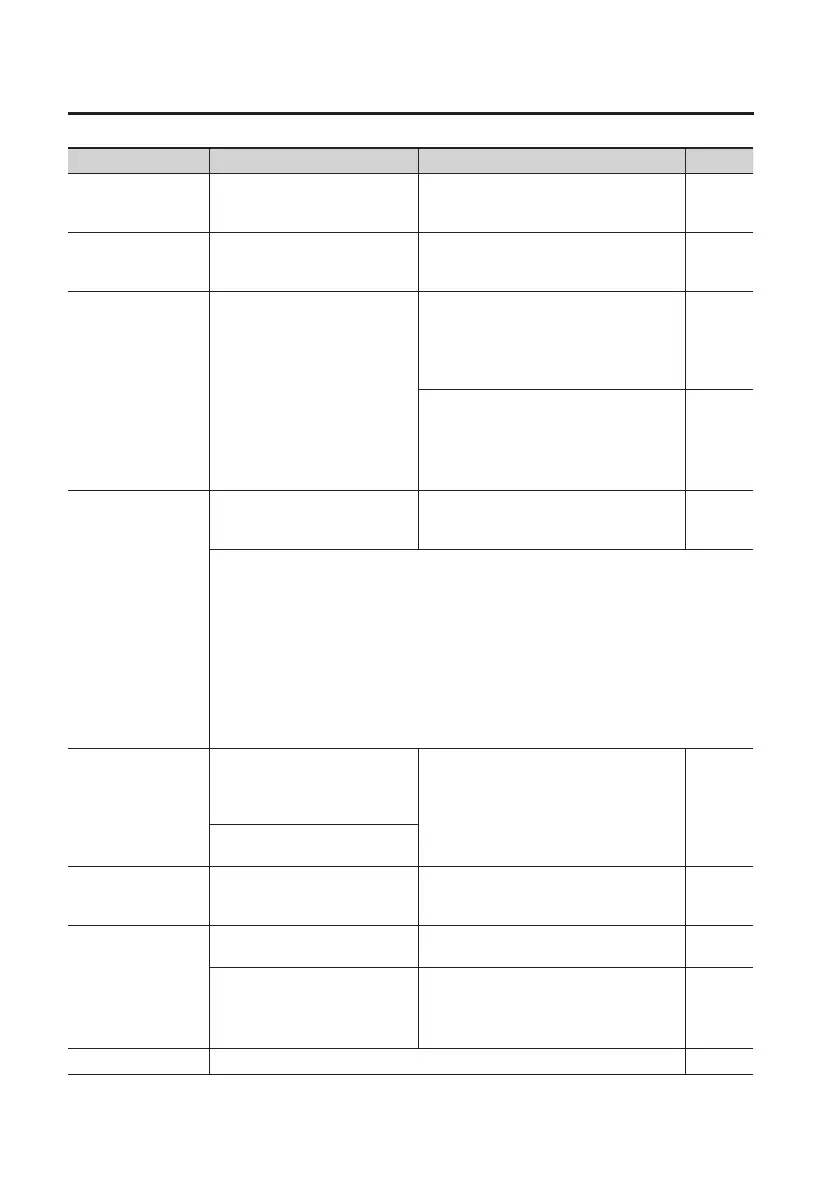
Error Message List
126
Message Cause Action Page
Data too long!
The song is too long (the le size
is too large) to be played.
Reduce the size of the le by, for example,
using your computer to divide it into
smaller portions.
–
Data too short!
You attempted to import a WAV/
MP3 le that was shorter than one
second.
The WAV/MP3 le must be longer than one
second for it to be imported.
–
Drive busy!
Data could not be read or
written fast enough because
the data is stored on the SD
card in a fragmentary manner.
Alternatively, you are using an SD
card that is not fast enough.
This problem is more likely to
occur if you join together phrases
(recorded data) of only a few
seconds in length, such as when
using punch-in/ out recording.
Reduce the number of tracks to be played
back simultaneously.
Use the Bounce operation to combine
tracks, and delete the tracks that you don’t
need to play. Then, try playback again.
p. 80
Reduce the number of items being
recorded simultaneously.
–
Event full!
While in MTR mode, you’ve
exceeded the number of events
that can be used in one song.
Erase unnecessary tracks, and carry out
song optimization in MTR mode.
p. 76, p. 88
What is an event?
An “event” is the smallest unit used by the BR-80 to manage the data recorded on an SD
card. Approximately 30,000 events are allocated for each newly created song.
For each track, each recording operation will consume two events. Operations such as
punch-in/out and track copy will also consume events.
The number of events consumed will change in a complex way depending on the
conditions.
For example, even if there actually is free space remaining on the SD card, no further record-
ing or track editing will be possible if all of the events have been used up. If this occurs, the
error message “Event Full!” will appear.
No card!
You performed a recorder or SD
card operation when no SD card
was inserted, or the card was
incompletely inserted.
Turn o the power, rmly reinsert the SD
card, and then turn the power on again.
p. 39
You removed the SD card after
selecting data on the SD card.
No le!
When importing WAV/MP3/SMF
data, the le to be imported did
not exist.
Prepare the le that is to be imported. –
No song!
The SD card does not contain
songs.
Create a new song. p. 57
The song folder contains incorrect
data, or does not contain the
necessary data.
Restore the backed-up data from your
computer back to the BR-80.
Restore the entire “ROLAND” folder to the
BR-80.
p. 107
Not available! The operation you attempted cannot be executed in the current mode. –


 To Next Page