Getting Ready to Use the BR-80
40
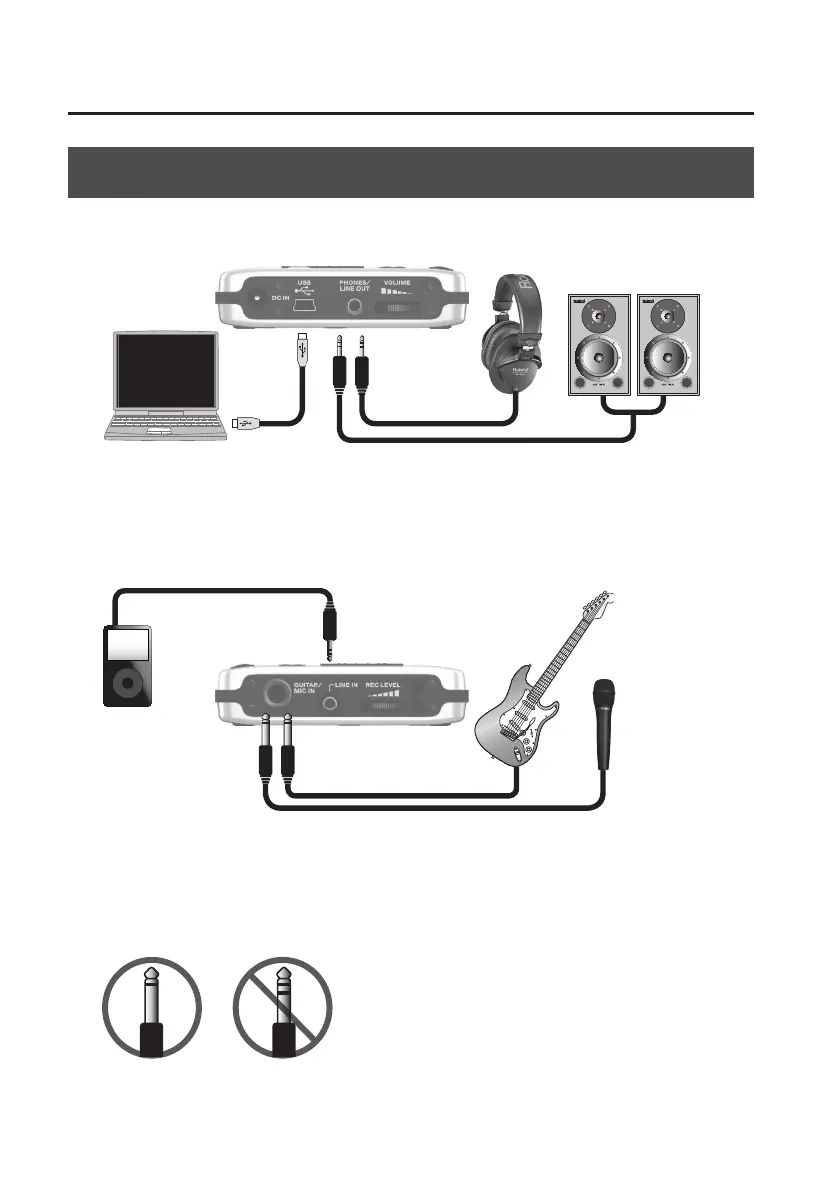
Connecting the External Equipment to the BR-80
Side Panel (left)
If you connect the BR-80 to your computer via USB, it will operate on USB bus power. (You’ll need
to install the driver.) If you use the USB connection simultaneously with an AC adaptor, the AC
adaptor will take priority.
Computer
Headphones Amplied
Speakers
Side Panel (right)
Digital audio
player
Electric Guitar
Microphone
Set the [GUITAR/MIC] select switch on the bottom panel to the appropriate position for the device
that’s connected.
When connecting an external microphone,
make sure that its plug is a phone plug of
the unbalanced TS type.
Balanced TRS phone plugs cannot be used.
* To prevent malfunction and damage, always make
sure to turn down the volume and switch o the
power on all of your equipment before you make any
connections.
* When connection cables with resistors are used, the
volume level of equipment connected to the inputs
(LINE IN jack, GUITAR/MIC IN jack) may be low. If this
happens, use connection cables that do not contain
resistors.
* Howling could be produced depending on the
location of microphones relative to speakers. This can
be remedied by:
1. Changing the orientation of the microphone(s).
2. Relocating microphone(s) at a greater distance
from speakers.
3. Lowering volume levels.



 To Next Page