Recording/Playback
58
5. Press the [ENTER] button.
The song will be selected, and you’ll return
to the Level Meter screen.
* The display will indicate “Keep power
on!” while the data is being updated.
Never turn o the power while this
message is shown.
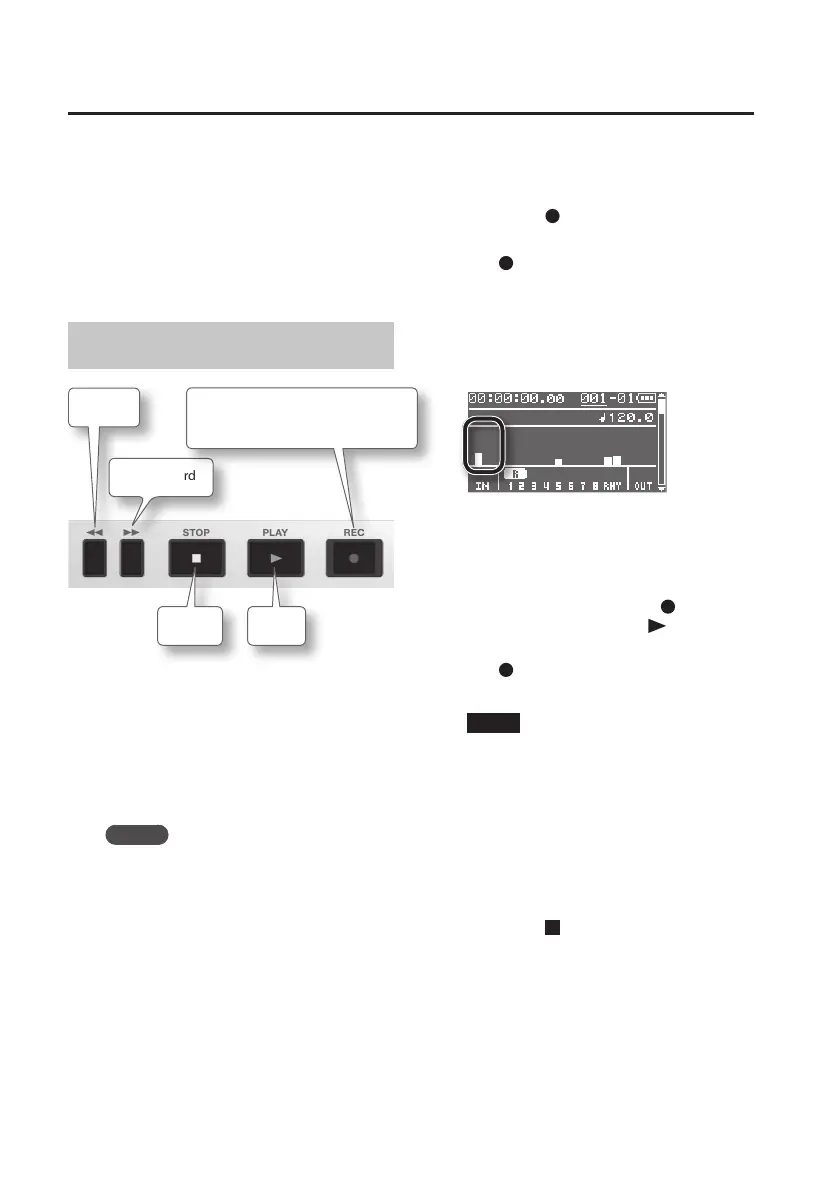
Recording
Rewind
Stop
Play
Fast-forward
While stopped: Recording standby
During playback: Recording
1. Connect the device you want to
record (p. 40).
The device you connect will be selected
automatically.
If you don’t connect anything, the built-in
microphones will be selected.
MEMO
• If you connect a device to the GUITAR/
MIC IN jack, the GUITAR/MIC IN jack
will take priority, and the built-in
microphones will turn o.
• If you connect devices to the LINE IN
jack or the USB connector, they will be
mixed with the input from the GUITAR/
MIC IN jack or the built-in microphones.
• To record only the sound arriving at the
LINE IN jack and USB connector, turn the
[REC LEVEL] dial all the way down. Use
the controls of the connected device to
adjust the recording level.
2. Use the track buttons to select the
recording track (p. 59).
3. Press the [ ] (REC) button to enter
recording-standby mode.
The [ ] (REC) button will blink.
4. Use the [REC LEVEL] dial to adjust the
recording level.
Adjust the loudness of the sound you’ll be
recording.
If the peak indicator lights, adjust “INPUT
SENS” (p. 114).
5. Start recording.
In recording-standby mode ([ ] (REC)
button blinking), press the [ ] (PLAY)
button.
The [
] (REC) button will light, and
recording will begin.
NOTE
• The recording level will change if you
operate the [REC LEVEL] dial while in
during recording.
Take care so as not to inadvertently
move the [REC LEVEL] dial.
• You can’t turn the power o during
recording. You must rst stop recording,
and then turn the power o.
6. Press the [ ] (STOP) button to stop
recording.



 To Next Page