Recording/Playback
47
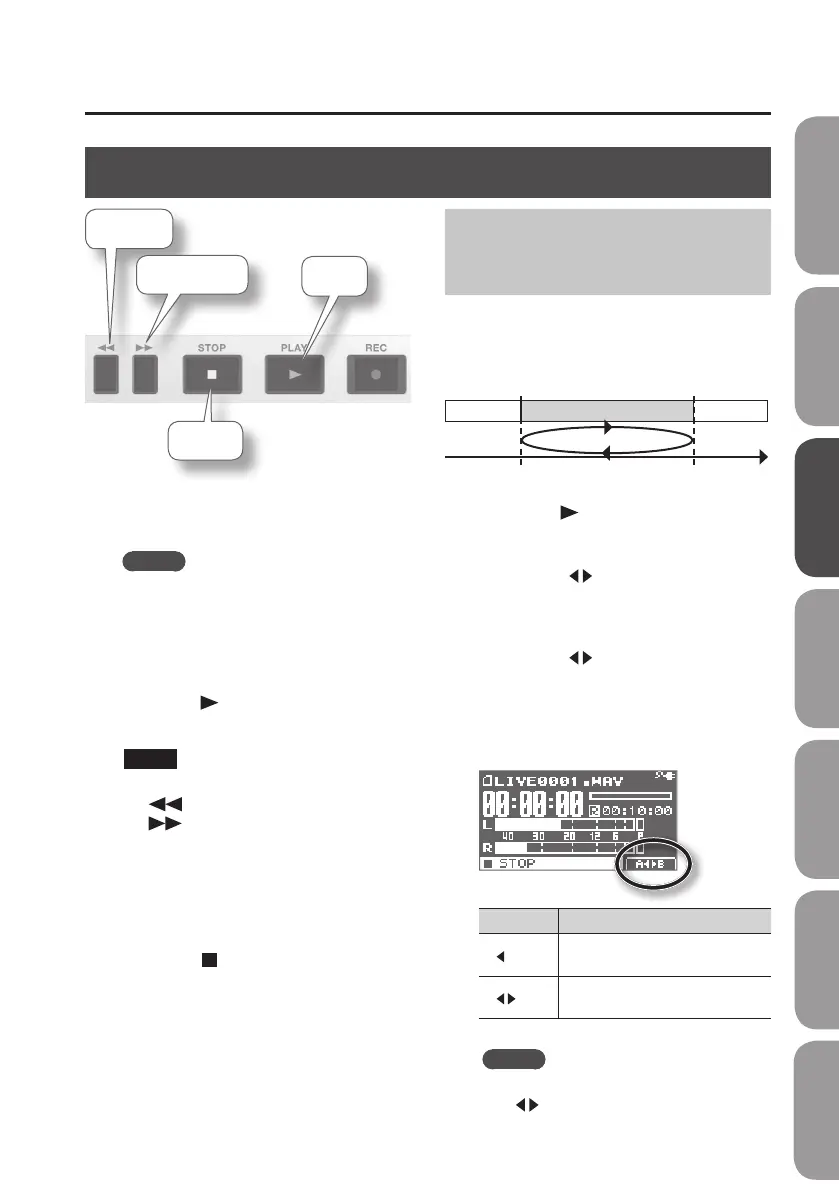
Playback
Rewind
Stop
Fast-forward
Play
1. Use the dial to select the le that you
want to play.
MEMO
If the display indicates “No Song,” the
current folder contains no les that
the BR-80 can play back. If the display
indicates “No Card,” no SD card has been
inserted.
2. Press the [ ] (PLAY) button to play
the le.
NOTE
During playback, you can hold down the
[
] button to rewind, or the
[
] button to fast-forward. Normal
playback will resume when you release
the button.
3. Use the [VOLUME] dial to adjust the
volume.
4. Press the [ ] (STOP) button to stop
playback.
Playing Back Repeatedly
(AB Repeat)
Use this feature for guitar solo practice
and in other situations where you want to
practice along with a single section as it
plays back repeatedly.
Time
Section to repeat
A (Repeat Start)
B (Repeat End)
1. Press the [ ] button.
The song will play back.
2. Press the [A B] button at the point
where you want to start repeating
(point A).
3. Press the [A B] button at the point
where you want to stop repeating
(point B).
AB Repeat will turn on, and playback will
begin repeating.
AB Repeat Explanation
A
Time location “A” has been
registered for AB Repeat.
A
B
Playback will repeat between time
locations “A” and “B” (AB Repeat).
MEMO
To cancel the repeat function, press the
[A
B] button once again.
Quick Start Preparations LIVE REC Mode MTR Mode eBand Mode
Convenient Functions
Appendix



 To Next Page