Recording Ideas for Songs (LIVE REC Mode)
20
Step 2
Record
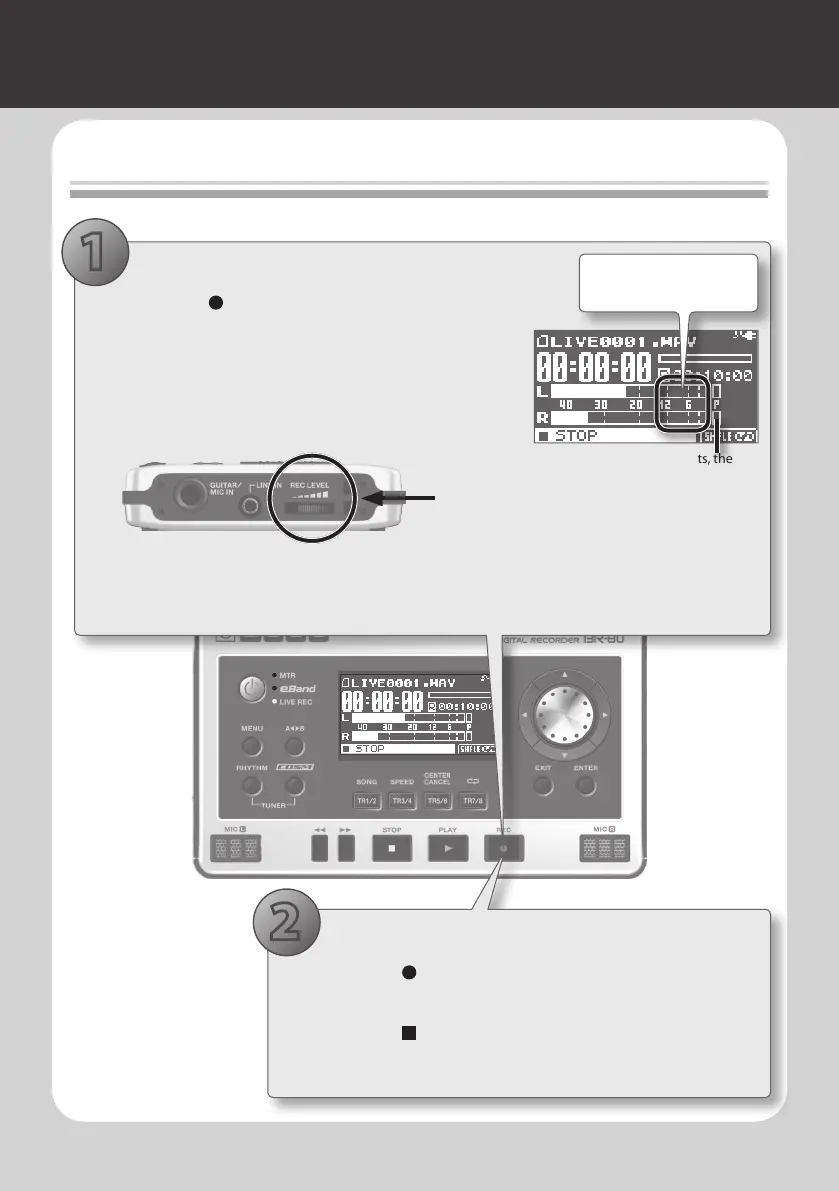
1. Adjust the recording level
1. Press the [ ] (REC) button.
The BR-80 will enter recording-standby mode.
2. While actually performing, use the [REC LEVEL] dial
located on the right side of the BR-80 to adjust the
recording level.
While you perform, make adjustments so that the INPUT
level meter is moving in the range of 12–P (-12–0 dB).
[REC LEVEL] dial
* When adjusting the recording level, you might notice a little noise; this is normal and does
not indicate malfunction.
3. Use the [VOLUME] dial to adjust the volume.
2. Record
1. Press the [ ] (REC) button.
Recording will start.
2. Press the [ ] (STOP) button to stop recording.
When recording stops, a le name will automatically be
assigned, and the data will be saved.
2
1
If the P (PEAK indicator) lights, the
sound will distort.
Adjust so the level meter
moves within this range.



 To Next Page