Turning Your Idea Into a Song (MTR Mode)
24
Step 3
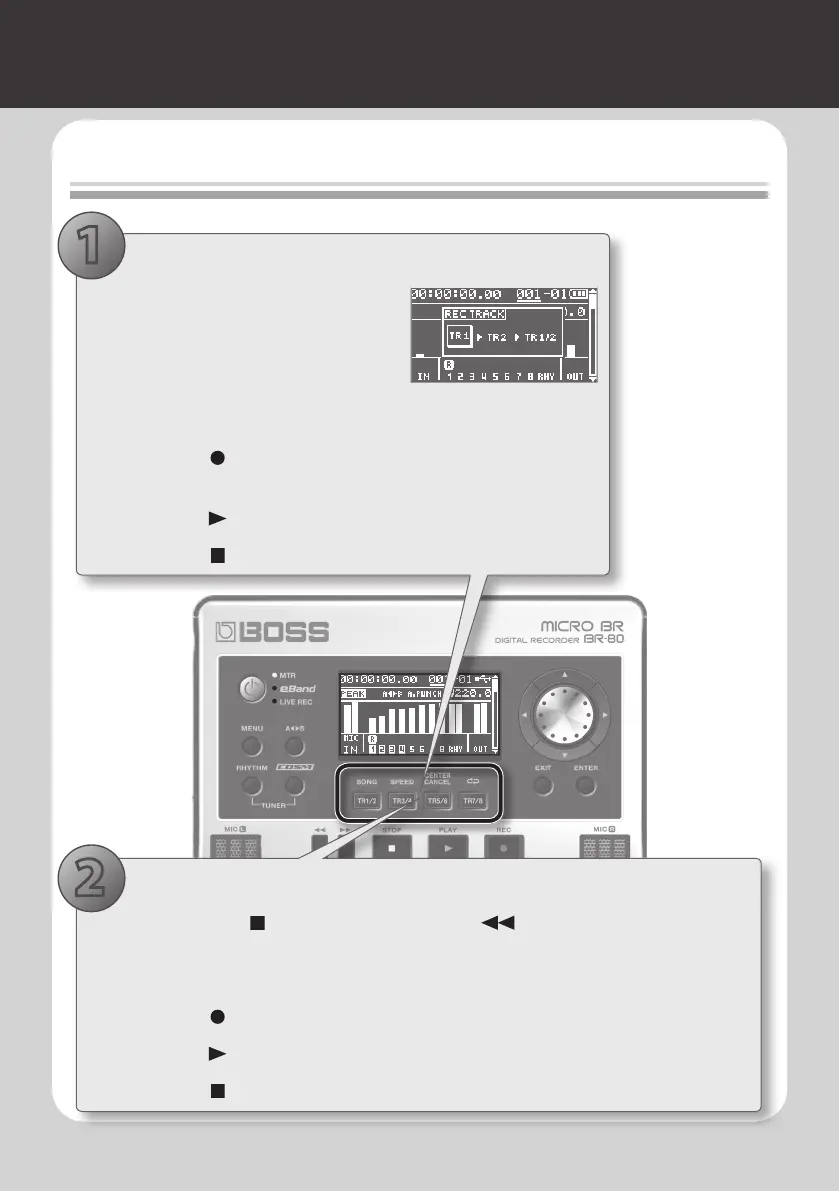
Recording/Multi-track Recording
1. Record
1. Press the track button of the track you
want to record.
The REC TRACK screen will appear.
2. Press the track button a number of
times to select the recording track.
The recording track will switch each time you press the track button.
3. Press the [ ] (REC) button.
The BR-80 will enter recording-standby mode.
4. Press the [ ] (PLAY) button to start recording.
5. Press the [ ] (STOP) button to stop recording.
1. Record a performance on another track
1. Hold down the [ ] (STOP) button and press the [ ] button to return to the
beginning of the song.
2. Use the track buttons to select a dierent recording track.
3. Press the [ ] (REC) button.
4. Press the [ ] (PLAY) button to start recording.
5. Press the [ ] (STOP) button to stop recording.
2
1



 To Next Page