Mastering
82
* The mastering eect provides 19 “preset
patches” (P01–P19), 10 rewritable “user
patches” (U01–U10), and 10 ”song
patches” (S01–S10) which are stored for
each song.
1. In the mixer screen (p. 63–p. 66), make
the desired playback track settings.
2. Press the [MENU] button.
The Menu screen will appear.
3. Use the cursor buttons to move the
cursor to “MASTERING/BOUNCE,” and
press the [ENTER] button.
4. Use the cursor [ ] [ ] buttons to
move the cursor to “MASTERING,” and
press the [ENTER] button.
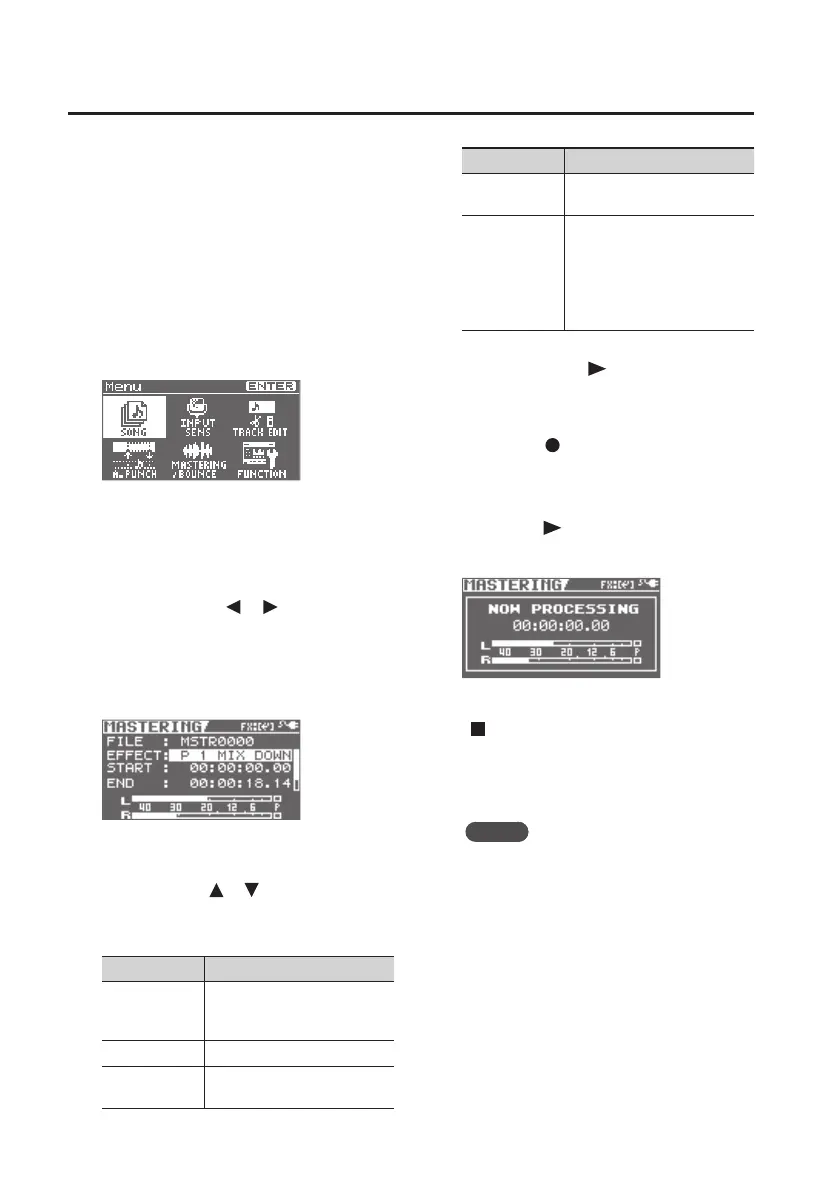
The BR-80 will enter mastering mode, and
the MASTERING screen will appear.
5. Make mastering settings.
Use the cursor [ ] [ ] buttons and the
dial to select the item that you want to edit,
and use the dial to change the settings.
Parameter Explanation
FILE
Shows the name of the WAV
le that will be created by
mastering.
EFFECT Selects the mastering eect.
START
Species the location at which
mastering is to start.
Parameter Explanation
END
Species the location at which
mastering is to end.
LEVEL
Species the volume of the
WAV le that will be created by
mastering.
Set the volume level so it is as
high as you can get it without
causing the sound to distort.
You can press the [ ] (PLAY) button to
audition the result of mastering with the
current settings.
6. Press the [ ] (REC) button.
The BR-80 will enter recording-standby
mode.
7. Press the [ ] (PLAY) button.
Mastering will begin.
If you decide not to mastering, press the
[ ] (STOP) button or the [EXIT] button.
When mastering is completed, you’ll be
returned to the level meter screen.
MEMO
• Mastering operation will stop
automatically upon reaching the time
set for END.
• The mastered song will be saved as a
WAV le in the ROLAND/MASTERING
folder.
• The saved WAV le can be recalled and
played in eBand mode (p. 94).



 To Next Page