Power distribution and control system
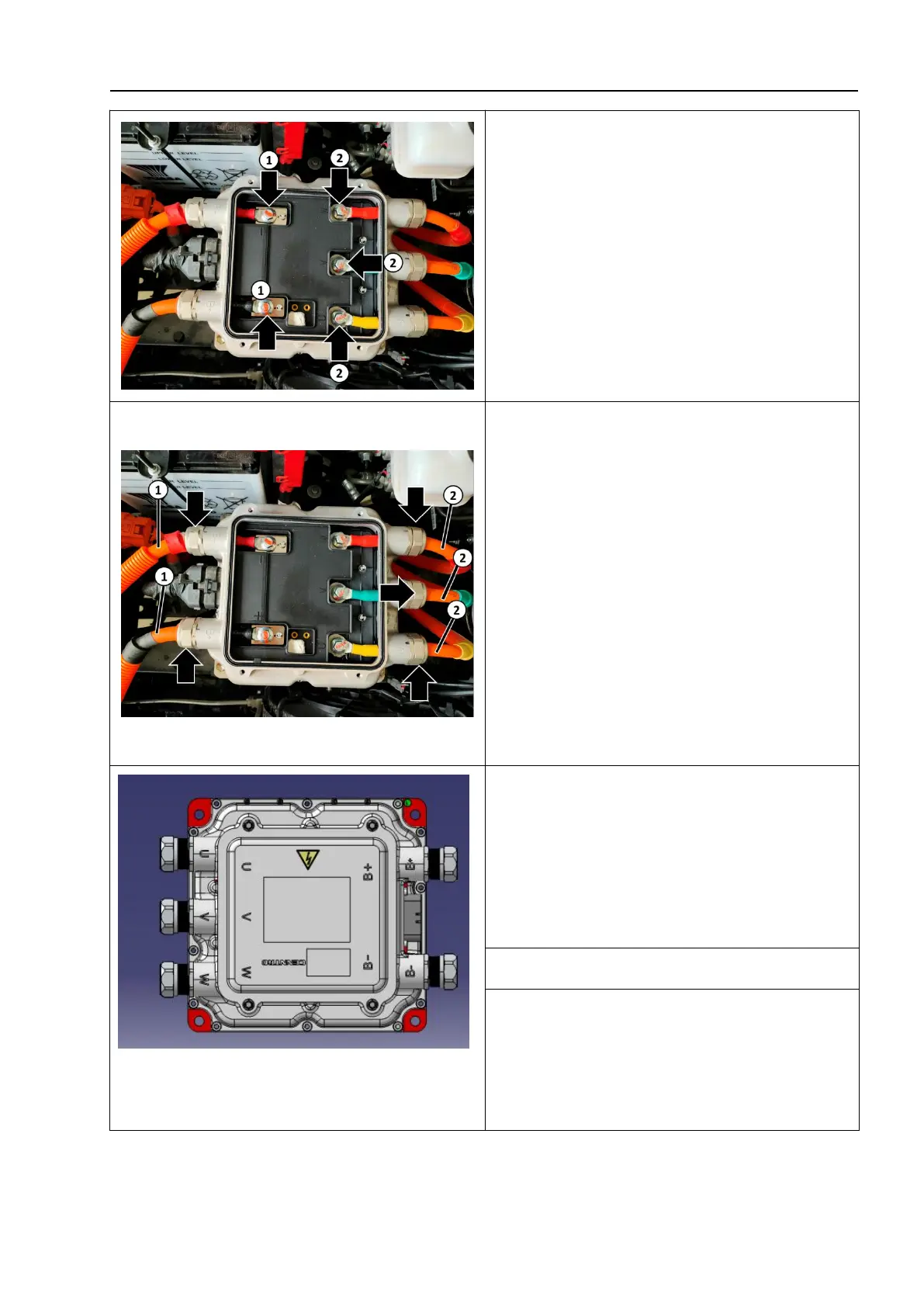
6. Unscrew the connecting fixing bolts
between the positive and negative wire
harnesses of the MCU and the interior of
the motor control unit- as shown by the
arrow 1-.
Unscrew the fixing bolt connecting the
motor harness to the inside of the motor
control unit- as shown by the arrow 2-;
7. Unscrew the fixing nuts on the positive and
negative wire harnesses of the MCU and the
outer side of the motor control unit-as shown by
the arrow-, disconnect the positive and negative
wire harnesses of the MCU-1-and remove them;
Unscrew the fixing nuts on the outer side of
the motor harness and motor control unit -
as shown by the arrow -, disconnect the
positive and negative wire harnesses of the
MCU - 2 - and remove them.
8. Unscrew the fixing bolt - as shown by
the arrow - and remove the motor control
unit.
Bolt – as shown by the arrow-tightening torque:
10~14N·m
1. The installation sequence is the reverse of
the removal sequence.



 To Next Page