Programmable DC Power Supply (with Solar Array Simulation) 62000H Series
Operating & Programming Manual
A5: Execution step:
(1) SEQ#1:
A. Since SEQ TYPE = AUTO is set for SEQ#1, it begins to execute the settings
in SEQ#1.
B. During the SEQ#1 voltage rise, the maximum loading current is 1A and does
not exceed the current setting of 20A; therefore SEQ#1 is in CV Mode
during the voltage rise.
C. Once the voltage reachs 10V, the program maintains the 10V for the
remainder of the time duration setting.
D. Skip to SEQ#2.
(2) SEQ#2:
A. Since SEQ TYPE = AUTO is set for SEQ#2, it begins to execute the
settings in SEQ#2.
B. During the SEQ#2 voltage rise, the maximum loading current is 3A and
does not exceed the current setting of 20A; therefore, SEQ#2 is in CV Mode
during the voltage rise.
C. Once the voltage reaches 30V, the program maintains the 30V for the
remainder of the time duration setting.
D. Skip to SEQ#3.
(3) SEQ#3:
A. Since SEQ TYPE = AUTO and TIME=0 are set for SEQ#3, it indicates
SEQ#3 is not executed and the Program is ended.
(4) As RUN COUNT=2 is set, steps (1), (2) and (3) are executed again.
(5) End.
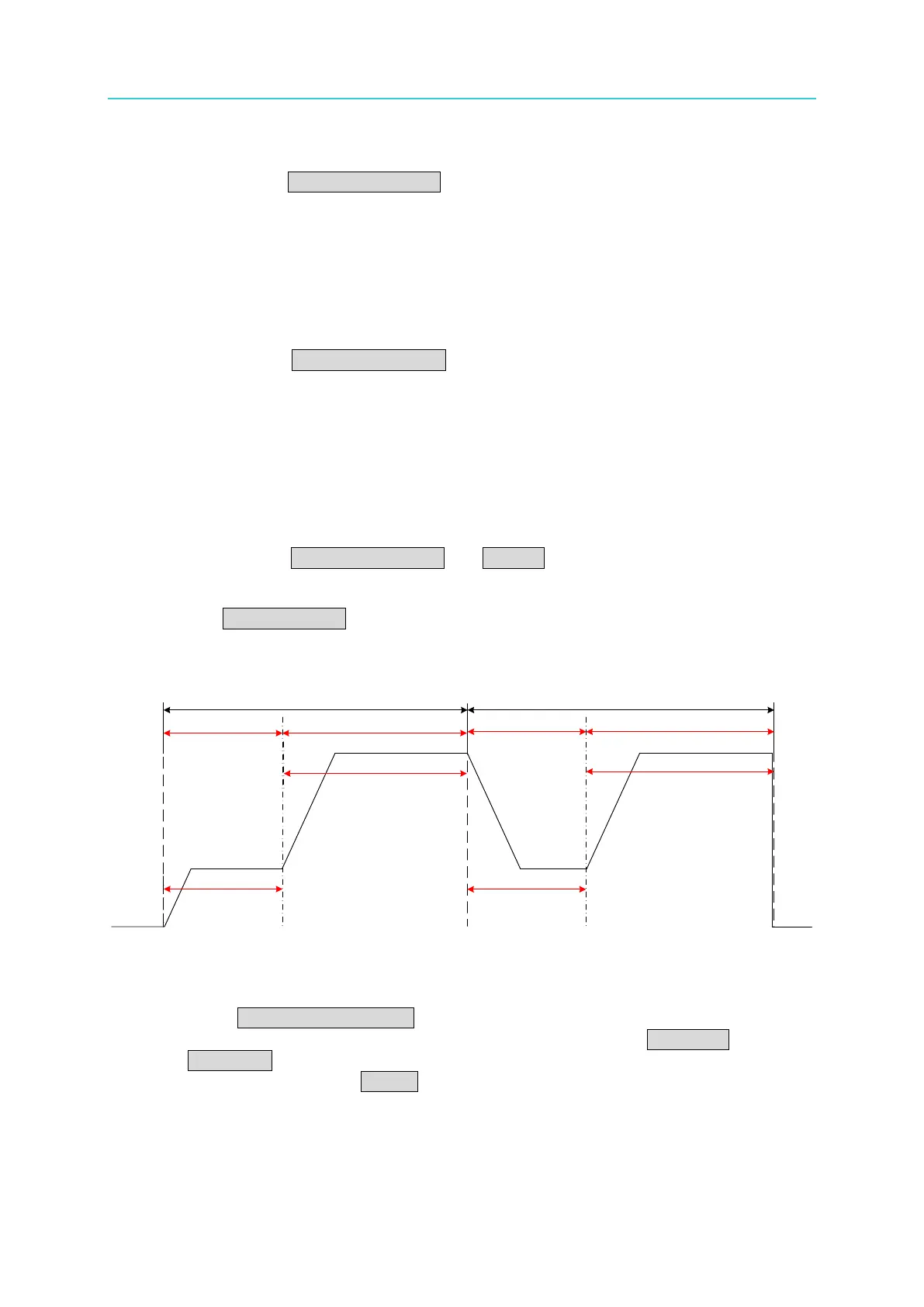
Figure 4-11 shows the output waveform:
Figure 4-11
b. Setting Sequence Type to MANUAL
When SEQ TYPE = MANUAL is set, the Sequence page shown in Figure 4-12
indicates the sequence will run automatically and stop at the VOLTAGE or
CURRENT setting without skipping to the next sequence until any key on the front
panel is pressed. The (TIME =) setting does not display when the Sequence Type
is set to MANUAL.
COUNT 1 COUNT 2
SEQ#1 SEQ#2 SEQ#1
SEQ#2
START
END
10V
30V
10V
30V
5(Sec) 5(Sec)
10(Sec) 10(Sec)








 To Next Page