Operator’s Manual: Standard 360a Model Y (360y) Label Applicator
7
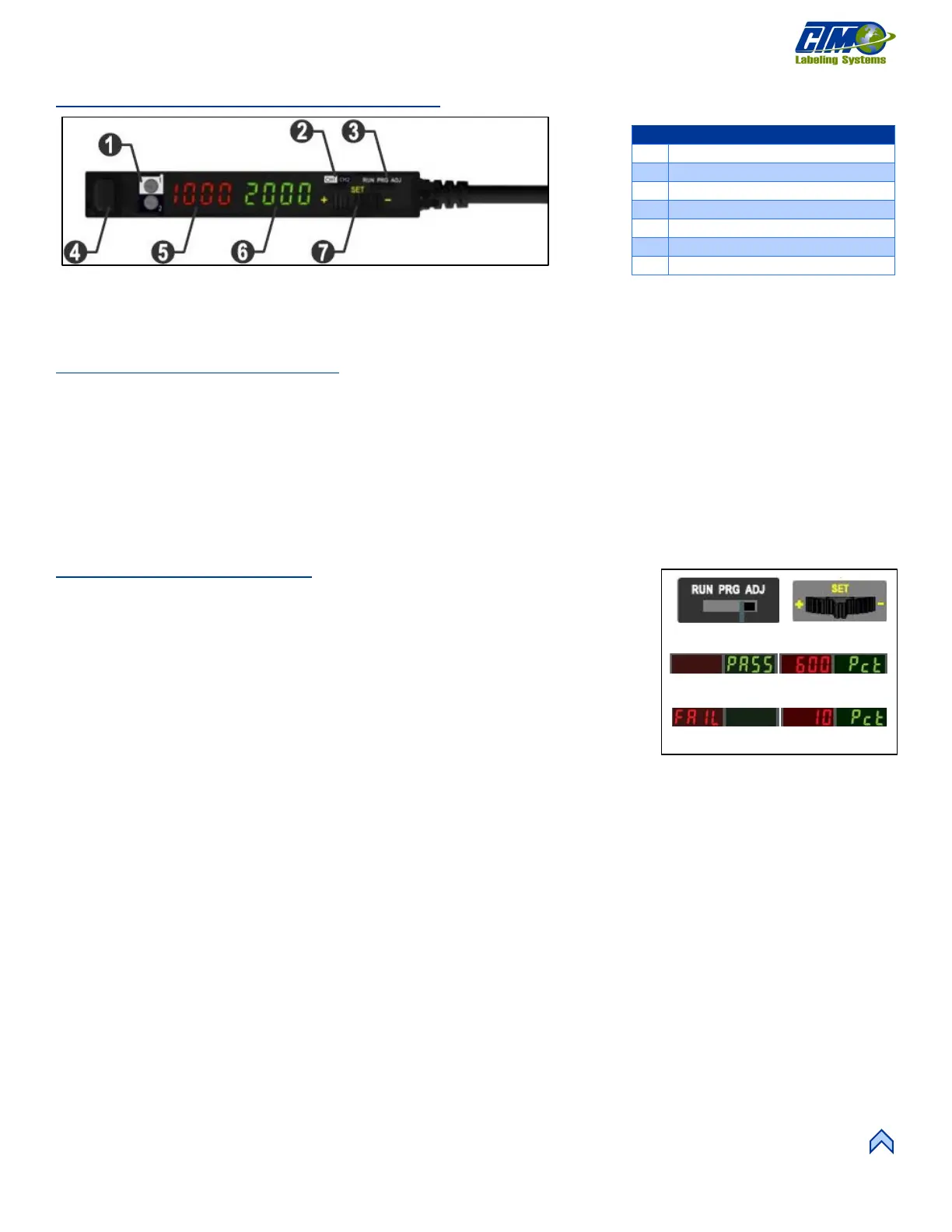
Banner DF-G3 Fiber Optic Sensor
There are two modes of teaching: Dynamic and Static. Static Teach or Two-point Teach is the most common and involves teaching an
On state then teaching the Off state.
Two-Point Teach Procedure
Two-Point Teach programs sensitivity by statically presenting two conditions to the sensor. The sensor locates a single sensing
threshold midway between the taught conditions. The adaptive threshold system remains in effect during RUN mode to automatically
adjust for changes in the light or the dark conditions.
When Two-Point Teach mode is used to program sensitivity, the output On state (light or dark operate) remains as it was last
programmed. To change to either light or dark operate, use the SETUP mode.
Sensitivity may be adjusted at any time when the sensor is in ADJ mode by using the (+) and (-) rocker switch. When a manual
adjustment is made, the midway threshold system is adjusted.
Programming the Sensor
1. Switch the mode switch to ADJ [16A].
2. Present the first condition (either liner only or label and liner).
3. Click the SET rocker button [16B].
4. Present the second condition.
5. Click the SET Rocker button again [16B].
6. The display will show either PASS [16C] or FAIL [16D].
CH1/CH2 Switch (Dual Output)
[15] Banner DF-G3 Fiber Optic Sensor
[16] Programming the Sensor



 To Next Page