Operator’s Manual: Standard 360a Model Y (360y) Label Applicator
19
360y HMI Applicator Display
Secondary to Primary Transfer Process
1. Secondary applicator is labeling, and the primary applicator is brought back online but the primary applicator does not start
labeling.
2. Secondary applicator continues to label until it is taken offline or the primary goes back online.
3. Secondary applicator sends a signal to the primary applicator to start labeling while it continues to label. The signal occurs at
the first apply cycle of the secondary applicator after the transfer is initiated.
4. Primary applicator waits for its next product detect signal to start labeling again and once received, the primary applicator
sends a signal to the secondary applicator to start the “Off Sequence.”
5. Secondary applicator continues to label for the “Off Distance.”
a. If the secondary is taken offline or enters a critical while it is the active applicator, products pass by unlabeled.
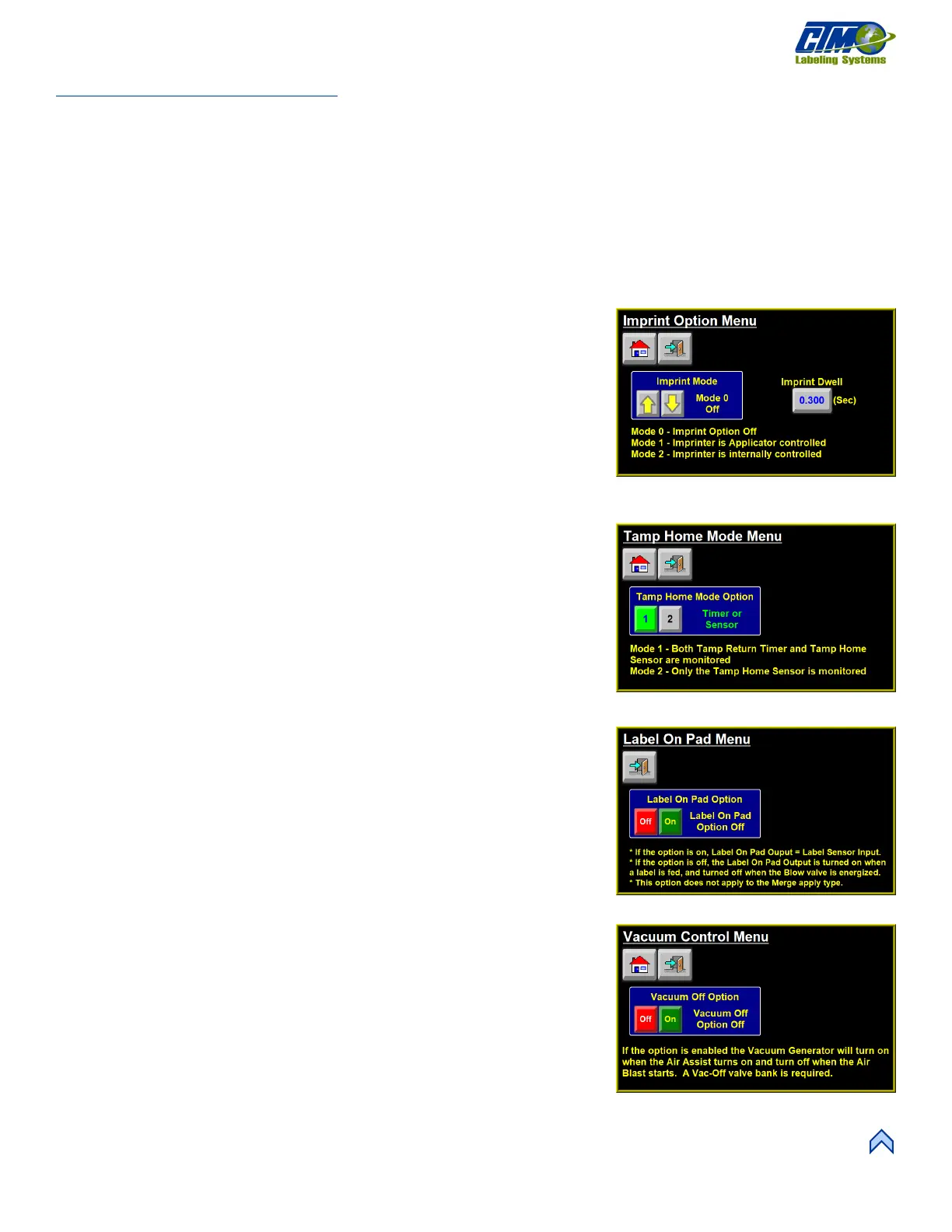
Imprint Menu
This menu [43] allows a hot stamp printer to be installed into the web path of the
applicator. It is useful in instances where one-line printing or date coding is required.
There are two modes for the imprinter:
• Mode 1: The original sequence. This is used if the applicator is controlling the
imprint valve. The Imprint Dwell value is the time the applicator holds the
imprint valve on.
• Mode 2: Used when the imprinter has its own controller. The Imprint Dwell
Value is the amount of time the applicator waits for a sequence complete
signal from the imprinter and should be close to the imprinter’s dwell time.
Tamp Home Mode
This menu [44] is only accessible if the applicator is set to Tamp or Corner Wrap.
There are two modes for the Tamp Home sensor:
• Mode 1: Default option where the applicator looks for a tamp home input OR
the completion of the retract timer before turning on the tamp home output.
• Mode 2: Applicator only looks for the tamp home input and ignores the tamp
retract timer. No label is fed out until the tamp home input is on.
• Delay Feed Time: Used in Mode 2 to delay the label feed after the tamp home
input is on.
Label On Pad
This menu [45] allows anyone interfacing with the applicator to know whether there is
currently a label on the label pad. It also allows the applicator to provide a signal that
matches the current state of a vacuum switch sensor while the blow is not on. This
option cannot be enabled if the applicator is a merge. The applicator must be equipped
with a vacuum switch for this option to properly function.
Vacuum Control
This menu [46] allows the operator to turn the Vacuum Off Option on or off. The
applicator can be fitted with a Vacuum Off valve bank that allows the applicator’s
electrical control of the vacuum flow. The sequences of Normal Tamp and Corner
Wrap applications are changed with the Vacuum Off option enabled. Instead of feeding
a label immediately after the tamp returns home, the applicator waits for the next
product detect signal (with the vacuum valve off), turns on vacuum, and feeds and
applies the label at that point.
[46] Vacuum Off Option Menu
[45] Label On Pad Option Menu



 To Next Page